Menu and Navigation
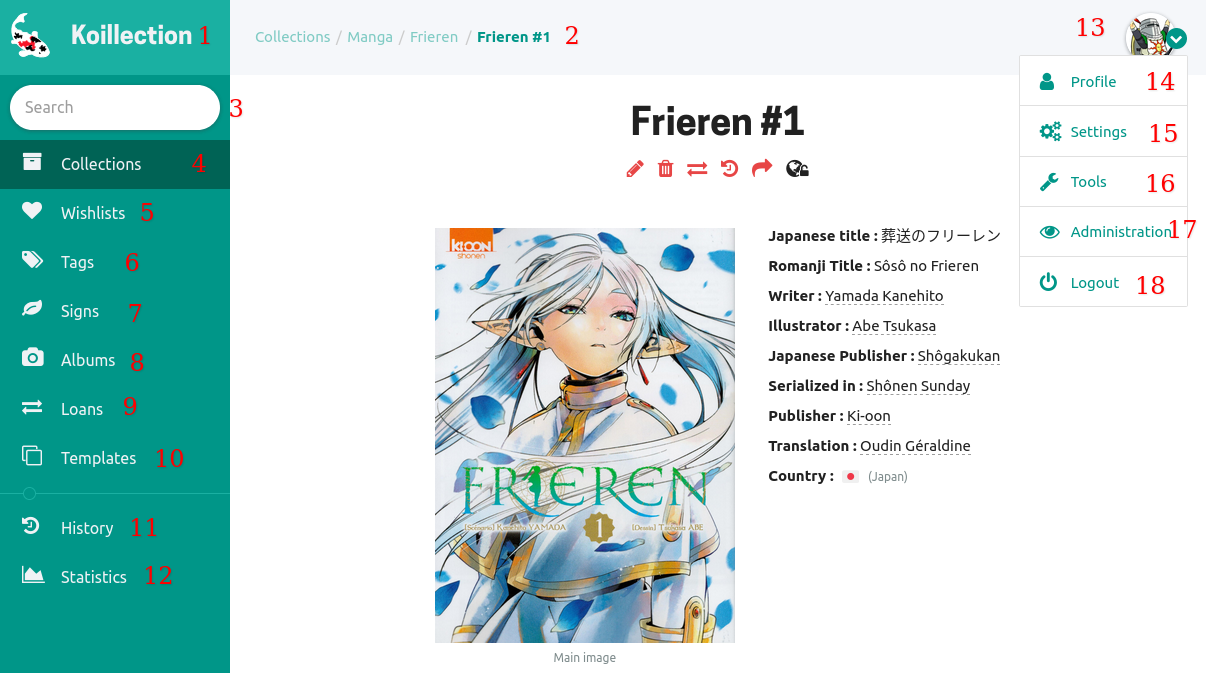
- Click here to go back to your collection main page (same as 4)
- Breadcrumb leading to the current page, each parts are clickable
- A quick search input. Typing a few letter will open a list showing you a few results you can click on to quickly access them. You can also press
Enter, it will bring you to a more details search page. - Your collections (see Collections page)
- Your wish lists
- Your tags (see Tags page)
- Your signs. Signs are added during an item creation/edition, this page will gather them in the same place. (see Items page)
- Your photo albums
- A list of your lent items (see Loans page)
- Templates used during item creation (see Templates page)
- An history of edited/created/removed objects
- Some stats and graphics about your collection
Most of this menu entries can be disabled from the settings page (see Settings page)
- Click on your avatar to open a drop down list
- Your profile, here you can edit your avatar, name, email and password
- Your settings (see Settings page)
- Here you can export your collection as a printable list, csv file. You can export your collection as an SQL file and an images archive.
- Admin only, can be used to add new users and offers some tools to backup your Koillection instance
- Logs you out of Koillection