This is a quick demo of a discord bot that announces deaths for private wow servers. The use case for this bot would be to allow a community to be able to see deaths in hardcore modes. If you would like a demo of this software, or need help integrating please reach out to me in this discord channel https://discord.gg/r2b55UEFxh

-
Clone repo
-
Run
npm install -
Add port to the
.envfile -
Add TOKEN to the
.envfileFollow step 2 from this tutorial for generating the auth token and bot. "Send Messages" in the bot permissions are all that is required. https://www.sitepoint.com/discord-bot-node-js/ To get the token click on "Bot" in the left hand side, and click the copy token.
-
Add WEBHOOKID and WEBHOOKTOKEN to the
.envfile.Follow step 1 to create the discord webhook. Then use that webhook URL to fill out the .env file. https://www.digitalocean.com/community/tutorials/how-to-use-discord-webhooks-to-get-notifications-for-your-website-status-on-ubuntu-18-04 Example,
https://discord.com/api/webhooks/12345678910/T0kEn0fw3Bh00K
12345678910 is the WEBHOOKID
T0kEn0fw3Bh00K is the WEBHOOKTOKEN
-
Run
node index.js -
Import postman scripts into postman https://www.postman.com/
-
Modifiy the tests to include the new Token from step 4.
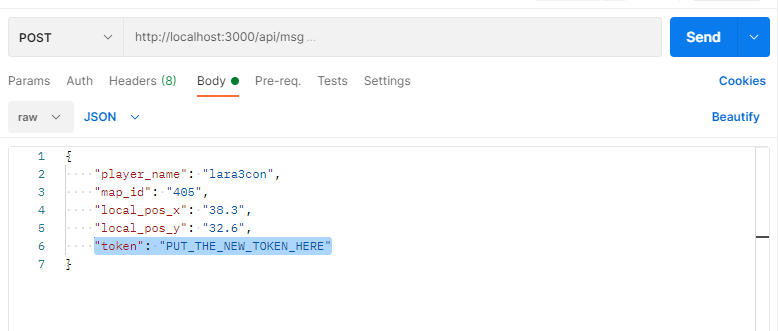
-
Run the tests
See the postman scripts for details on the json payload. CURL could be used to send out a request to node webserver. Replace localhost with the ip address, and make sure the ports are forwarded.
C++ code
  CURLcode ret;
  CURL *hnd;
  struct curl_slist *slist1;
  std::string jsonstr =  "{\r\n    \"player_name\":\"ikillalot\",\r\n
      \"map_id\":\"215\",\r\n
      \"local_pos_x\":\"63.2\",\r\n
      \"local_pos_y\":\"82.3\",\r\n
      \"token\":\"SECRESSECSEFCSERSERSERSER\"\r\n}";

  slist1 = NULL;
  slist1 = curl_slist_append(slist1, "Content-Type: application/json");

  hnd = curl_easy_init();
  curl_easy_setopt(curl, CURLOPT_URL, "http://localhost:3000/api/msg");
  curl_easy_setopt(hnd, CURLOPT_NOPROGRESS, 1L);
  curl_easy_setopt(hnd, CURLOPT_POSTFIELDS, jsonstr.c_str());
  curl_easy_setopt(hnd, CURLOPT_USERAGENT, "curl/7.38.0");
  curl_easy_setopt(hnd, CURLOPT_HTTPHEADER, slist1);
  curl_easy_setopt(hnd, CURLOPT_MAXREDIRS, 50L);
  curl_easy_setopt(hnd, CURLOPT_CUSTOMREQUEST, "POST");
  curl_easy_setopt(hnd, CURLOPT_TCP_KEEPALIVE, 1L);

  ret = curl_easy_perform(hnd);

  curl_easy_cleanup(hnd);
  hnd = NULL;
  curl_slist_free_all(slist1);
  slist1 = NULL;