Challenge 4 #57
Challenge 4 #57
Conversation


 erickwize
left a comment
erickwize
left a comment
erickwize
left a comment
There was a problem hiding this comment.
I left out some comments, good work.
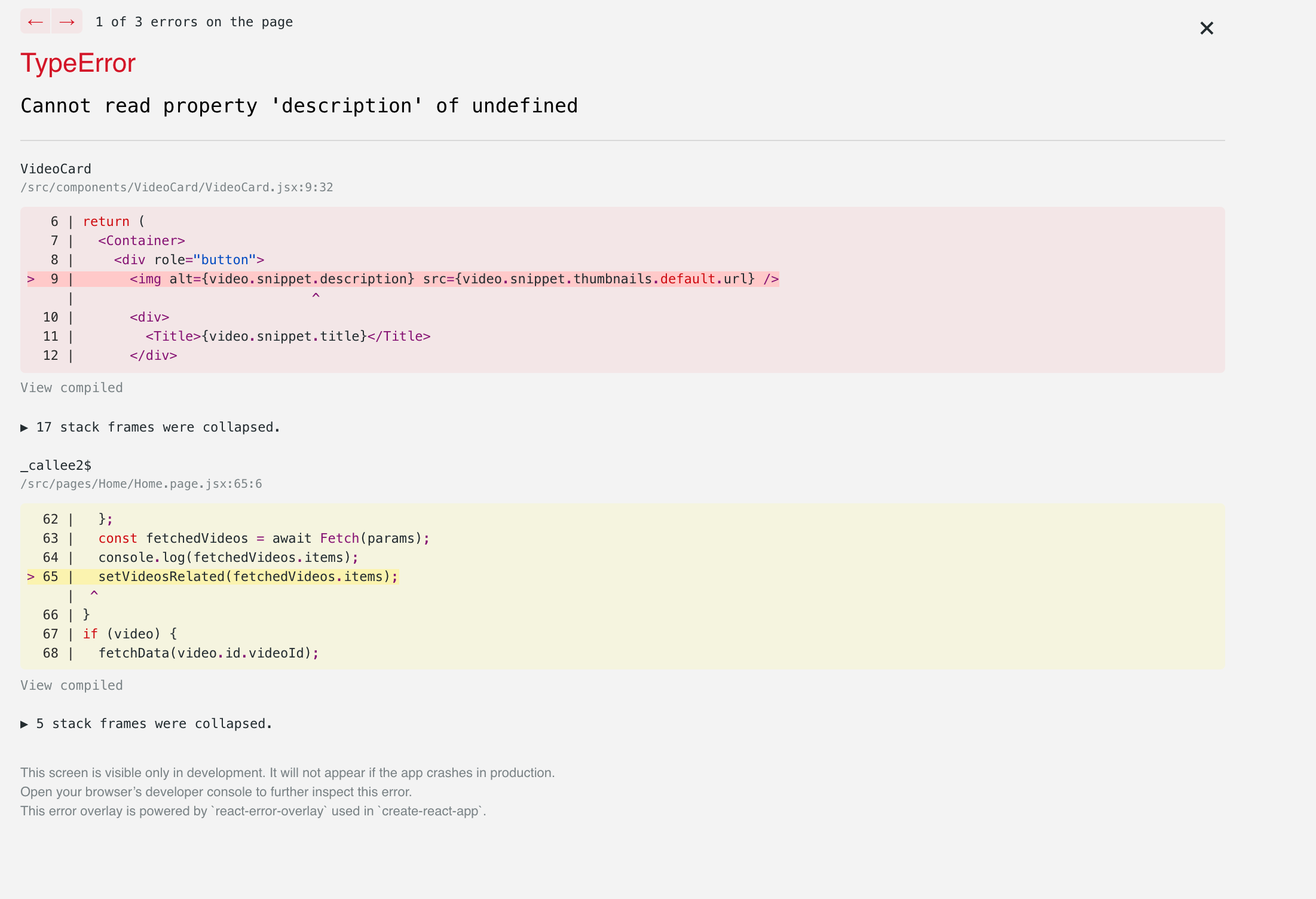
I also saw that sometimes when you click some videos this happens:
| @@ -0,0 +1 @@ | |||
| REACT_APP_API_YOUTUBE_KEY = AIzaSyAOsyZMq5msH04OZ9W7Y_fQX--TictP_v8 No newline at end of file | |||
There was a problem hiding this comment.
I recommend to not keep track of this file, it is a good practice to create a .env file but also not keeping track of this file.
| import LocalThemeProvider from '../../state/ThemeContext.provider'; | ||
|
|
||
| function App() { | ||
| // const [search, setSearch] = useState('Wizeline'); |
There was a problem hiding this comment.
I recommend removing all commented code so it won't be kept commented in the future.
| const NavBarStyled = styled.div` | ||
| background-color: ${(props) => props.theme.primary}; | ||
| display: flex; | ||
| align-items: center; | ||
| justify-content: space-between; | ||
| `; |
There was a problem hiding this comment.
I recommend taking out the style from the logic of the components
| <div> | ||
| <LocalThemeProvider> | ||
| <SearchContext.Provider value={{ state, dispatch }}> | ||
| <NavBar search={handleSearch} /> |
There was a problem hiding this comment.
I would use the context inside the NavBar itself instead of creating a function and then send it to the component. The prop drilling is not being removed even with the usage of a Context. One of the usages of the context is to remove prop drilling
| justify-content: space-between; | ||
| `; | ||
|
|
||
| function NavBar({ search }) { |
There was a problem hiding this comment.
I also recommend using the context hook to obtain the search value instead of using prop drilling to obtain the value.
| text-align: center; | ||
| `; | ||
|
|
||
| export default function VideoList({ videos, handleVideoSelected }) { |
There was a problem hiding this comment.
Instead of using prop drilling with handleVideoSelected use the context API from react
| /> | ||
| ); | ||
| }); | ||
| return <VideoListContainer>{renderedVideos}</VideoListContainer>; |
There was a problem hiding this comment.
I also recommend putting the map itself inside the video.map(...)
| const renderedVideos = videos.map((video) => { | ||
| return ( | ||
| <VideoCard | ||
| key={Math.random()} |
There was a problem hiding this comment.
And instead of using a Math.random() you could use something unique from the video. i.e. the etag from the video or the title itself. It is not a good practice because every re-render the Math.random() would change and the key performance won't work.
| .then((response) => response.data) | ||
| .catch((error) => { | ||
| console.log(error); | ||
| }); |
There was a problem hiding this comment.
I recommend not combining async/await and promises in the same block, you should try to get the information using all async/await or using only promises.
| const HomeBody = styled.div` | ||
| background-color: #1a243b; | ||
| text-align: center; | ||
| display: flex; | ||
| `; | ||
| const VideoRelatedWrap = styled.div` | ||
| text-align: center; | ||
| flex: 3; | ||
| margin-top: 100px; | ||
| `; | ||
| const H4 = styled.h4` | ||
| color: #b9b1b1; | ||
| `; | ||
| const VideoListWrap = styled.div` | ||
| text-align: center; | ||
| flex: 4; | ||
| `; | ||
| const VideoDetailWrap = styled.div` | ||
| text-align: center; | ||
| flex: 5; | ||
| `; |
There was a problem hiding this comment.
Extract CSS style from the component
erickwize
left a comment
erickwize
left a comment
There was a problem hiding this comment.
Comments
I left out some comments, good work. I also recommend creating the PR into your own github repo, not into the base one.
I also saw that sometimes when you click some videos this happens:
Acceptance Criteria
- The search term is stored and retrieved from the Global Context correctly.
- The appearance theme is stored on the Global Context and applied correctly to the App UI.
-
useReducerhook is implemented correctly to manage the Global State.
Bonus Points
- Testing coverage is above 70%. (Please include a screenshot of the code coverage report in your PR description).
2 participants


Adding: