Simple console tools for Webview debugging.




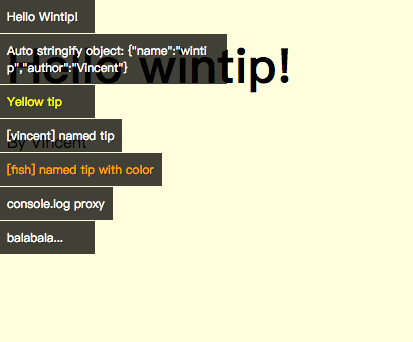
yarn add wintipor
npm install wintipalso
<script src="https://unpkg.com/wintip/dist/wintip.min.js"></script>import wintip from 'wintip'
wintip('Hello wintip')
// Pass multiple parameters
wintip('How', 'are', 'you')
// Customize the tip color
const colorTip = wintip.$({color: 'yellow'})
colorTip('I am yellow')
colorTip('I am yellow too!')You can specify different levels of wintips by the following methods, and use the output option of the wintip.config method to control the output level of the wintip.
- wintip.info: info-level logs
- wintip.warn: warn-level logs
- wintip.error: error-level logs
wintip.config({
  // 'default', 'info', 'warn', 'error'
  output: 'warn' // Specify the warn-level
})

// Below the warn-level,not show
wintip('default level messages')

// Below the warn-level,not show
wintip.info('info level messages')

// Equal the warn-level, show
wintip.warn('warn level messages')

// Above the warn-level, show
wintip.error('error level messages')Basic function, create a tip on the window.
wintip('something')

wintip('hello', 'wintip')

// Object will be serialized
wintip('stringify', {a: 1})

// Return DOM node
const tip = wintip('message')

tip.textContent = 'new message'Show info-level wintips
Show warn-level wintips, text color is #fee381
Show error-level wintips, text color is #ff4545
- output {
String} Control display level, default'default'. - console {
Boolean} Proxy console.log method, defaultfalse - opacity {
Number} Background opacity, range0~1, default0.75. - color {
String} base color of the tip, default'#fff', expectHEXorRGBstring.
Global config. Please put it in your entry file or in the main file.
import wintip from 'wintip'

wintip.config({
  // 'default', 'info', 'warn', 'error'
  output: false,  // Hidding all tips
  color: '#fff'  // Expect `HEX` or `RGB` string.
})- color {
String} specify the tip color, expectHEXorRGBvalue. - level {
String} log level: 'default', 'info', 'warn', 'error'
Create a tip with options.
const yellowTip = wintip.$({color: 'yellow'})
const orangeTip = wintip.$({color: 'orange', level: 'info'})

orangeTip('I am orange, my level is info')
yellowTip('I am yellow')
yellowTip('I am yellow too!')

// Quick usage
wintip.$({color: 'green'})('balabala')- name {
String|Number} name of the tip. - opts {
Object} optional.- color {
String} specify the tip color, expectHEXorRGBvalue. - level {
String} log level: 'default', 'info', 'warn', 'error'
- color {
Create a tip with names and options(optional). Note: the named tip can be reused.
// Return a tip function
const fooTip = wintip.$('foo')

fooTip('origin message')

fooTip('Rewrite new message in the same place')

// Quick usage
wintip.$('bar')('balabala')Remove a tip
wintip('first tip')
wintip.$('foo')('foo tip')
const tip = wintip('bar')

// Remove first tip in window
wintip.remove(1)

// Remove the tip named foo
wintip.remove('foo')

// Remove tip node
wintip.remove(tip)