
A Stateful, Desktop-Class TUI Framework for Go
vtui is a modern, cross-platform Terminal User Interface (TUI) framework for Go. It is heavily inspired by classic desktop UI paradigms—specifically Turbo Vision (Borland) and the Far Manager internal UI kit.
Unlike modern web-inspired TUI libraries that use Flexbox or Grid layouts, vtui is designed from the ground up for building complex, stateful applications: file managers, database clients, IDEs, and heavy-duty text editors.
While tcell is an excellent low-level terminal driver and tview is a great high-level component library, vtui is built with a fundamentally different philosophy:
| Feature | tcell + tview / cview | vtui (this project) |
|---|---|---|
| Abstractions | Driver + Widgets. Low-level canvas with Flexbox-like layout containers. | Application Framework. Full-featured OOP hierarchy (Dialogs, Menus, Focus cycles). |
| Layout Mode | Flexbox/Grid. Modern web-like proportions. | GrowMode (Turbo Vision style). "Rubber" layout with anchors, perfect for pixel-perfect TUI dialogs. |
| Input | Standard Terminfo-based mapping. | vtinput integration. Native support for Kitty/Win32 protocols (distinguishes Ctrl+Enter, Shift+Tab, etc.). |
| Rendering | Full-widget declarative redraw. | ScreenBuf + ShadowBuf. Bitwise diffing. Only changed cells are sent via minimal ANSI sequences. |
| Memory/GC | Standard Go allocations during redraws. | Zero-allocation rendering. Designed to stay GC-silent during the Flush() cycle to eliminate micro-stutters. |
| Input Lag | Standard parsing (can be sensitive to fast bursts). | Event Draining. Optimized for "instant" feel and bracketed paste without flickering. |
- You are building a heavy-duty tool where the user spends hours (File Manager, Spreadsheet, Hex Editor).
- You need perfect keyboard support (all modifiers, key-up/key-down events).
- You want the classic UX of Far Manager or Turbo Vision (Movable Windows, Modal Dialogs, Dropdown Menus).
- You need an application architecture that manages Z-ordering and focus cycles automatically.
At the lowest level, vtui uses a strict double-buffering approach.
- The application logic draws to a logical grid of
CharInfocells (which hold 24-bit TrueColor attributes and Unicode characters). - When
Flush()is called,vtuicompares the logical buffer with a "shadow" buffer representing the physical terminal state. - It generates and writes the absolute minimum ANSI escape sequences needed to transition the terminal to the new state. This step is allocation-free.
The heart of vtui. It manages a stack (Z-order) of Frame objects.
- Desktop: The bottom layer.
- Panels/Windows: User-defined workspaces.
- Dialogs: Modal popups that trap focus.
- Menus: Context menus or dropdowns that automatically close when losing focus.
The
FrameManagerroutesvtinput.InputEvents to the top-most active frame, handles background repainting viaSaveScreen(saving the content under a dialog to restore them instantly when it closes), and manages global components like theMenuBarandStatusLine.
Instead of containers and flex-ratios, widgets within a Dialog are positioned using absolute coordinates and GrowMode flags.
If a dialog is resized, a widget can:
GrowNone: Stay exactly where it is.GrowHiX: Stretch its right edge (e.g., anEditfield expanding to fill width).GrowLoX | GrowHiX | GrowLoY | GrowHiY: Keep its relative distance from the bottom-right corner (e.g., an "OK" button anchored to the bottom).
The framework abstracts the physical output through the SurfaceRenderer interface. This allows the same UI code to run in different environments:
- AnsiRenderer: The default backend. Translates buffer changes into optimized ANSI escape sequences for standard terminals.
- GogpuRenderer: A hardware-accelerated backend that draws directly to a GPU-backed window using the
gogpulibrary. Provides crisp text rendering and high FPS. - X11/Wayland Renderers: Native Unix backends that draw to software bitmapped windows without requiring a terminal emulator.
- PureX11Renderer: A 100% pure Go X11 backend using the XGB library and SHM. Experimental and requires further testing.
You can select a backend at startup by passing the desired driver to vtui.RunInGUIWindow.
vtui comes with a standard library of controls that look and feel exactly like Far Manager:
Dialog,BorderedFrame(Single/Double line Win32-style boxes)Button,Checkbox,RadioButtonEdit(Single-line input with scrolling, history, password masking, and text selection)ListBox,ComboBoxTable(Multi-column list with alignment and scrollbars)VMenu(Context menus),MenuBar(Top-level dropdown menus)KeyBar(F1-F12 function key hints at the bottom),StatusLine- Common Dialogs:
ShowMessage,InputBox,SelectFileDialog,SelectDirDialog
vtui uses an automated Layout Validator to ensure that all dialogs follow strict design guidelines: no overlapping elements, proper spacing ("air"), and correct padding from window borders. Every new dialog or window component must include a unit test that calls vtui.AssertLayout. See UI_TESTING.md for detailed instructions and test boilerplate.
package main

import (
	"os"
	"github.com/unxed/vtinput"
	"github.com/unxed/vtui"
	"golang.org/x/term"
)

func main() {
	// 1. Enable advanced terminal input
	restore, _ := vtinput.Enable()
	defer restore()

	// 2. Initialize the Screen Buffer
	width, height, _ := term.GetSize(int(os.Stdin.Fd()))
	scr := vtui.NewScreenBuf()
	scr.AllocBuf(width, height)

	// 3. Boot the Frame Manager
	vtui.FrameManager.Init(scr)
	vtui.FrameManager.Push(vtui.NewDesktop())

	// 4. Create a Dialog
	dlg := vtui.NewDialog(0, 0, 40, 10, " Hello vtui ")
	dlg.Center(width, height)
	dlg.ShowClose = true

	// Add an Edit field
	edit := vtui.NewEdit(dlg.X1+2, dlg.Y1+3, 36, "Type here...")
	dlg.AddItem(vtui.NewLabel(dlg.X1+2, dlg.Y1+2, "&Name:", edit))
	dlg.AddItem(edit)

	// Add an OK button
	btn := vtui.NewButton(dlg.X1+16, dlg.Y1+7, "&Ok")
	btn.OnClick = func() {
		vtui.ShowMessage(" Result ", "You typed:\n"+edit.GetText(), []string{"&Close"})
	}
	dlg.AddItem(btn)

	vtui.FrameManager.Push(dlg)

	// 5. Start the event loop
	vtui.FrameManager.Run()
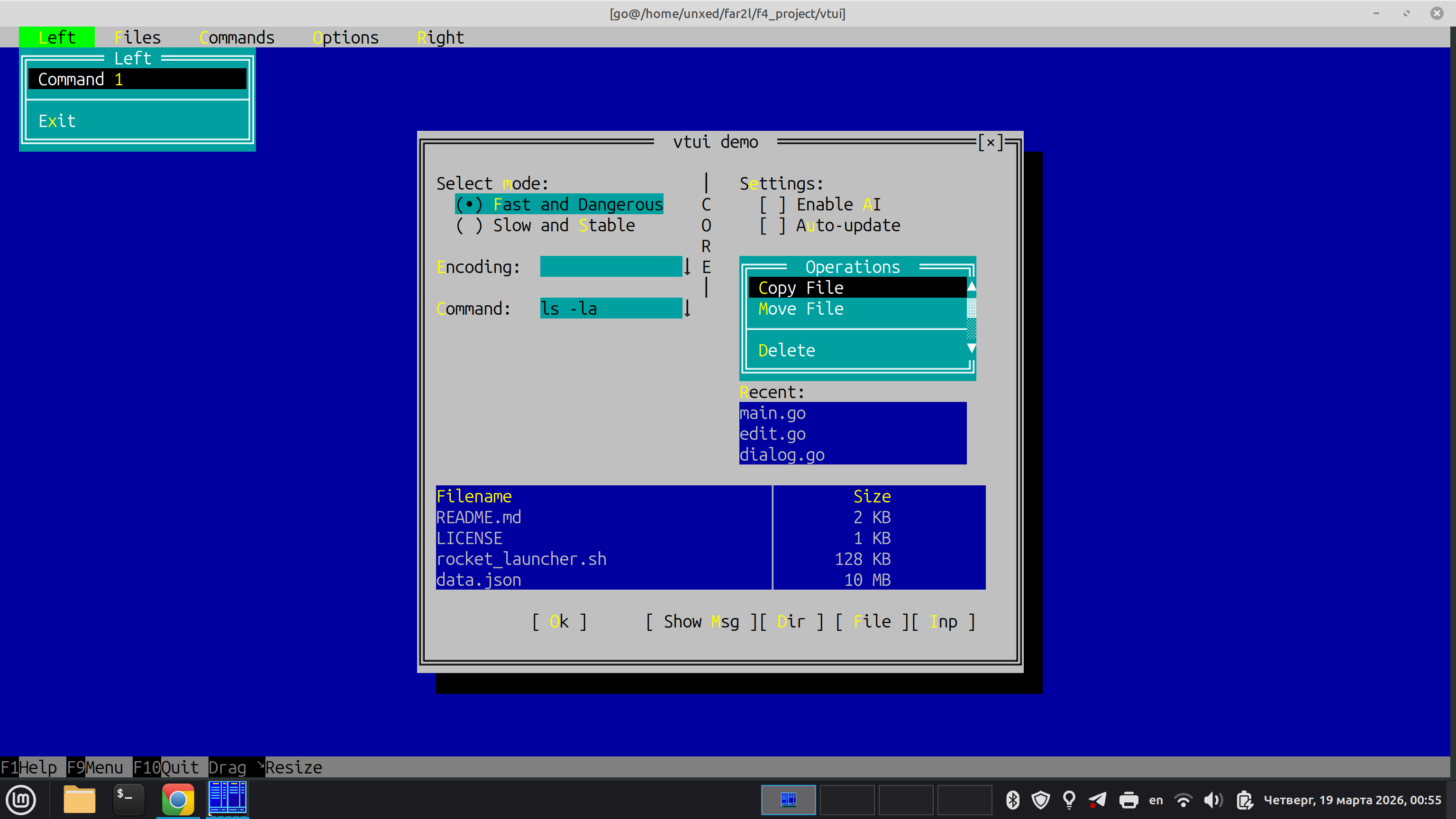
}The repository includes a demo app that showcases widgets and layout features. You can run it directly in the terminal or test different GUI backends using command-line flags:
go run ./cmd/test-app                 # Default terminal mode
go run ./cmd/test-app --gui=gogpu     # Hardware-accelerated GPU window
go run ./cmd/test-app --gui=x11       # Native X11 window
go run ./cmd/test-app --gui=wayland   # Native Wayland window