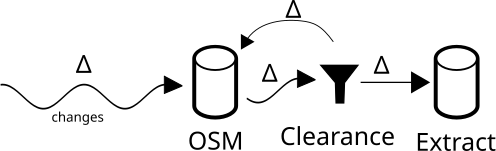
"Clearance" is a tool that helps track changes in OSM on tematics, and keep replication extracts up to date, while still following quality rules. Instead of relying on timestamps or changesets, it focuses on partial and local data updates. If some data is rejected, it either needs to be fixed in OSM or approved manually, data edits are only done in OSM. Reviewing and fixing are done collaboratively.
Online demo : https://clearance-dev.teritorio.xyz
Ensure git submodule is ready
git submodule init
git submodule update
docker compose --profile "*" build
Copy the configuration file and adapt it.
cp .env.template .env
Set a private random value for the SECRET_KEY_BASE key.
To log into Clearance (to manually validate changes), an OpenStreetMap user is required. Register your Clearance instance as an OAuth 2.0 application on https://www.openstreetmap.org/oauth2/applications.
- The redirect URL should be
https://[your Clearance backend, could be 127.0.0.1:8000]/users/auth/osm_oauth2/callback. Only "Read user preferences" permission is required. - Fill in the values of
OSM_OAUTH2_ID,OSM_OAUTH2_SECRET,OSM_OAUTH2_REDIRECT(your Clearance Frontend, could behttp://127.0.0.1:8000/) in your.envfile.
This is only required if you plan to use OSM extracts from osm-internal.download.geofabrik.de. It is not needed for download.geofabrik.de or other providers.
The internal Geofabrik extracts include metadata, while standard Geofabrik extracts do not.
To use this, you must set the OSM_GEOFABRIK_USER and OSM_GEOFABRIK_PASSWORD fields in your .env file with OSM credentials. Note: The password is stored in plain text.
docker compose up -d postgres
To init the data base, first time only
docker compose run --rm api bundle exec rails db:schema:load
If required, you can enter into the Postgres shell with:
docker compose exec -u postgres postgres psql
After code update, update the database schema:
docker compose run --rm api bundle exec rails db:migrate
docker compose run --rm script ./bin/update-schema.sh
Create at least one project inside projects_config from the projects_config_template directory.
Adjust the config.yaml and the export*.osm_tags.json files.
Set up the initial OSM extract in the database. Use the project directory name from projects_config.
docker compose run --rm script ./bin/setup.sh emergency
Note: PBFs from Geofabrik have daily diffs, while OSM-FR have minutely updates.
If you plan to use extract and diff from Clearance, dump the first extract. In all cases, you can use the Overpass-like API.
docker compose run --rm script ./bin/dump.sh emergency
The update should be done by a cron job but can also be run manually. Get Update, Import, and Generate Validation report in the database:
# All projects
docker compose run --rm script ./bin/update.sh

# Only one project
docker compose run --rm script ./bin/update.sh emergency
Run update for all projects from cron every 2 minutes:
*/2 * * * * cd clearance && bash -c "docker compose run --rm script ./bin/update.sh &>> log-`date --iso`"
Note 1: If you use only Geofabrik, set a daily cron, check the hour of Geofabrik diff release.
Note 2: To lower CPU usage, you can lower the update frequency. It is not required to run it every minute.
Drop a project.
docker compose run --rm script ./bin/drop.sh emergency
Check if the imported extract update with diff is the same data as dump from Clearance with retained objects.
docker compose run --rm script ./bin/check-integrity.sh emergency
Setup
bundle install
bundle exec tapioca init

bundle exec rake rails_rbi:routes
# bundle exec tapioca dsl
bundle exec srb rbi suggest-typed
Tests and Validation
bundle exec srb typecheck
bundle exec rubocop --parallel -c .rubocop.yml --autocorrect
docker compose run --rm script bundle exec rake test
docker compose run --rm script bundle exec rake test:sql
Clearance starts by downloading an OSM extract from remote sources like OSM-FR or Geofabrik and loads the objects into a Postgres/PostGIS database in raw format (not as spatial objects). Each object is a row in a osm_base_n, osm_base_w or osm_base_r table.
This osm_base_* tables ar the truth. The data is considered as qualified and with the goal to not deteriorate its quality.
The osm_base_* can be queried with an Overpass API and the data is also available as an OSM extract with diff updates.
Updates are fetched from remote sources in a loop. Minutely updates are available from OSM-FR, and daily updates are available from Geofabrik.
The updates are loaded into an osm_changes table, as is, in raw format, without applying the updates.
The content of osm_changes is processed to determine if the changes can be applied to the osm_base_*:
- If the changes are outside of the area of interest, they can be applied (note: objects can be moved in or out of the area of interest).
- If the changed tags are not targeted by the configured tag combination, they are also out of interest, then changes can be applied.
- Changes of interest in the area of interest are subject to validation rules. Changes not triggering any validator rules are also applied to the
osm_base_*.
Changes can also be applied to osm_base_* by manual validation, see below.
Held objects are kept in the osm_changes table.
While changes are applied to osm_base_*, they are removed from osm_changes. Validated changes are available from the Overpass API and as update diffs.
So, the Clearance project acts as an OSM Extract/Update proxy of valid data. The OSM Extracts and Updates are standards and can be used with any OSM compatible tools.
The goal is to retain suspect changes as not complying with quality criteria. The OSM tags properties, the metadata properties, the geometry and the changeset properties can be used to evaluate the quality.
Currently implemented validators:
- deleted: flag deleted objects
- geom: flag objects with change distance greater than a threshold
- tags: flag objects based on tags key and value
- user: flag objects based on contributor name
More advanced validators are planned.
After each update, the validation is reevaluated. The validation is done using the last version of incoming changed objects. Changes to validate are computed between osm_base_* and the last version of OSM objects.
If a new update makes previously retained objects pass the validation, there are no more objects to retain and cumulated changes are applied to osm_base_*.
Held objects rejected by validation must be fixed in order to comply with quality rules. Once fixed in OpenStreetMap, the next update makes them pass the validation and they are available in the osm_base_*.
The original OpenStreetMap data is the only modifiable version. All contributions must be done to the original OpenStreetMap database.
In case the change is considered valid according to the user despite the quality rule rejecting it, the integration into the osm_base_* can be accepted manually.
Held objects and manual object acceptance are available via API and user frontend.
The idea is to group changes locally to make contextual validation. It allows detecting, and ignoring, e.g. deletion and recreation of the same object. It also allows implementing multi-object validators, e.g. to validate road network continuity.
Engine
- Ensure database integrity (base and changes, by source type)
- LoCha splitting strategy on large clusters
- Support changes on objects larger than a cluster: admin relations, large landuses, rivers
Configuration
- Add OSM extract URL in the config file to initialize the project from it
- By feature type
- LoCha / clustering distance
- Evaluation of geometry change thresholds
Validators implementation
- Check for broken network continuity
- Add detection of new duplicate or similar objects
- Validate again OpenData set
- Validate changes using external rule sets, like MapCSS from JOSM or Osmose-QA validation
Validation evaluation scoring
- Fetch user blocks and use them in score
- Fetch changeset discussions and use them in the score
- Contributors' reputation: based on external tools / APIs
- Support equivalent tagging schemas to avoid false positives
UI / UX
- Partial validation of LoCha
- Validation review UI / UX
- Configuration UI:
- Display
- Edit
- User tools
- Review status (Fixed, I will do it, Need help...)
- Data Revert tool
- Easy creation of changeset discussions or OSM notes