Thomas Ratsakatika | AI and Environment Researcher | University of Cambridge
This software was developed in partnership with Fundația Conservation Carpathia, a nature conservation and restoration organisation based in Romania. Read the licenses and disclaimer before use.
March 2025: Now uses DeepFaune v1.3 (new animals: beaver, bison, fallow deer, moose, otter, racoon, reindeer and wolverine). More details can be found here.
March 2025: Option to use MegaDetector v6 or v5; however, initial tests indicate that the larger MegaDetector v5 model gives better results for this use case (processing time is not a constraint). More details can be found here.
This repository contains code to run a wildlife alert system on your laptop, PC or server. You can even run a basic version on a Raspberry Pi 4B (requires 4GB RAM minimum).
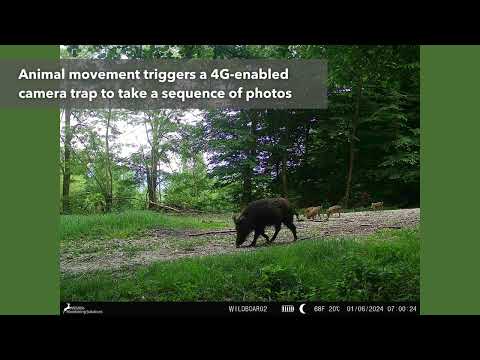
The system will process photos sent from a 4G-enabled camera trap and send alerts directly to your mobile phone.
The system uses a classification model that can identify 34 European and North American mammals, however, it can be adapted to use other models.
To get started, you will need at least one 4G-enabled camera trap, a dedicated email address, a Telegram account and some basic Python skills.
If you don't have these - or you just want to test the system on your laptop - run the Example Tutorial.

© Photos credit: Fundația Conservation Carpathia

Beta warning: this alert system is still in development and may result in unexpected behaviour. Also note that third-party functionality (e.g. Gmail 'app passwords', the Telegram API) may change at any time, resulting in the system not working.
The Example Tutorial Notebook is designed to give you an overview of how the alert system works, and experiment with the detection and classification models on some example images.
To run the example tutorial, you will need to be able to run Python in a Jupyter Notebook. There are many tutorials on how to do this online. One option is to download VS Code and add the Python and Jupyter extensions.
Once you are set up with Jupyter, you will need to copy the alert system code repository onto your computer. If you know how to use Git, the command is:
git clone https://github.com/ratsakatika/camera-traps.gitVS Code also provides tools to "clone" (copy) a repository. You can alternatively download everything as a zip file by clicking on the green 'code' button at the top of this page.
Now you will need to create a "virtual environment" and install all the packages required to run the alert system. Open a new terminal (within VS Code or your operating system), navigate to the newly created camera-traps folder (cd camera-traps), and create a virtual environment with the required modules using pip (recommended) or conda (download here).
-
Create a pip virtual environment (recommended):
python3 -m venv .venv source .venv/bin/activate pip install -r requirements.txt -
Create a conda virtual environment (untested):
conda env create -f environment.yml
conda activate camera_traps
If you are using Windows Subsystem for Linux (recommended if using Windows), you will also need to install Tkinter:
sudo apt update
sudo apt install python3-tk
Finally, download the detection and classification models into the /models directory:
mkdir -p models
wget -nc -O models/md_v5a.0.0.pt https://github.com/agentmorris/MegaDetector/releases/download/v5.0/md_v5a.0.0.pt
wget -nc -O models/deepfaune-vit_large_patch14_dinov2.lvd142m.v3.pt https://pbil.univ-lyon1.fr/software/download/deepfaune/v1.3/deepfaune-vit_large_patch14_dinov2.lvd142m.v3.pt
You can now open and run the Example Tutorial Notebook.
Below are detailed instructions for setting up the alert system. If anything doesn't make sense, follow the more detailed Example Tutorial.
- Clone the repository.
- Download the detection and classification models and move them to the models directory.
- Create the camera traps virtual environment with pip (requirement.txt) or conda (environment.yml).
- Create a dedicated email account to receive the 4G camera trap photos and generate an app password. Your email provider must support app passwords (e.g. Gmail - requires two-factor authentication set up).
- Set up your 4G camera trap to send photos to this dedicated email address.
- Create a bot in Telegram using @BotFather and note down the bot token (detailed instructions here).
- Create a group in Telegram, add the bot to the group and make it an admin. Then note down the group's chat ID (do this AFTER adding the bot - the chat ID should start with '#-100')
- Update the config.yaml.example file with your email account settings, and Telegram chat ID and bot token. Save this file as config.yaml.
- Update the camera locations CSV file with your camera(s) details, location and a google maps link.
- Verify that the settings in the advanced alert system script meet your requirements.
- Activate the virtual environment and run the alert system script:
python3 scripts/advanced_alert_system.py
The script will check the email account every 60 seconds for unread emails, download any photos, detect and classify animals, and send an alert to your Telegram Group. It will then update the capture database and save the original photos in the photos folder. A high-level process flow diagram can be found here.

You can also find code for processing camera trap data, and testing and fine-tuning AI models in the archive folder. These notebooks are experimental and while they contain comments, are no detailed tutorials. Contact me if you have any queries.
Important: Users must agree to the respective license terms of third-party models. Once downloaded, these models should be moved to the models directory. Alternatively, use the bash commands provided below in the camera-traps directory.
The advanced version of the alert system uses the MegaDetector object detection model and DeepFaune species classification model:
- MegaDetector Detection Model v5a: md_v5a.0.0.pt
- DeepFaune Classifier Model v1.3: deepfaune-vit_large_patch14_dinov2.lvd142m.v3.pt
mkdir -p models
wget -nc -O models/md_v5a.0.0.pt https://github.com/agentmorris/MegaDetector/releases/download/v5.0/md_v5a.0.0.pt
wget -nc -O models/deepfaune-vit_large_patch14_dinov2.lvd142m.v3.pt https://pbil.univ-lyon1.fr/software/download/deepfaune/v1.3/deepfaune-vit_large_patch14_dinov2.lvd142m.v3.pt
If you would like to use MegaDetector v6, the weights for the "MDV6-yolov10-x" model can be downloaded here.
mkdir -p models
wget -nc -O models/MDV6-yolov10x.pt https://zenodo.org/records/14567879/files/MDV6-yolov10x.pt?download=1
The basic version uses DeepFaune's object detection and species classification models:
- DeepFaune Detection Model: deepfaune-yolov8s_960.pt
- DeepFaune Classifier Model v1.0: deepfaune-vit_large_patch14_dinov2.lvd142m.pt
mkdir -p models
wget -nc -O models/deepfaune-yolov8s_960.pt https://pbil.univ-lyon1.fr/software/download/deepfaune/v1.1/deepfaune-yolov8s_960.pt
wget -nc -O models/deepfaune-vit_large_patch14_dinov2.lvd142m.pt https://pbil.univ-lyon1.fr/software/download/deepfaune/v1.1/deepfaune-vit_large_patch14_dinov2.lvd142m.pt
Advanced users can also adapt the code to integrate their own classification models to identify different species. See Dan Morris' Camera Trap Survey for potential alternatives.
Some example photos are provided in data/example_photos to get you started.
You could also investigate LILA BC and WildLife Insights if you want to download large camera trap datasets to train your own model using the notebooks provided in the archive folder.
.
├── archive             # Directory for analysis, fine-tuning and testing notebooks
├── assets              # Directory for images and other media
├── data                # Directory for storing data
│   ├── example_photos  # Subdirectory of example photos
│   └── photos          # Subdirectory for storing photos received
├── models              # Directory for storing the AI models
├── notebooks           # Directory for the example tutorial notebook
├── scripts             # Directory for alert system scripts
├── config.yaml         # Alert system configuration file (rename config.yaml.example)
├── environment.yml     # Conda environment configuration file
├── requirements.txt    # Pip environment configuration file (recommended)
├── LICENSE             # License file for the repository
└── README.md           # Readme file with project overview and instructions
For questions or more information, please contact Tom Ratsakatika.
@misc{ratsakatika2024ai,
  author       = {Thomas Ratsakatika},
  title        = {AI for Wildlife Monitoring},
  year         = 2025,
  month        = jun,
  institution  = {University of Cambridge},
  howpublished = {\url{https://github.com/ratsakatika/camera-traps}}
}
See: https://www.deepfaune.cnrs.fr/en/
See: https://github.com/microsoft/CameraTraps
The alert system code is released under the MIT license. Further details can be found here.
The DeepFaune models' license can be found here. Commercial use of the DeepFaune models is forbidden.
The MegaDetector model's license can be found here.
Anyone who accesses, uses, or refers to this repository, including but not limited to its code, software, applications, instructions, and any third-party applications or services mentioned or linked herein, takes full responsibility for their actions and outcomes. The author(s) of this repository makes no warranties or representations, express or implied, regarding the accuracy, reliability, completeness, or suitability of the code, instructions, or any associated third-party applications or services for any particular purpose. By accessing or using this repository, you agree to do so at your own risk and in accordance with the terms of the relevant licenses. The author(s) shall not be held liable for any damages, including but not limited to direct, indirect, incidental, or consequential damages, arising from the use or misuse of the code, applications, instructions, or any third-party applications or services. Users are advised to review and comply with all applicable laws, licenses, and terms of use of any third-party code, applications, or services referenced in this repository.
I would like to thank Professor Srinivasan Keshav and Dr Ruben Iosif for their invaluable insights and expertise while developing this software. I would also like to thank Fundația Conservation Carpathia's Wildlife and Rapid Intervention Team, who hosted me in Romania, deployed the camera traps, and provided valuable feedback during the system's development.
This software was built as part of the UKRI-funded Artificial Intelligence for Environmental Risk Centre for Doctoral Training programme at the University of Cambridge.

|

|