a script to install the horizon client on the steam deck
Short: It automatically installs the horizon view client of VMware. You will be asked for your root-Password so make sure you have set one before executing the script (otherwise it wont work) you can do this by opening a terminal and type: passwd
Long: The script downloads the currently newest VMware-Horizon-View Client (2209), makes the vmware .bundle-file executable, disables the steamosd-readonly filesystem for the installation, deletes all pre existing installations (rm -rf /etc/vmware*), executes the official installer via commandline and install the client. It also automatically fixes some graphical issues in the horizon client due to a misconfiguration of the .desktop-file by reading out your current used theme and putting it in the .desktop-file as a execution-parameter. After that steamos-readonly mode will be enabled again.
Because of the steam os immutable file system, the horizon clients gets purged after each steam-os update. With this script it is easy to reinstall or install it in less then a minute.
download the .desktop file (here https://github.com/j0hnnyclaymore/horizon-client-steam-deck/releases/tag/v0.2), got to your download-folder and double click on the icon, click Continue, type in your deck user password:
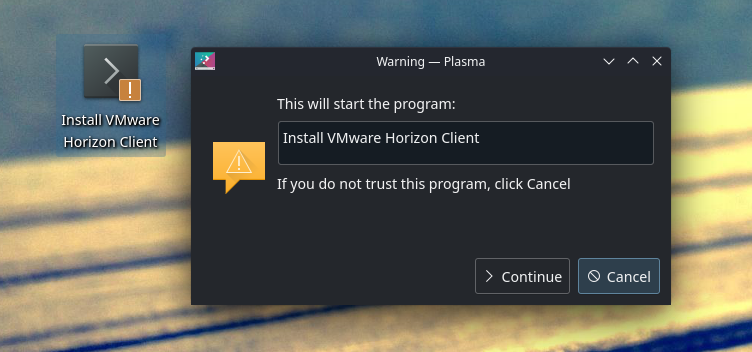
- open a terminal (you can press
ALT + F2and typeterminalfor that) cd Downloadswget https://raw.githubusercontent.com/j0hnnyclaymore/horizon-client-steam-deck/main/vmware-horizon-deck-installer.shchmod +x vmware-horizon-deck-installer.sh./vmware-horizon-deck-installer.sh- Type in your password for the steam deck user
- Answer all questions and enjoy!