Releases: opf/openproject
OpenProject 17.3.0

212b79a oliverguenther
Oliver Günther
oliverguenther
Oliver Günther
Release date: 2026-04-15
We released OpenProject 17.3.0.
The release contains several bug fixes and we recommend updating to the newest version.
In these Release Notes, we will give an overview of important feature changes. At the end, you will find a complete list of all changes and bug fixes.
Important feature changes
Take a look at our release video showing the most important features introduced in OpenProject 17.3.0:
Release video of OpenProject 17.3
Improvements to agile planning and execution with sprints and backlogs
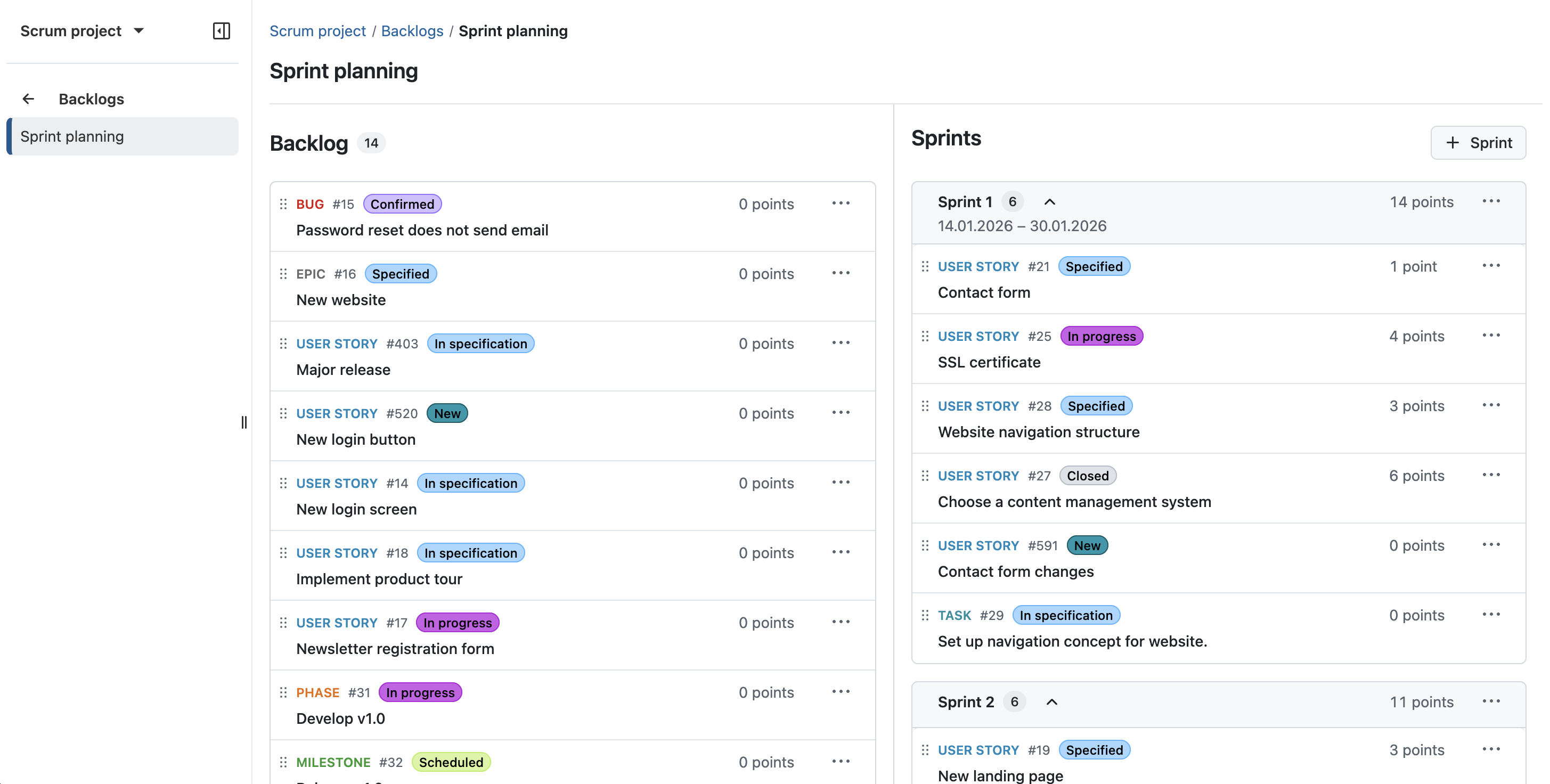
OpenProject 17.3 introduces several improvements to agile planning and execution, making it easier to structure and manage work with sprints and backlogs and reducing the need for manual setup. These changes are part of our ongoing efforts to further strengthen agile workflows in OpenProject.
Important
If you are already working with the Backlogs module, you will notice updates to the layout and behavior when updating to OpenProject 17.3. All existing data will be preserved, and no manual action is required. To learn more about the reason behind these changes, please see this blog article.
Dedicated sprint objects
OpenProject introduces dedicated sprint objects for agile planning, replacing the previous use of versions as a workaround. Sprints are now a core entity within the Backlogs module, allowing teams to plan, organize, and track their work more intuitively.
Work packages can be assigned directly to sprints, and sprints include key attributes such as name, status, and dates. This provides a clearer structure for agile workflows and aligns OpenProject more closely with established Scrum practices.
All work packages visible on backlogs
Backlogs now display all work package types within a project, removing previous limitations on which types could be included. This allows teams to manage and prioritize all relevant work in one place without additional configuration.
By making all work packages visible in backlogs and sprint planning, OpenProject provides a more consistent and flexible approach to organizing work across different use cases.
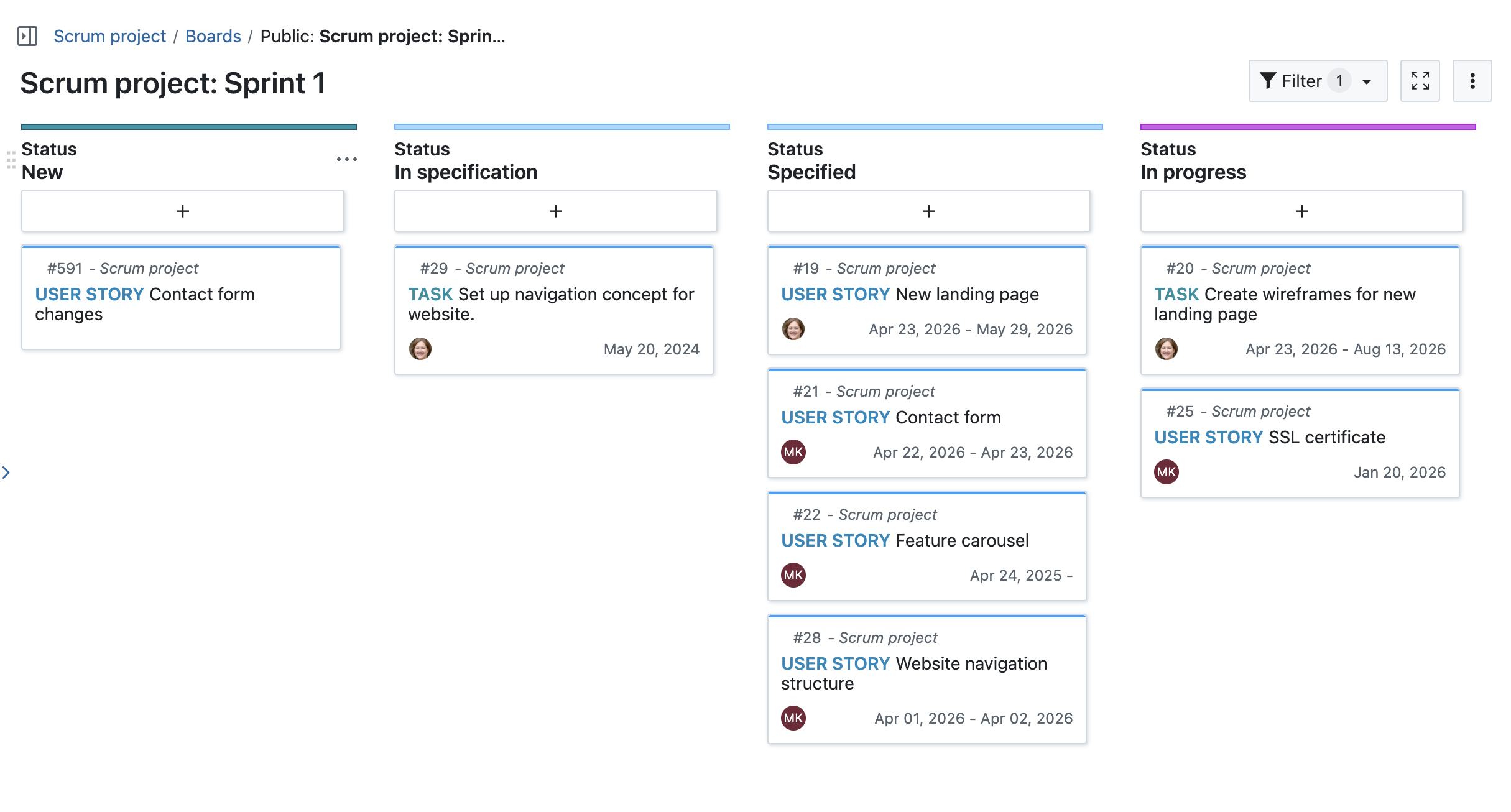
Automatic board creation when starting a sprint
When starting a sprint, a dedicated board is now created automatically and configured based on the project’s workflows. Teams are directly taken to the board, allowing them to start working without any additional setup.
This reduces manual configuration and ensures that sprint boards are consistently structured across projects.
Closing a sprint and handling remaining work
Active sprints can now be completed directly from the sprint view, making it easier to transition to the next iteration. When closing a sprint, users are guided to handle unfinished work packages in bulk.
Remaining work can be moved to the backlog or reassigned to another sprint, helping teams to continue their work without manual adjustments.
See our documentation to learn more about backlog and sprints with OpenProject.
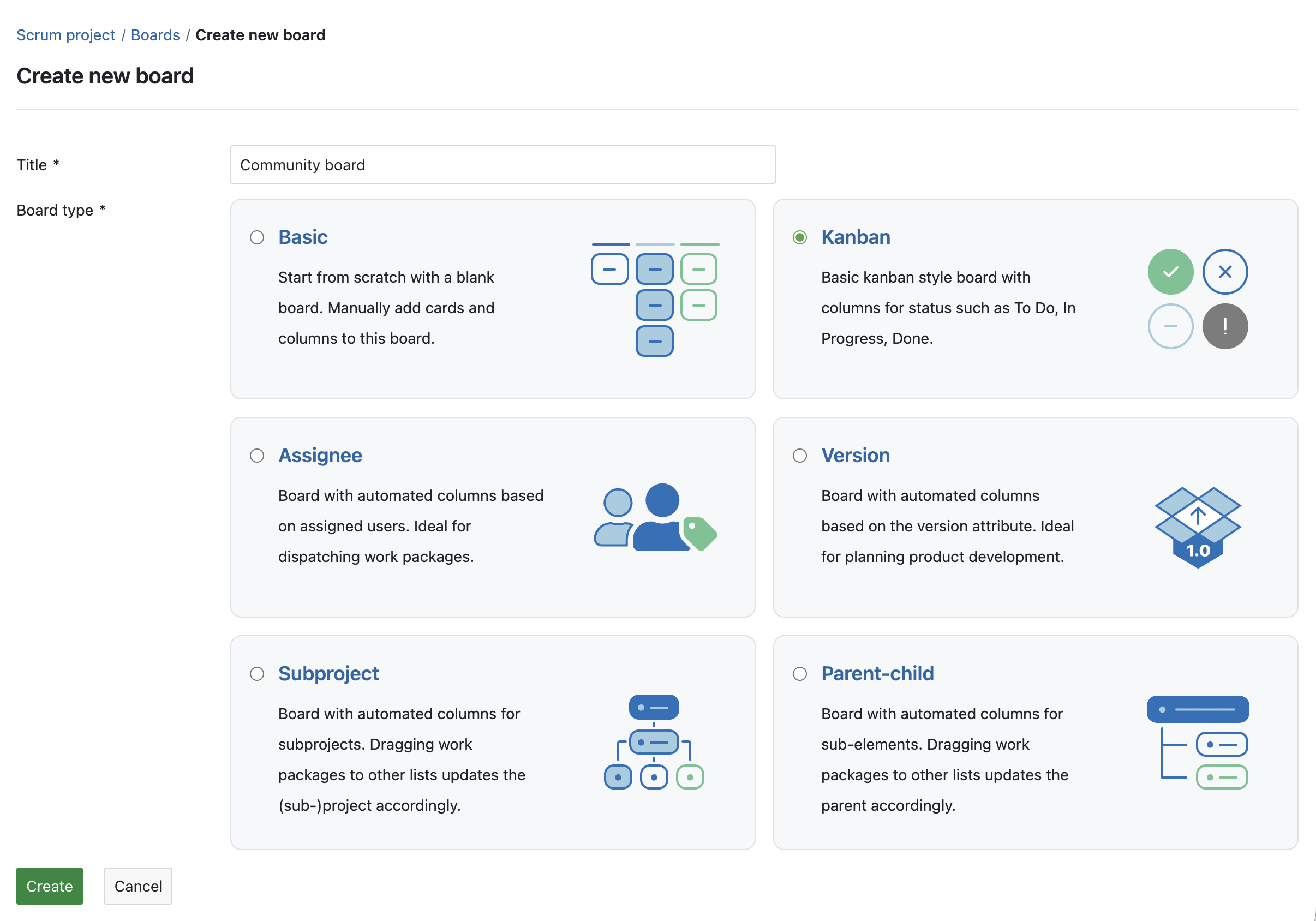
Action boards available in the Community edition
With the improvements to agile planning features such as sprints and backlogs, boards play a central role in organizing and tracking work. To support this, all action board types are now available in the Community edition.
This extends the existing board functionality in the Community edition and allows teams to use a wider range of board configurations, such as Kanban or parent-child boards, without requiring an Enterprise plan.
In-place editing of project attributes on the project overview page
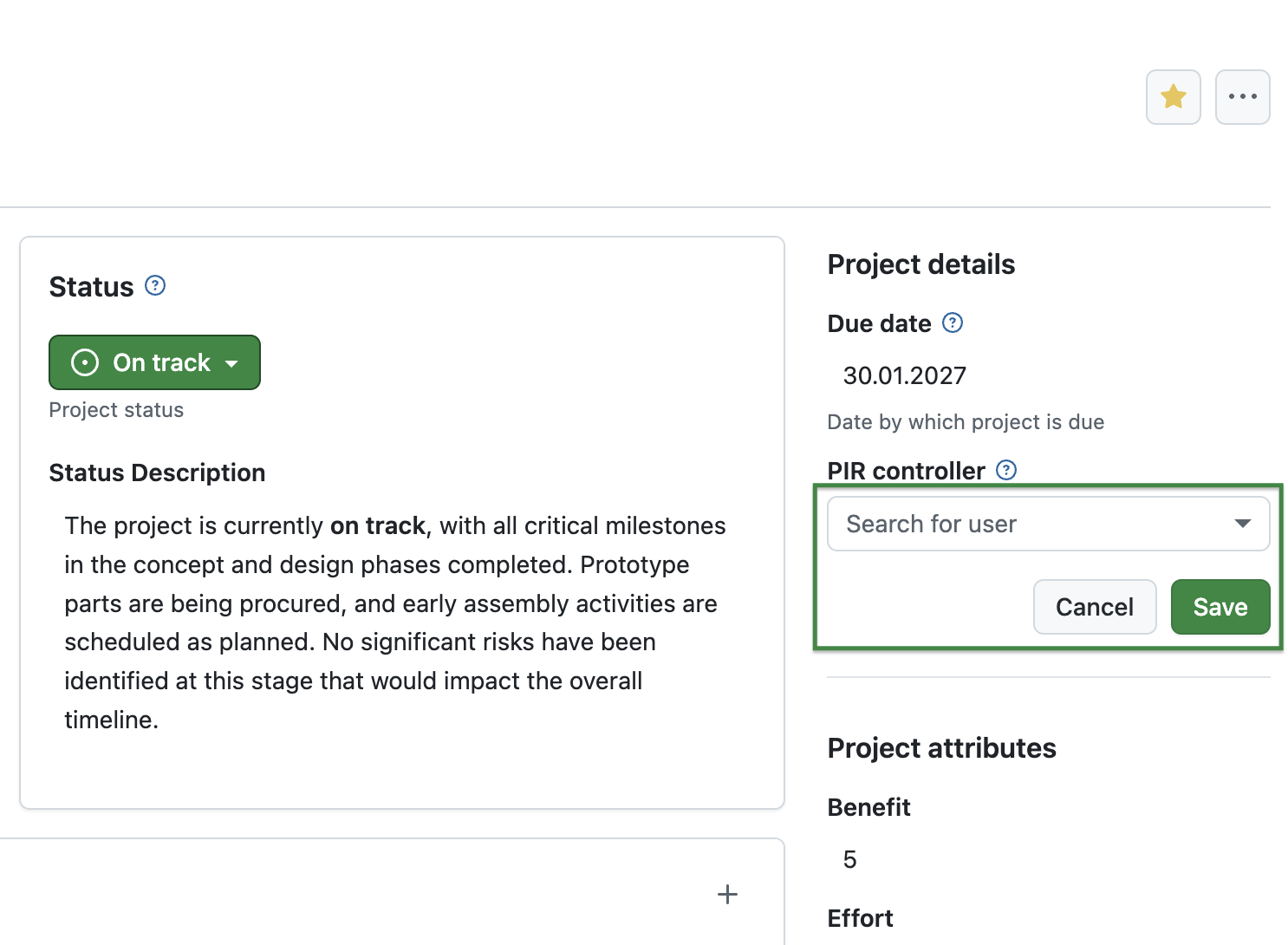
Project attributes on the project overview page (Project home) can now be edited directly in place, without opening a separate dialog. This allows users to update project information more quickly and with fewer interruptions.
Depending on the attribute type, changes can be applied immediately or confirmed within the field, providing a more streamlined and consistent editing experience.
Sharing of meeting templates (Enterprise add-on, Basic plan)
Meeting templates, introduced as an Enterprise add-on in OpenProject 17.2, can now be shared across projects, making it easier to reuse standardized agendas and structures. Depending on the configuration, templates can be made available within a project, across subprojects, or throughout the entire instance.
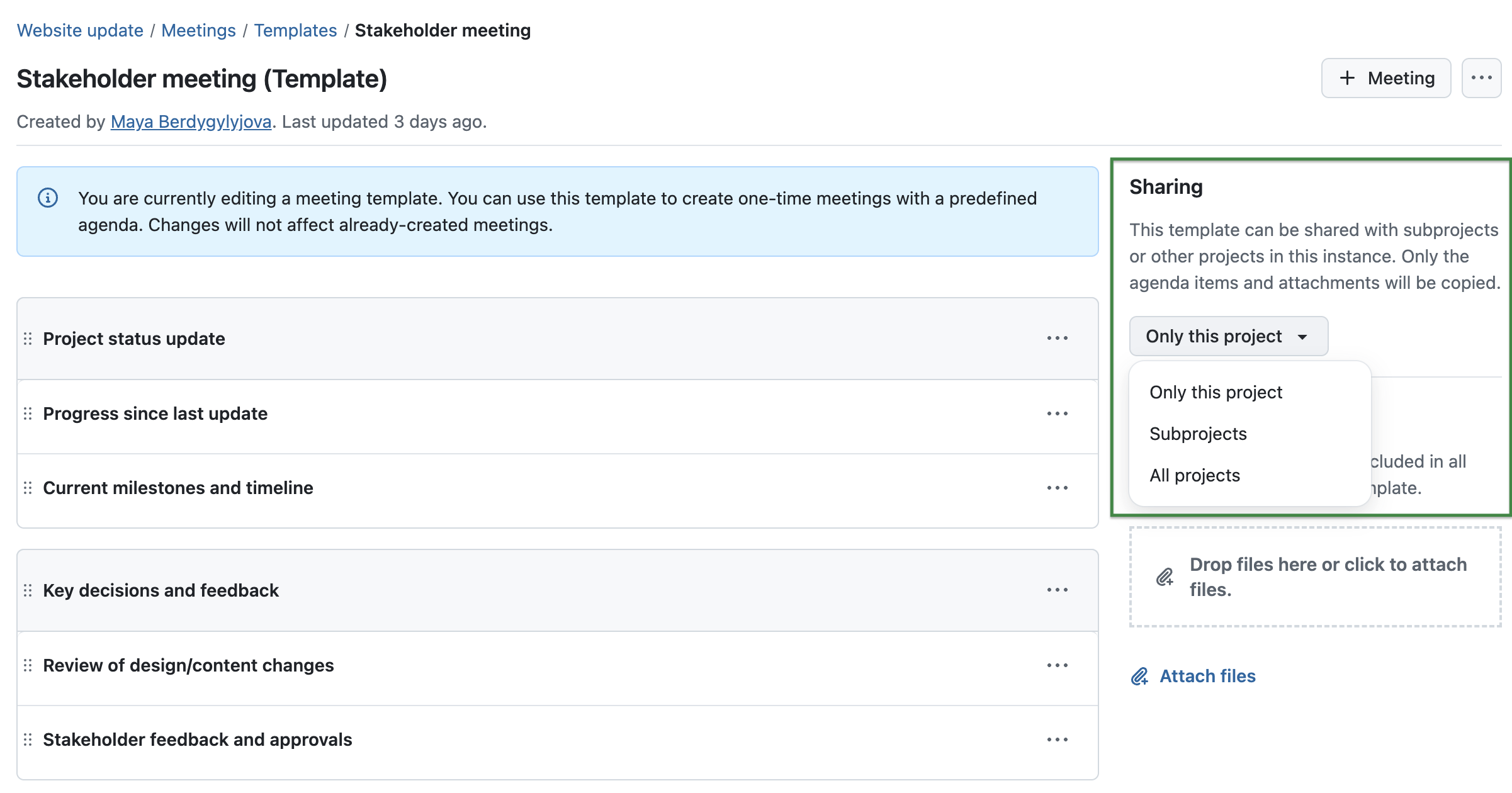
For more details, please refer to the Meetings documentation.
Improved workflow configuration for administrators
Workflow configuration has been improved to make it easier to focus on relevant types, roles, and statuses. A new index page allows workflows to be accessed by type, reducing complexity when navigating and editing configurations.
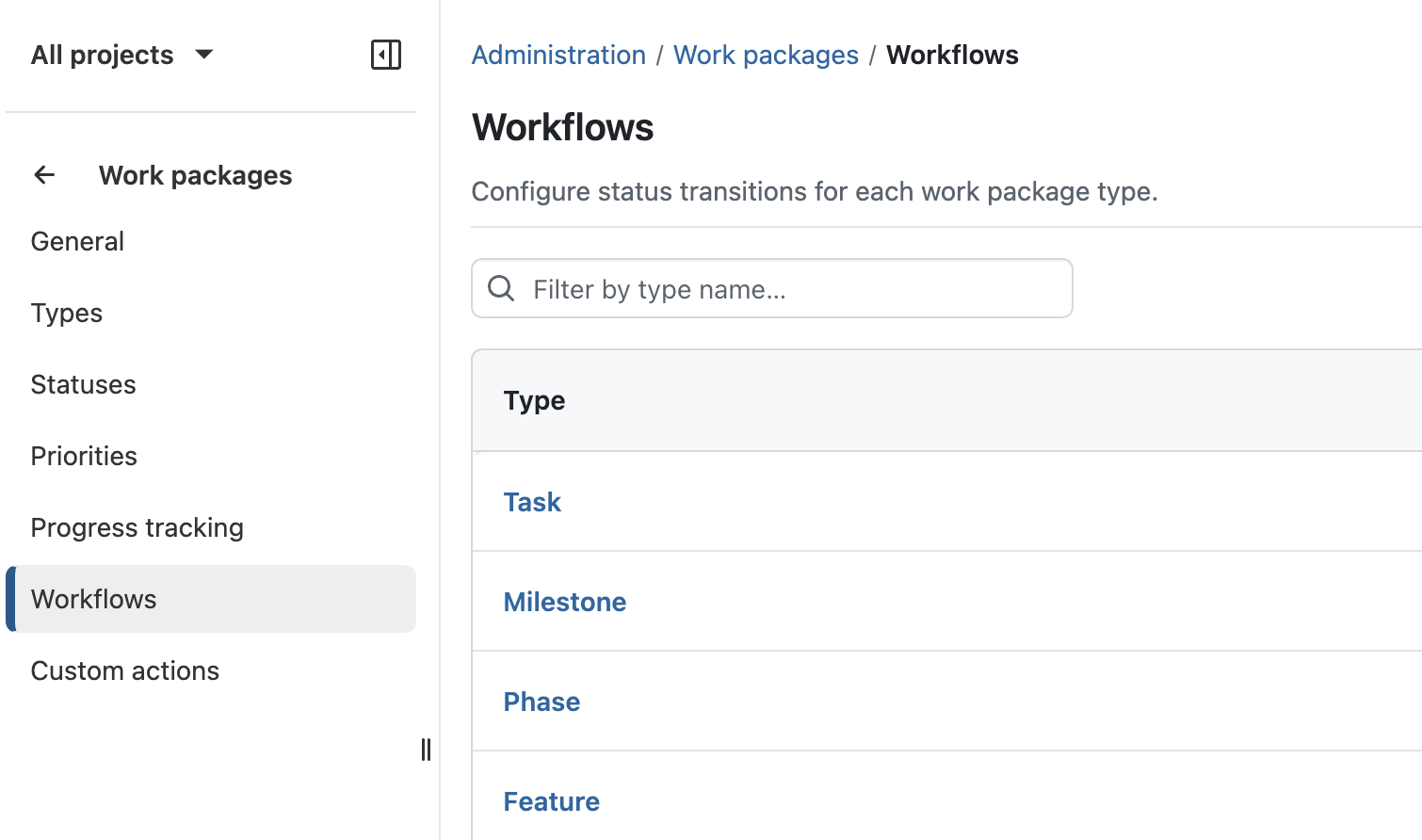
When editing workflows, only relevant statuses are displayed, and role selection is streamlined. In addition, saving changes is now more reliable, with improved handling of unsaved changes and a fixed save action.
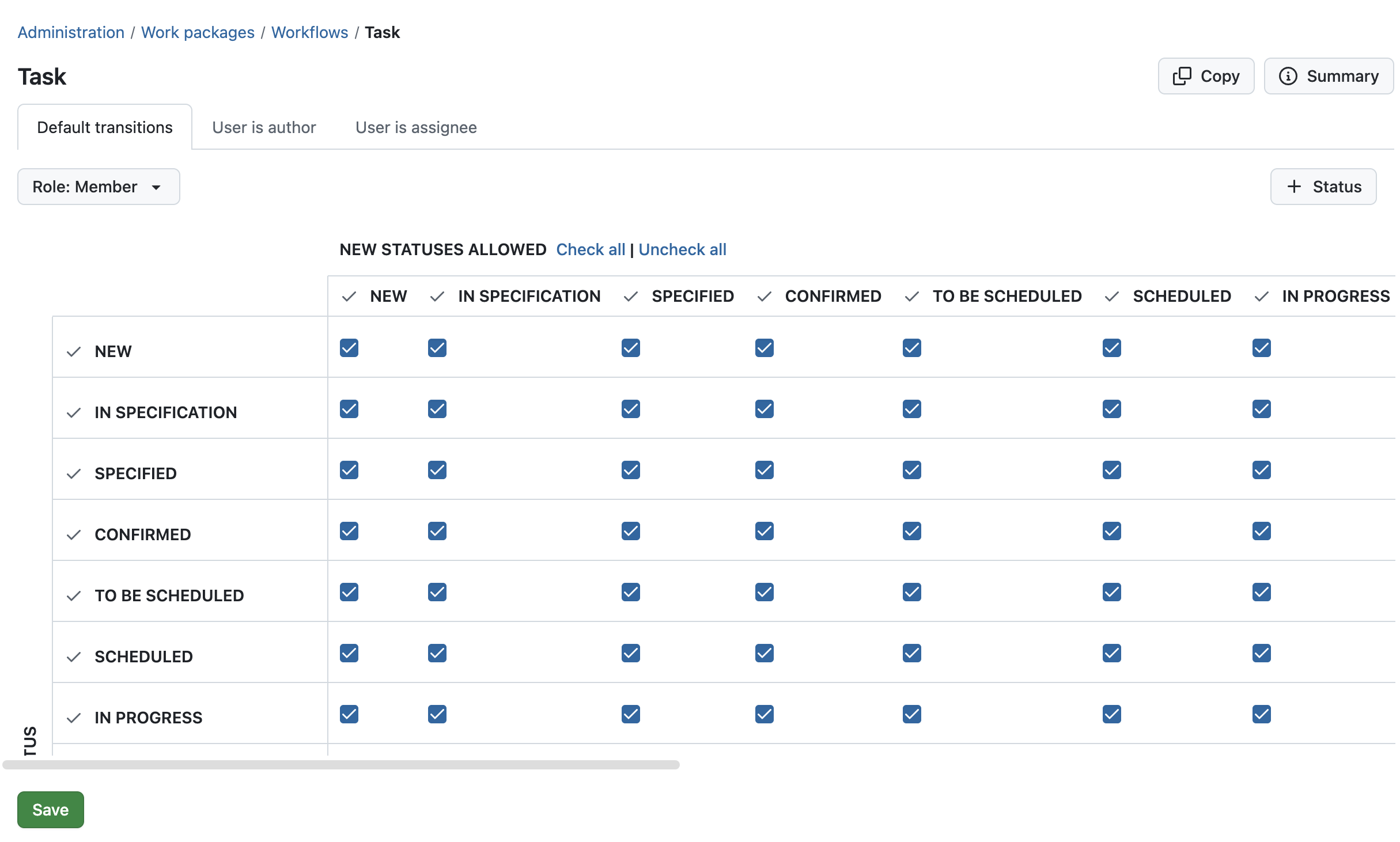
Read more about workflow management in our system admin guide.
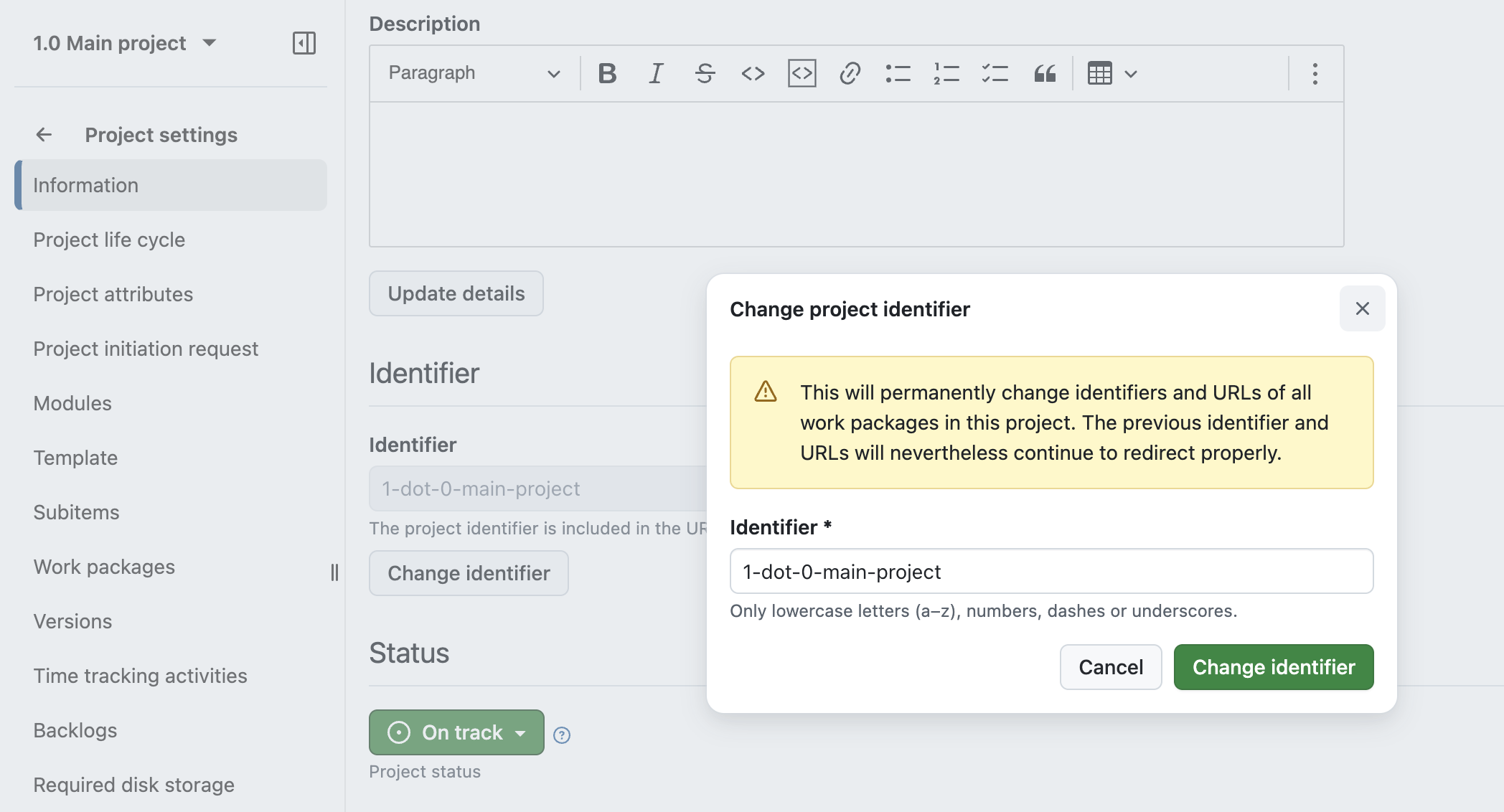
Improved handling of project identifiers
Project identifiers can now be easily changed without invalidating existing links. Previous identifiers remain valid and continue to redirect to the project.
In addition, identifier handling has been improved when creating or copying projects, including automatic suggestions and updated validation. These improvements also apply to API-based project creation.
Improved work package search when selecting items across the application
Work package search has been continuously improved in recent releases. With OpenProject 17.3, these improvements are now extended to more areas of the application.
When selecting work packages in relations, boards, meetings, time tracking, or filters, it is now possible to search by attributes such as type and status. This aligns the search behavior with the global search and makes it easier to find and select the correct work packages in different workflows.
Nested groups for improved user and permission management
Groups can now be nested, allowing memberships and permissions to be inherited through the group hierarchy. This lays the foundation for further improvements in structuring and managing groups.
Security fixes
CVE-2026-33667 - 2FA OTP Verification Missing Rate Limiting
The 2FA OTP verification (confirm_otp action) has no rate limiting, lockout mechanism, or failed-attempt tracking. An attacker who knows a user's password can brute-force the 6-digit TOTP code without any protection slowing or blocking the attempts.
The existing brute_force_block_after_failed_logins setting only counts password login failures and does not apply to the 2FA verification stage.
This vulnerability was reported by GitHub user Wernerina. Thank you for responsibly disclosing your findings.
For more information, please see the GitHub advisory #GHSA-234r-45m2-w6cv
GHSA-hh5...
OpenProject 17.2.3
bcee06c
oliverguenther
Oliver Günther
Release date: 2026-03-31
We released OpenProject OpenProject 17.2.3.
The release contains several bug fixes and we recommend updating to the newest version.
Below you will find a complete list of all changes and bug fixes.
Security fixes
CVE-2026-34717 - SQL Injection in Cost Reporting =n Operator via parse_number_string
The =n operator in cost reports did not appropriately treat user input
This vulnerability was reported by user Ochk0 through a GitHub security advisory. Thank you for responsibly disclosing your findings.
For more information, please see the GitHub advisory #GHSA-5rrm-6qmq-2364
Bug fixes and changes
OpenProject 17.1.4
3185039
oliverguenther
Oliver Günther
Release date: 2026-03-31
We released OpenProject OpenProject 17.1.4.
The release contains several bug fixes and we recommend updating to the newest version.
Below you will find a complete list of all changes and bug fixes.
Security fixes
CVE-2026-34717 - SQL Injection in Cost Reporting =n Operator via parse_number_string
The =n operator in cost reports did not appropriately treat user input
This vulnerability was reported by user Ochk0 through a GitHub security advisory. Thank you for responsibly disclosing your findings.
For more information, please see the GitHub advisory #GHSA-5rrm-6qmq-2364
Bug fixes and changes
OpenProject 17.0.7
68099e7
oliverguenther
Oliver Günther
Release date: 2026-03-31
We released OpenProject OpenProject 17.0.7.
The release contains several bug fixes and we recommend updating to the newest version.
Below you will find a complete list of all changes and bug fixes.
Security fixes
CVE-2026-34717 - SQL Injection in Cost Reporting =n Operator via parse_number_string
The =n operator in cost reports did not appropriately treat user input
This vulnerability was reported by user Ochk0 through a GitHub security advisory. Thank you for responsibly disclosing your findings.
For more information, please see the GitHub advisory #GHSA-5rrm-6qmq-2364
Bug fixes and changes
OpenProject 16.6.10
53daf3c
oliverguenther
Oliver Günther
Release date: 2026-03-31
We released OpenProject OpenProject 16.6.10.
The release contains several bug fixes and we recommend updating to the newest version.
Below you will find a complete list of all changes and bug fixes.
Security fixes
CVE-2026-34717 - SQL Injection in Cost Reporting =n Operator via parse_number_string
The =n operator in cost reports did not appropriately treat user input
This vulnerability was reported by user Ochk0 through a GitHub security advisory. Thank you for responsibly disclosing your findings.
For more information, please see the GitHub advisory #GHSA-5rrm-6qmq-2364
Bug fixes and changes
OpenProject 17.2.2
d97c35e
oliverguenther
Oliver Günther
Release date: 2026-03-17
We released OpenProject OpenProject 17.2.2.
The release contains several bug fixes and we recommend updating to the newest version.
Below you will find a complete list of all changes and bug fixes.
Bug fixes and changes
OpenProject 17.2.1
2880197
oliverguenther
Oliver Günther
Release date: 2026-03-16
We released OpenProject OpenProject 17.2.1.
The release contains several bug fixes and we recommend updating to the newest version.
Below you will find a complete list of all changes and bug fixes.
Security fixes
CVE-2026-32698 - SQL Injection via Custom Field Name can be chained to Remote Code Execution
OpenProject is vulnerable to an SQL injection attack via a custom field's name. When that custom field was used in a Cost Report, the custom field's name was injected into the SQL query without proper sanitation. This allowed an attacker to execute arbitrary SQL commands during the generation of a Cost Report.
As custom fields can only be generated by users with full administrator privileges, the attack surface is somewhat reduced.
Together with another bug in the Repositories module, that used the project identifier without sanitation to generate the checkout path for a git repository in the filesystem, this allowed an attacker to checkout a git repository to an arbitrarily chosen path on the server. If the checkout is done within certain paths within the OpenProject application, upon the next restart of the application, this allows the attacker to inject ruby code into the application.
As the project identifier cannot be manually edited to any string containing special characters like dots or slashes, this needs to be changed via the SQL injection described above.
This vulnerability was reported by user sam91281 as part of the YesWeHack.com OpenProject Bug Bounty program, sponsored by the European Commission.
For more information, please see the GitHub advisory #GHSA-jqhf-rf9x-9rhx
CVE-2026-32703 - Repository files are served with the MIME type allowing them to be used to bypass Content Security Policy
When using the Repositories module in a project, it was possible to access the raw files via the browser with a URL like /projects/{project}/repository/revisions/{commit_id}/raw/{file}.js.raw. For those files, the MIME type was detected via the filename extension. For JavaScript and CSS files those files were then served from the same domain name as the application with the correct MIME type for active content and could be used to bypass the Content Security Policy. Together with other areas, where unsanitized HTML was served, this allowed persistent XSS attacks.
The MIME type detection for Repository files has been removed and files are served as application/octet-stream which will block their execution via the Content Security Policy.
Two places that could be used to abuse this vulnerability have been fixed:
The Repositories module did not properly escape filenames displayed from repositories. This allowed an attacker with push access into the repository to create commits with filenames that included HTML code that was injected in the page without proper sanitation. This allowed a persisted XSS attack against all members of this project that accessed the repositories page to display a changeset where the maliciously crafted file was deleted.
When a work package name contains HTML content and the work package is attached to a meeting, the work package name is rendered in the activities feed without proper sanitation.
All of those vulnerabilities were reported by user sam91281 as part of the YesWeHack.com OpenProject Bug Bounty program, sponsored by the European Commission.
For more information, please see the GitHub advisory #GHSA-p423-72h4-fjvp
Bug fixes and changes
- Bugfix: Screenshot overlaps with CKeditor tool bar when scrolling [#72678]
- Bugfix: Jira import: error when imported type is the same as on OP (with mandatory custom fields) [#72854]
- Bugfix: Nextcloud: When creating an AMPF folder fails, other folders are also not created [#72940]
- Bugfix: Send test email fails when using SMTP and TLS [#73099]
- Bugfix: curl removed from openproject/openproject:17-slim in 17.2.0 [#73142]
Contributions
A big thanks to our Community members for reporting bugs and helping us identify and provide fixes.
This release, special thanks for reporting and finding bugs go to Martin Pfister.
OpenProject 17.1.3
a5cb0dc
oliverguenther
Oliver Günther
Release date: 2026-03-16
We released OpenProject OpenProject 17.1.3.
The release contains several bug fixes and we recommend updating to the newest version.
Below you will find a complete list of all changes and bug fixes.
Security fixes
CVE-2026-32698 - SQL Injection via Custom Field Name can be chained to Remote Code Execution
OpenProject is vulnerable to an SQL injection attack via a custom field's name. When that custom field was used in a Cost Report, the custom field's name was injected into the SQL query without proper sanitation. This allowed an attacker to execute arbitrary SQL commands during the generation of a Cost Report.
As custom fields can only be generated by users with full administrator privileges, the attack surface is somewhat reduced.
Together with another bug in the Repositories module, that used the project identifier without sanitation to generate the checkout path for a git repository in the filesystem, this allowed an attacker to checkout a git repository to an arbitrarily chosen path on the server. If the checkout is done within certain paths within the OpenProject application, upon the next restart of the application, this allows the attacker to inject ruby code into the application.
As the project identifier cannot be manually edited to any string containing special characters like dots or slashes, this needs to be changed via the SQL injection described above.
This vulnerability was reported by user sam91281 as part of the YesWeHack.com OpenProject Bug Bounty program, sponsored by the European Commission.
For more information, please see the GitHub advisory #GHSA-jqhf-rf9x-9rhx
CVE-2026-32703 - Repository files are served with the MIME type allowing them to be used to bypass Content Security Policy
When using the Repositories module in a project, it was possible to access the raw files via the browser with a URL like /projects/{project}/repository/revisions/{commit_id}/raw/{file}.js.raw. For those files, the MIME type was detected via the filename extension. For JavaScript and CSS files those files were then served from the same domain name as the application with the correct MIME type for active content and could be used to bypass the Content Security Policy. Together with other areas, where unsanitized HTML was served, this allowed persistent XSS attacks.
The MIME type detection for Repository files has been removed and files are served as application/octet-stream which will block their execution via the Content Security Policy.
Two places that could be used to abuse this vulnerability have been fixed:
The Repositories module did not properly escape filenames displayed from repositories. This allowed an attacker with push access into the repository to create commits with filenames that included HTML code that was injected in the page without proper sanitation. This allowed a persisted XSS attack against all members of this project that accessed the repositories page to display a changeset where the maliciously crafted file was deleted.
When a work package name contains HTML content and the work package is attached to a meeting, the work package name is rendered in the activities feed without proper sanitation.
All of those vulnerabilities were reported by user sam91281 as part of the YesWeHack.com OpenProject Bug Bounty program, sponsored by the European Commission.
For more information, please see the GitHub advisory #GHSA-p423-72h4-fjvp
Bug fixes and changes
OpenProject 17.0.6
3e1b0a8
oliverguenther
Oliver Günther
Release date: 2026-03-16
We released OpenProject OpenProject 17.0.6.
The release contains several bug fixes and we recommend updating to the newest version.
Below you will find a complete list of all changes and bug fixes.
Security fixes
CVE-2026-32698 - SQL Injection via Custom Field Name can be chained to Remote Code Execution
OpenProject is vulnerable to an SQL injection attack via a custom field's name. When that custom field was used in a Cost Report, the custom field's name was injected into the SQL query without proper sanitation. This allowed an attacker to execute arbitrary SQL commands during the generation of a Cost Report.
As custom fields can only be generated by users with full administrator privileges, the attack surface is somewhat reduced.
Together with another bug in the Repositories module, that used the project identifier without sanitation to generate the checkout path for a git repository in the filesystem, this allowed an attacker to checkout a git repository to an arbitrarily chosen path on the server. If the checkout is done within certain paths within the OpenProject application, upon the next restart of the application, this allows the attacker to inject ruby code into the application.
As the project identifier cannot be manually edited to any string containing special characters like dots or slashes, this needs to be changed via the SQL injection described above.
This vulnerability was reported by user sam91281 as part of the YesWeHack.com OpenProject Bug Bounty program, sponsored by the European Commission.
For more information, please see the GitHub advisory #GHSA-jqhf-rf9x-9rhx
CVE-2026-32703 - Repository files are served with the MIME type allowing them to be used to bypass Content Security Policy
When using the Repositories module in a project, it was possible to access the raw files via the browser with a URL like /projects/{project}/repository/revisions/{commit_id}/raw/{file}.js.raw. For those files, the MIME type was detected via the filename extension. For JavaScript and CSS files those files were then served from the same domain name as the application with the correct MIME type for active content and could be used to bypass the Content Security Policy. Together with other areas, where unsanitized HTML was served, this allowed persistent XSS attacks.
The MIME type detection for Repository files has been removed and files are served as application/octet-stream which will block their execution via the Content Security Policy.
Two places that could be used to abuse this vulnerability have been fixed:
The Repositories module did not properly escape filenames displayed from repositories. This allowed an attacker with push access into the repository to create commits with filenames that included HTML code that was injected in the page without proper sanitation. This allowed a persisted XSS attack against all members of this project that accessed the repositories page to display a changeset where the maliciously crafted file was deleted.
When a work package name contains HTML content and the work package is attached to a meeting, the work package name is rendered in the activities feed without proper sanitation.
All of those vulnerabilities were reported by user sam91281 as part of the YesWeHack.com OpenProject Bug Bounty program, sponsored by the European Commission.
For more information, please see the GitHub advisory #GHSA-p423-72h4-fjvp
Bug fixes and changes
OpenProject 16.6.9
494c7a7
oliverguenther
Oliver Günther
Release date: 2026-03-16
We released OpenProject OpenProject 16.6.9.
The release contains several bug fixes and we recommend updating to the newest version.
Below you will find a complete list of all changes and bug fixes.
Security fixes
CVE-2026-32698 - SQL Injection via Custom Field Name can be chained to Remote Code Execution
OpenProject is vulnerable to an SQL injection attack via a custom field's name. When that custom field was used in a Cost Report, the custom field's name was injected into the SQL query without proper sanitation. This allowed an attacker to execute arbitrary SQL commands during the generation of a Cost Report.
As custom fields can only be generated by users with full administrator privileges, the attack surface is somewhat reduced.
Together with another bug in the Repositories module, that used the project identifier without sanitation to generate the checkout path for a git repository in the filesystem, this allowed an attacker to checkout a git repository to an arbitrarily chosen path on the server. If the checkout is done within certain paths within the OpenProject application, upon the next restart of the application, this allows the attacker to inject ruby code into the application.
As the project identifier cannot be manually edited to any string containing special characters like dots or slashes, this needs to be changed via the SQL injection described above.
This vulnerability was reported by user sam91281 as part of the YesWeHack.com OpenProject Bug Bounty program, sponsored by the European Commission.
For more information, please see the GitHub advisory #GHSA-jqhf-rf9x-9rhx
CVE-2026-32703 - Repository files are served with the MIME type allowing them to be used to bypass Content Security Policy
When using the Repositories module in a project, it was possible to access the raw files via the browser with a URL like /projects/{project}/repository/revisions/{commit_id}/raw/{file}.js.raw. For those files, the MIME type was detected via the filename extension. For JavaScript and CSS files those files were then served from the same domain name as the application with the correct MIME type for active content and could be used to bypass the Content Security Policy. Together with other areas, where unsanitized HTML was served, this allowed persistent XSS attacks.
The MIME type detection for Repository files has been removed and files are served as application/octet-stream which will block their execution via the Content Security Policy.
Two places that could be used to abuse this vulnerability have been fixed:
The Repositories module did not properly escape filenames displayed from repositories. This allowed an attacker with push access into the repository to create commits with filenames that included HTML code that was injected in the page without proper sanitation. This allowed a persisted XSS attack against all members of this project that accessed the repositories page to display a changeset where the maliciously crafted file was deleted.
When a work package name contains HTML content and the work package is attached to a meeting, the work package name is rendered in the activities feed without proper sanitation.
All of those vulnerabilities were reported by user sam91281 as part of the YesWeHack.com OpenProject Bug Bounty program, sponsored by the European Commission.
For more information, please see the GitHub advisory #GHSA-p423-72h4-fjvp