got it! You want to give a single command which will directly create the README.md file as soon as it is run, and its entire content will be in English.
Here is that direct command. Copy-paste this into your Termux (where onxx.py is) and press Enter:
cat > README.md << "EOF"
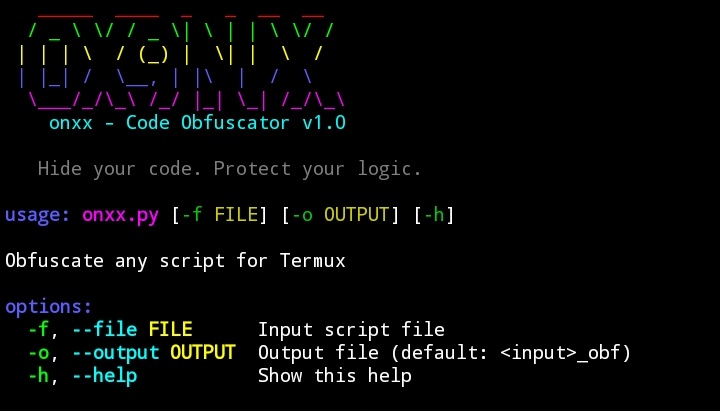
Hide your code. Protect your logic.
A smart and lightweight Python script designed for Termux (and other Linux environments) to obfuscate Python and Bash scripts instantly.
🚀 Auto-Feature: When you run this tool, it automatically opens our official GitHub repository (
https://github.com/onxx-x143) in your browser to keep you updated!
- 🔍 Auto-Detection: Automatically detects if the input file is Python or Bash.
- 🐍 Python Obfuscation: Uses
zlibcompression +base64encoding + randomized variable names, executed viaexec(). - 🐚 Bash Obfuscation: Encodes the entire script in
base64and pipes it tobash. - 📱 Termux First: Optimized for Termux on Android (sets
chmod 755automatically). - 🎨 Colored Banner: Beautiful ANSI-colored banner to give it a professional look.
- 🌐 GitHub Redirect: Automatically attempts to open the repo URL (
termux-open-url,xdg-open,am start) every time the tool runs. - ✓ Cross-Platform: Works on Termux (Android), Linux, and Windows (WSL/Git Bash).
Follow these steps to get the tool running on your Termux:
git clone https://github.com/onxx-x143/Codehide.git
cd Codehide
chmod +x main.sh
bash main.sh
If you don't want to use Git, just create a new file onxx.py and paste the full script code into it.
📋 Usage
Run the script using Python 3.
Basic Syntax
python onxx.py -f <your_script> [-o <output_file>]Command-Line Arguments
Argument Description -h, --help Show the help menu and exit. -f, --file (Required) Path to the input script you want to obfuscate. -o, --output Path to the output file. (Default: <input_name>_obf.)
🧪Examples
- Obfuscate a Python script
If you have a Python file named main.py:
python onxx.py -f main.pyOutput: The tool will generate main_obf.py in the same directory.
- Obfuscate a Bash script
If you have a shell script named setup.sh:
python onxx.py -f setup.sh -o secure_setup.shOutput: It creates secure_setup.sh with the obfuscated Bash payload.
- Just open the GitHub repo (without obfuscating)
Simply run the script without arguments:
python onxx.pyThis will display the banner, open the GitHub repo URL in your browser, and show the help menu.
🧠 How It Works
Python Obfuscation Logic
- Read your original source code.
- Compress it using zlib.
- Encodes the compressed bytes with base64.
- Generates a wrapper script with random variable names.
- The wrapper decodes and decompresses the payload and executes it using exec().
Example Wrapper:
``python import zlib,base64 xyzwqwer="eJxL..." # base64 payload poyuvbnm = zlib.decompress(base64.b64decode(xyzwqwer)) exec(poyuvbnm) `
Bash Obfuscation Logic
- Read your original Bash script.
- Encodes the entire text with base64.
- Wraps it in a Bash one-liner that decodes and runs it.
Example Wrapper:
#!/data/data/com.termux/files/usr/bin/bash
c2V0dXAgc2NyaXB0... |  base64 -d |  bash
📁 File Structure
` . ├── onxx.py # Main obfuscator script └── README.md # This documentation file ``
This tool provides obfuscation (hiding the source logic), not encryption. It is meant to deter casual snooping and make reverse engineering slightly harder. Do not rely on this for absolute security (e.g., storing passwords).
🤝 Contributing
Feel free to fork this repository and submit pull requests. If you find any bugs or have feature suggestions, please open an issue on the GitHub Issues page.
📄 License
This project is open-source. You are free to use, modify, and distribute it for personal or educational purposes. Maintained by: onxx-x143
📞 Connect
· GitHub: https://github.com/onxx-x143 · Repo URL: https://github.com/onxx-x143
Made with ❤️ for the Termux Community. EOF
``
- Copy the entire block shown above (from
bash to). - Paste it into Termux in the directory where your
onxx.pyfile is located, and press Enter. - A file named
README.md(entirely in English) will now be created in your folder. - To verify: type
cat README.md.
You can now upload this README.md to GitHub to fully present your report (project)! 🚀
by onxx-x143 🥷🏻