feat(mobile): app-icon lockup + email autofill on auth screens#4281
Open
voska wants to merge 1 commit into
Open
feat(mobile): app-icon lockup + email autofill on auth screens#4281voska wants to merge 1 commit into
voska wants to merge 1 commit into
Conversation


…fill

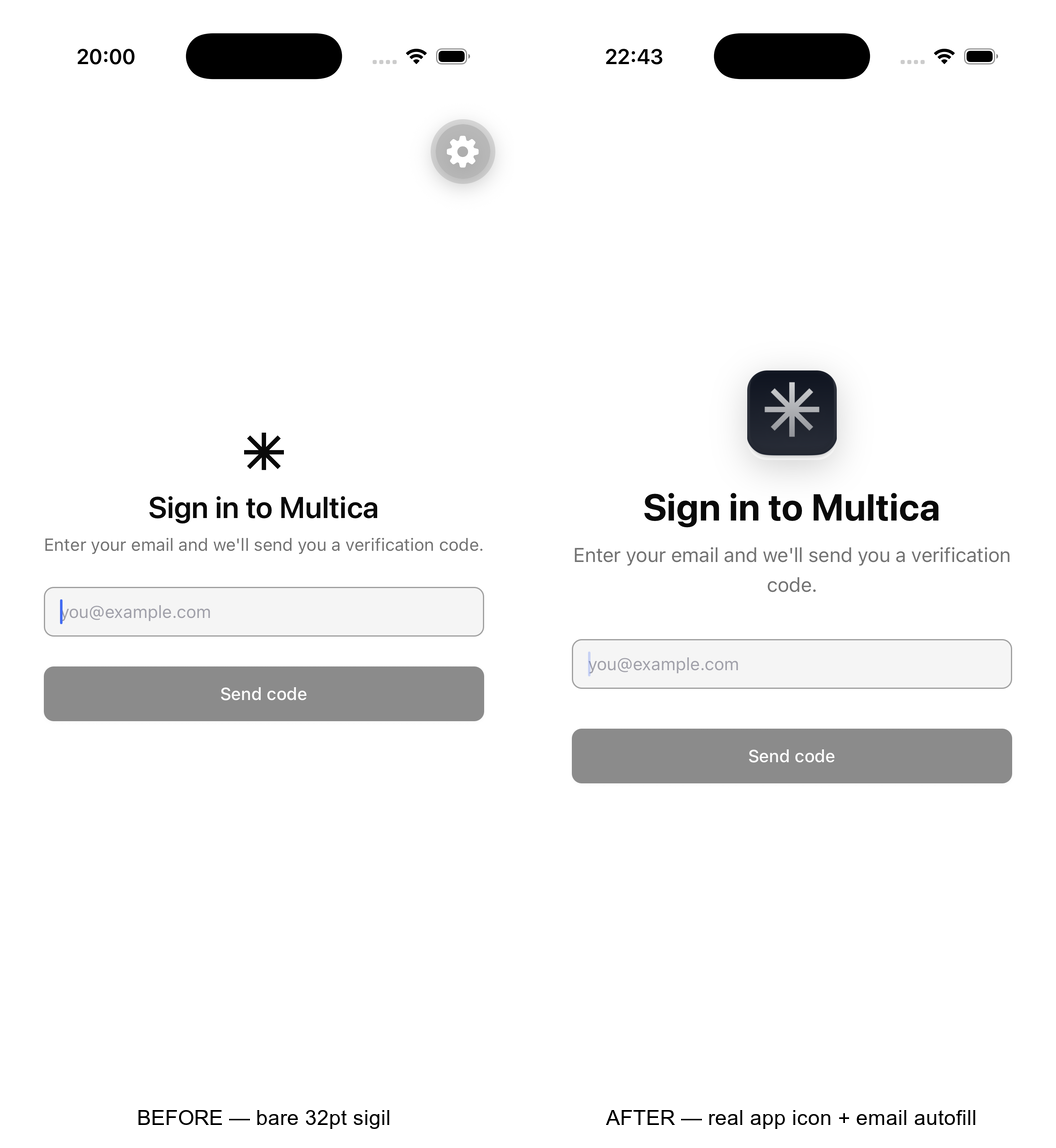
Login/verify now lead with the actual Multica app icon (assets/icon.png, the
same asset wired as `icon` in app.config.ts) rendered in a clipped squircle —
not a recreation — so the first impression shows the exact mark from the home
screen. Title bumped to 3xl bold, subtitle to base.

Also wire iOS email autofill on the login field: textContentType=emailAddress
(saved-email / Hide My Email suggestions) + autoCorrect=false. The OTP screen's
one-time-code autofill is already handled by input-otp-native.

Shared BrandMark component, no duplication; no new dependencies.

|
@voska is attempting to deploy a commit to the IndexLabs Team on Vercel. A member of the Team first needs to authorize it. |
This file contains hidden or bidirectional Unicode text that may be interpreted or compiled differently than what appears below. To review, open the file in an editor that reveals hidden Unicode characters.
Learn more about bidirectional Unicode characters
Sign up for free
to join this conversation on GitHub.
Already have an account?
Sign in to comment
1 participant

Add this suggestion to a batch that can be applied as a single commit.This suggestion is invalid because no changes were made to the code.Suggestions cannot be applied while the pull request is closed.Suggestions cannot be applied while viewing a subset of changes.Only one suggestion per line can be applied in a batch.Add this suggestion to a batch that can be applied as a single commit.Applying suggestions on deleted lines is not supported.You must change the existing code in this line in order to create a valid suggestion.Outdated suggestions cannot be applied.This suggestion has been applied or marked resolved.Suggestions cannot be applied from pending reviews.Suggestions cannot be applied on multi-line comments.Suggestions cannot be applied while the pull request is queued to merge.Suggestion cannot be applied right now. Please check back later.
What does this PR do?
Polishes the login / verify first-impression surfaces with the real product mark and a genuine iOS autofill fix — no invented assets.
assets/icon.png, the same asset wired asiconinapp.config.ts) in a clipped squircle — not a recreation. The source icon is an opaque white square with the squircle inset, so it's clipped + scaled to crop the white margin and read correctly on light and dark.textContentType="emailAddress"(saved-email / Hide My Email) +autoCorrect={false}. (The verify screen's one-time-code autofill was already handled byinput-otp-native.)Type of Change
Changes Made
components/brand/brand-mark.tsx(new) — renders the real app icon in a squircle frame.app/(auth)/login.tsx,app/(auth)/verify.tsx— useBrandMark, bump type; login gets the email autofill props.How to Test
Checklist
pnpm typecheckpasses; verified in the iOS SimulatorAI Disclosure
AI tool used: Claude Code. Used the existing app-icon asset (no recreated graphics) and wired the iOS email-autofill content type; verified in the Simulator.
Screenshots
Before (bare sigil) / after (real app icon + autofill):