Home
This Project covers how to use Spring Boot with Spring Kafka to Publish JSON/String message to a Kafka topic.
Firstly, you can easily create Maven project from Spring Initializr easliy. This site creates all the essential files needed.
- Project: Maven
- Language: Java
- Spring Boot: 2.5.0
- Java: 11
- JDK Version: Java 11
- Packaging: JAR
You can add Dependencies on this site.
- Spring Boot
- Apache Kafka
You can generate the project with above choices.
You will use Apache Kafka between applications. Apache Kafka is a framework implementation of a software bus using stream-processing. It is an open-source software platform developed by the Apache Software Foundation written in Scala and Java. The project aims to provide a unified, high-throughput, low-latency platform for handling real-time data feeds. Kafka can connect to external systems (for data import/export) via Kafka Connect and provides Kafka Streams, a Java stream processing library. Kafka uses a binary TCP-based protocol that is optimized for efficiency and relies on a "message set" abstraction that naturally groups messages together to reduce the overhead of the network roundtrip. This "leads to larger network packets, larger sequential disk operations, contiguous memory blocks [...] which allows Kafka to turn a bursty stream of random message writes into linear writes."
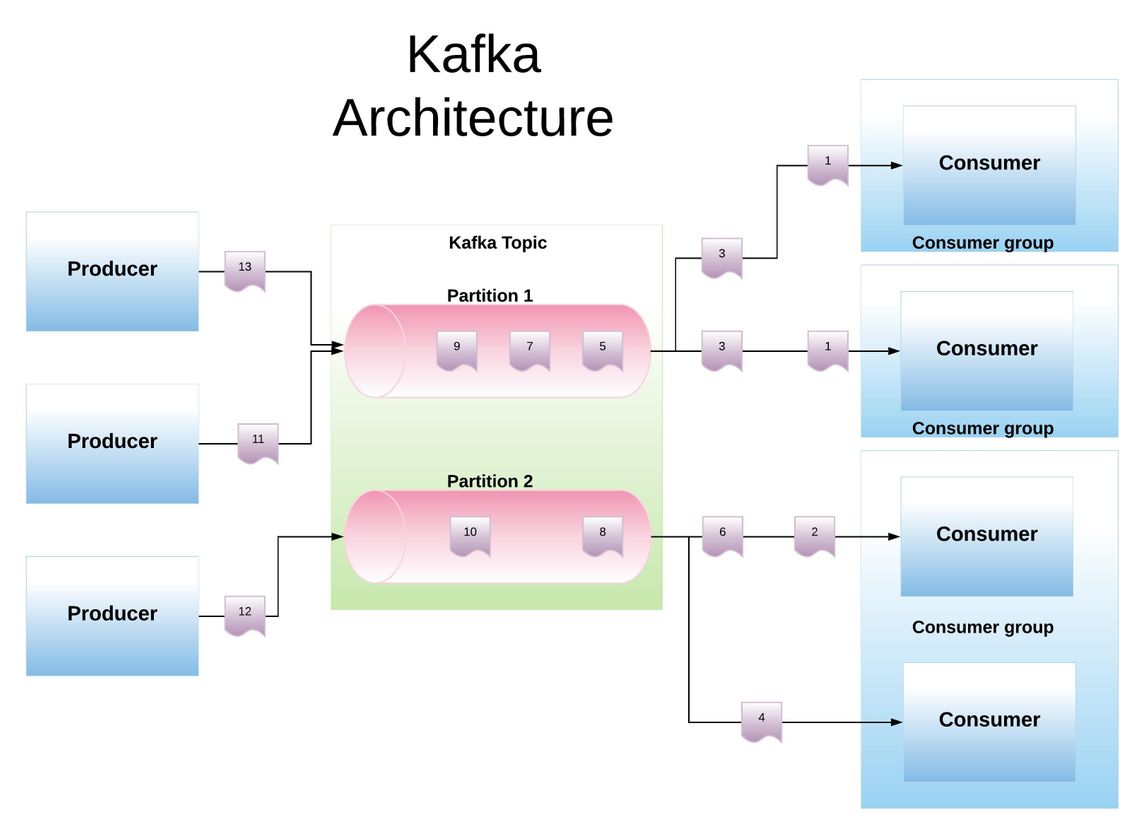
You can produce messages from Producer and you can consume messages from Consumer.
You can download from Kafka Download.
NOTE: If you want to use Kafka on Windows 10, you must configure from C:\kafka\config\server.properties and C:\kafka\config\zookeeper.properties files.
- In server file:
log.dirs=c:/kafka/kafka-logs - In zookeeper file:
dataDir=c:/kafka/zookeeper-data
You can pull this repo with Git and you can use file.
IntelliJ IDEA
- Open IntelliJ IDEA and select File > Open....
- Choose one of the Consumer and Producer project directories (not the category folder) and click OK.
- Select File > Project Structure... and ensure that the Project SDK and language level are set to use Java 11
- Run/debug configration > Build And Run > Choose Application
- double-click the run task under Tasks > application to run the app.
NOTE: You should use IntelliJ IDEA IDE for usability and latency. NOTE: You should review Build And Run Java Project With Maven
- Sensor1 X1,X1, BearingAngles1 according to (targetX,targetY)
- Sensor1 X2,X2, BearingAngles2 according to (targetX,targetY)
These coordinates will get value between (-x,+x)->(-500,+500), (-y,+y)->(-500,+500) randomly, because one of requirements equals to 1000x1000.
According to random coordinates this producer will calculate Bearing Angles.

If you want to test Consumer or Producer from terminal, you can use below commands.
_NOTE: _ You must be attention for BOOTSTRAP_SERVERS_CONFIG, "127.0.0.1:9092", PORT NUMBERS and TOPIC names.
bin/zookeeper-server-start.sh config/zookeeper.properties
bin/kafka-server-start.sh config/server.properties
bin/kafka-topics.sh --list --zookeeper localhost:2181
bin/kafka-topics.sh --create --zookeeper localhost:2181 --replication-factor 1 --partitions 1 --topic Location_json
bin/kafka-console-consumer.sh --bootstrap-server localhost:9092 --topic Location_json --from-beginning
bin/kafka-console-producer.sh --broker-list localhost:9092 --topic Location_json
NOTE: If you want to use Kafka on Windows 10, you must use like below command.
.\bin\windows\kafka-topics.bat instead of bin/kafka-topics.sh
- Location (String Message)
- Location_json (Sensor sensor)
{"name1":"1","positionX1":5,"positionY1":-1,"bearingAngle1":315,"name2":"2","positionX2":-5,"positionY2":1,"bearingAngle2":45}
Expectation Result: (-1,5)
The program will generate 3 points randomly in producer.
- Sensor 1 Location
- Sensor 2 Coordinates
- Target Coordinates
You can calculate bearing angle between these coordinates with this equation.

If you give 2 points coordinates and bearing angles according to (targetX,targetY), you can calculate (targetX,targetY) according to below equation. We know m = tan(90-ß). ß is Bearing Angle. As a result of equations, we have got two unknown and two equation. If you solve these equations, you can get targetX and targetY easily. The program will process this code.
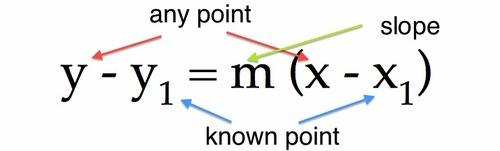
-
- org.apache.kafka.common.errors.SerializationException: Error deserializing key/value for partition. You must add default constractor in model/Sensor.java
- Apache Kafka Documentation
- Apache Kafka Repository
- Consumer Example
- Producer Example
- Apache Kafka Nedir?
- Bearing from one coordinate to another
- Apache Kafka Nedir?
- Simple Way to Implement Kafka with Java
