WebSocket Client / Console
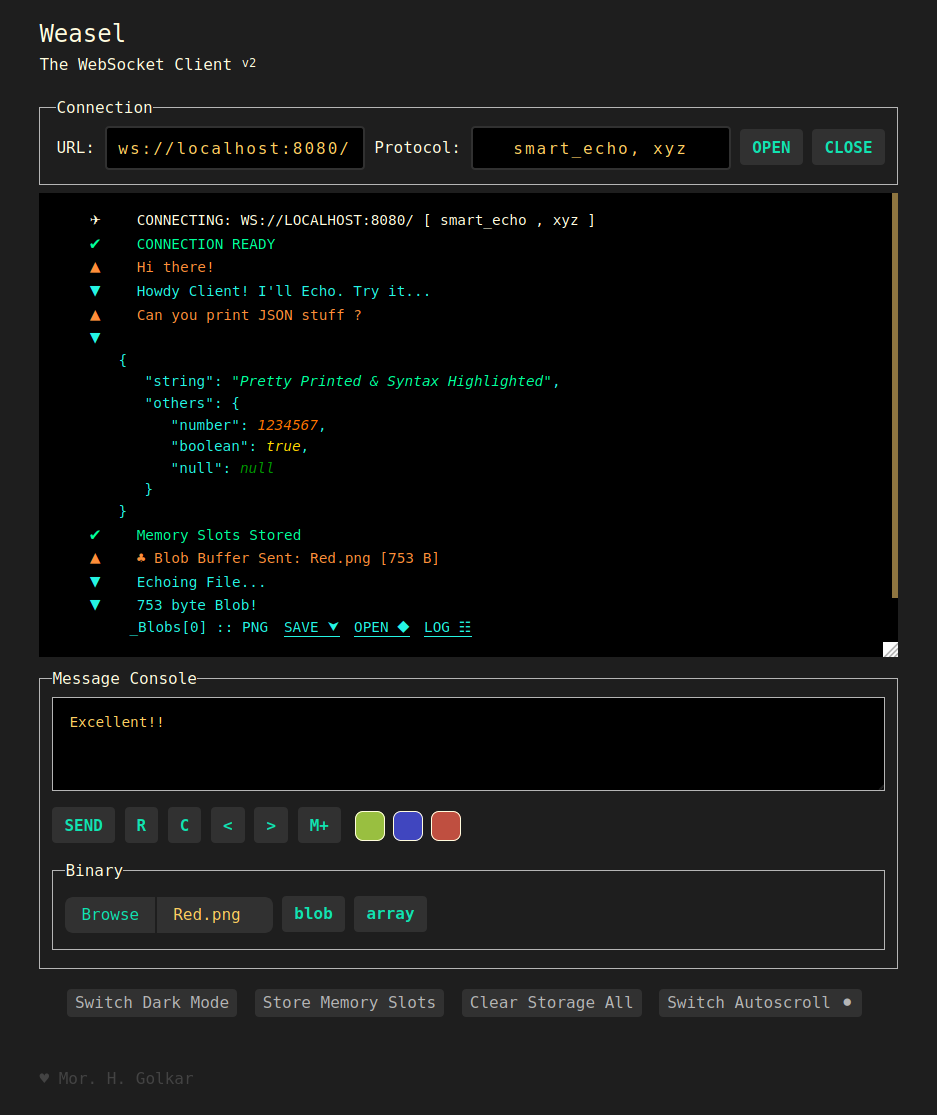
In-Browser Helper Console for WS Test and Developement
- Lightweight
- Dependency-free & Embeddable
- Works Offline (Local) in Modern Browsers
- Supports Binary and textual communication
- Syntax Highlighting (JSON)
- Supports Sub-Protocols
- Eye-Friendly Light / Dark Theme
- Colorized Memory Slots
- Message History
Check out its github page for a working demo
Online demo may only work with WSS (Secured WS;) To use with WS it's recommended to download the repo or use the Firefox Add-on.
Also available as:
Files in the
./srcdirectory consist the source of the Firefox add-on.
If you want to just use the tool,./weasel.htmlfile is the only file you need.
Ctrl + Enterto Send Text MessageCtrl + Alt + Bto Send Selected BinaryCtrl + MMemorizeCtrl + Alt + MRemember Next Memory Slot- Right Click on a Memory Slot to Remove it
- Double Click on a Memory Slot to Remember and Send it
Ctrl + Alt + ZMove Backward in the Sent Message HistoryCtrl + Alt + XMove Forward in the Sent Message HistoryCtrl + Alt + EnterOpen/Override SocketCtrl + Alt + SSwitch AutoscrollCtrl + <numeral key>Remembers Memory Slots by Indexe.g.
Ctrl+0recalls the first memory- Message console input captures
tabbutton press and inserts a "\t" character, when focused.We can use
Ctrl + Alt + Shift + Tabto jump out of it.