Seamless drawing into org-mode.


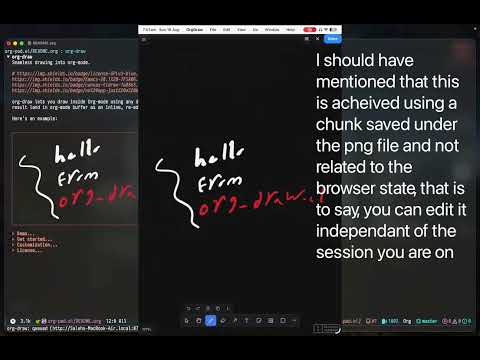
org-draw lets you draw inside Org-mode using any device with a web browser and have the result land in org-mode buffer as an inline, re-editable, portable figure.
(use-package org-draw
  :straight (org-draw :type git :host github :repo "larrasket/org-draw"
                      :files ("*.el" ("web" "web/canvas.html")))
:commands (org-draw org-draw-edit org-draw-setup))In ~/.doom.d/packages.el:
(package! org-draw
  :recipe (:host github :repo "larrasket/org-draw"
           :files ("*.el" ("web" "web/canvas.html"))))
In ~/.doom.d/config.el:
(use-package! org-draw
:commands (org-draw org-draw-edit org-draw-setup))(use-package org-draw
:ensure (:host github :repo "larrasket/org-draw"
:files ("*.el" ("web" "web/canvas.html")))
:commands (org-draw org-draw-edit org-draw-setup))M-x org-draw copies the
receiver URL to your clipboard. Open it on your machine or any device in your network.
If other people share your network and you don’t want them reaching the server, set
org-draw-require-pairing to non-nil. Then the page shows a code-entry screen and
org-draw-setup prints a single-use 6-digit code to type in (it expires after 5 wrong
attempts).
The drawing surface is tldraw. tldraw is loaded from a CDN, the device needs internet access the first time it opens the page (on an offline network the page shows a clear message instead of a blank screen).
org-draw-port(default8777)org-draw-directory(default"figures")org-draw-file-name-function(defaultorg-draw-default-file-name)org-draw-insert-attr-width(defaultnil) when set to an integer pixel width, org-draw inserts a#+ATTR_ORG: :width Nline above the link to a newly created figure, so it displays at a fixed width inline. Leave itnilto skip the ATTR line entirely.org-draw-require-pairing(defaultnil) whether a browser must enter a 6-digit code before it can draw. Off by default (any browser on your LAN can receive drawings). Set to non-nil on a shared network to require pairing.org-draw-token-file(default<user-emacs-directory>/org-draw-tokens) where paired-device tokens are stored (only used whenorg-draw-require-pairingis on)org-draw-figure-background(defaulttransparent) the background baked behind a figure’s ink in the exported PNG.transparentkeeps true ink colors and shows the figure against your org buffer’s background (so a white pen shows in a dark theme and a black pen in a light theme); or set it towhite,dark, or a CSS color string to bake that behind every figure.org-draw-web-canvas-filepath to the web canvas HTML served at/canvas(defaults toweb/canvas.htmlshipped with the package).org-draw-open-browser(defaultnil) when non-nil,org-drawandorg-draw-editopen the canvas in a browser on the machine running Emacs (viabrowse-url), so you can draw right there instead of on another device.org-draw-copy-url(defaultt) copy the receiver URL to the kill-ring onorg-draw-setupand on the firstorg-drawof a session. Set tonilto stop copying; the URL is still echoed and listed in the setup buffer.org-draw-web-open-function(defaultnil) a custom opener for the per-session/canvasURL; takes precedence overorg-draw-open-browser. Set it to a function (e.g. one that targets a specific browser); it is called with the URL.
No keys are bound by default. A suggested set for Org buffers:
(with-eval-after-load 'org
  (define-key org-mode-map (kbd "C-c d d") #'org-draw)
  (define-key org-mode-map (kbd "C-c d e") #'org-draw-edit)
  (define-key org-mode-map (kbd "C-c d s") #'org-draw-setup))
Or with use-package:
(use-package org-draw
  :bind (:map org-mode-map
         ("C-c d d" . org-draw)
         ("C-c d e" . org-draw-edit)
         ("C-c d s" . org-draw-setup)))