
A Simple Anti-Spoofing Discord bot for PokemonGo
EXAMPLE:
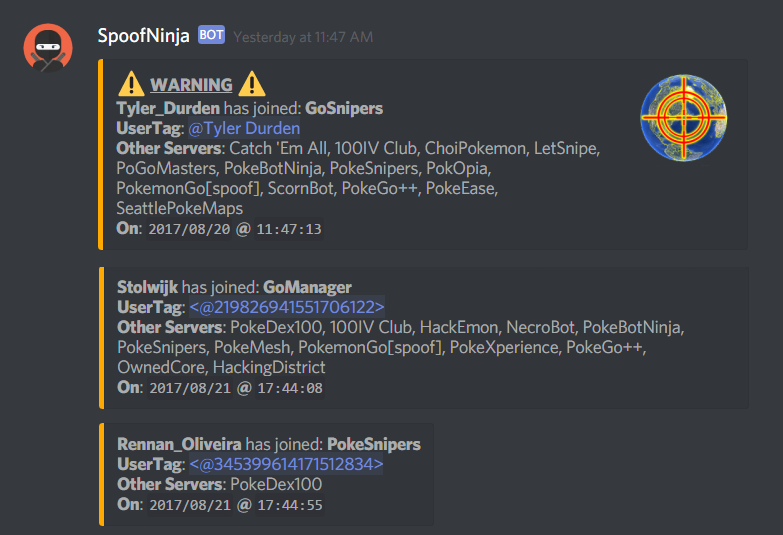
Here you can see it in action for SeattlePokeMaps
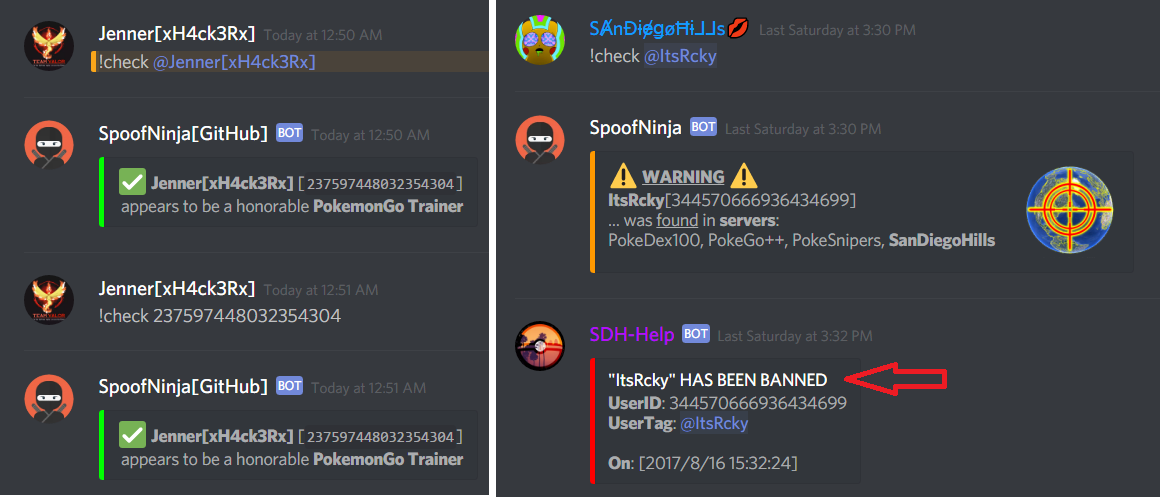
Alerts are triggered (with image) when
- someone joins your server while in a spoofing server, or
- someone joins a spoofing server while being in your server.
-I am NO a ["javascript","discord.js"] expert so I bet there are people out there that can make something better.
See it in action at my Discord server: https://discord.gg/2BGCV2K
-
Node.js (https://nodejs.org/en/download/
ver 8.4+) -
Discord.js (
npm install discord.js« should bever 12.2+) -
File-System (
npm install fs) -
A Discord dummy account
-
A dedicated Discord channel in your server (IE: #modlog/#mod-log/#spoofers/#noobs)
-
A Discord webhook url, for the channel above
-
User permisions to read messages, for the dummy account, to the channel above.
-
MAKE SURE YOU MEET THE REQUIREMENTS ABOVE
-
Change IP-address (using proxy or vpn) in order to:
- Log into your dummy account, and set your status/visibility to: INVISIBLE
- Join all the spoofing servers using the invite codes in
servers.json- most spoofing servers will have your IP banned already, they don't like mappers, but they like to scrape mapper's data - and if you try to join their server you will be wasting the new dummy account and will need another
- if any of the code say "INVITE EXPIRED" you might be banned already - your proxy or ipaddress didnt work
- EDITED PRIVATE MESSAGE ME HERE OR DISCORD FOR INVITE CODES, IT APPEARS SPOOFINGSERVER-OWNERS ARE DELETING THE INVITE CODES AND KICK/BANNING PEOPLE USING THEM.
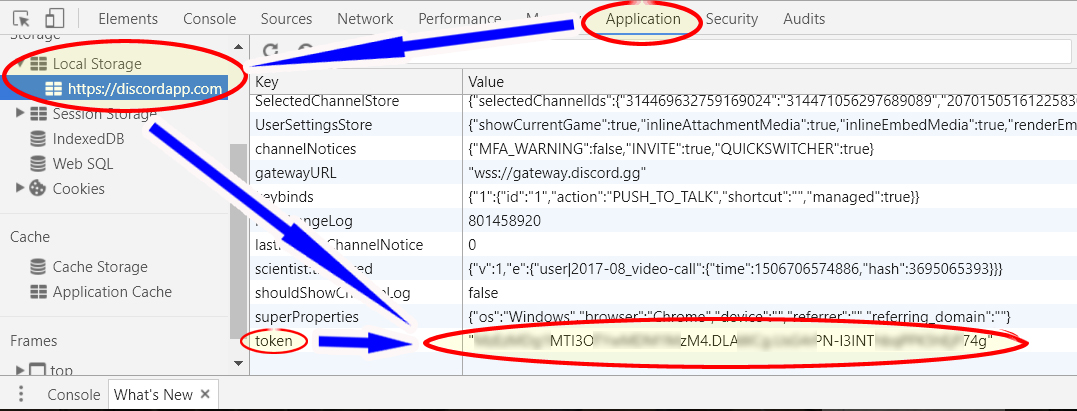
- GET the Dummy Account's Token, which will be required for the script to run (check users
onJoinandcommands)- This is not a UserBot nor DiscordApp; this is an actual discord [
dummy/alternate] account - specifically created and used by this script; DiscordApps, even when UserBot (akaApp Bot User) is enabled it DOES NOT work, as they have to independently invited by the admins at each spoofing server - in other words: impossible to use. - HOW TO GET TOKEN?:
- Using your browser or discord, while logged into the dummy account, do the shortcut key combination:
[
CTRL]+[SHIFT]+[I] - this should open Developer's Console Application and follow screenshot below in order to get the Token:
- This is not a UserBot nor DiscordApp; this is an actual discord [
-
Logout of the dummy account
-
Go back to your regular connection or IP-address
-
Modify
config.json -
LAUNCH THE SCRIPT
- Using command prompt or bash:
node spoofninja.js- The dummy account will not get banned as long as you DO NOT log into it using Discord app or browser
- If you close that window, the bot connection will be terminated
- Optional: you can install PM2 in order to have it running in the background (instructions below)
- Using command prompt or bash:
-
!check @mention/user_id- use a@mentionoruser_id, ie:!check @JennerPalacios!check 237597448032354304
-
!check server- to check entire server, for online users and invisible users- users that are currently logged in or active users
- it does not the entire list of users that are registered to the server.
-
!suggest- to suggest a feature, command, etc... ie:!suggest a way to order pizza
-
!feedback- to offer feedback, comments, concerns, etc... ie:feedback not bad you noOb, but you can do better
-
!help- to get the list of available commands
-
logAll: provides better feedback/logging - especially for new guys -
shareInfo: by default: OFF ("no"), to share only your webhook- in order to get update or notifications from me to your channel without having to join my server or sending me private messages, keep up to date with commands, features, or just chat.
PM2 allows you to run scripts in the background, you can access PM2 from anywhere (any folder, using cmd prompt),
but for the first launch, the command needs to be run from the folder where the files are located.
npm install pm2 -g
pm2 start spoofninja.js
pm2 log
-If you would like to modify the file and keep it up-to-date while it's running - instead of stopping the bot, and restarting it again...
» you can start/restart a process/script using "--watch"
pm2 start spoofninja.js --watch
pm2 list (display a list of running processes)
pm2 stop <NAME/ID> (stops the process)
pm2 kill (stops pm2)