Skip to content

Print the class when using Node's print_tree()/print_tree_pretty()#50346

Open
Calinou wants to merge 1 commit intogodotengine:masterfrom
Calinou:node-print-tree-print-class
Open

Print the class when using Node's print_tree()/print_tree_pretty()#50346
Calinou wants to merge 1 commit intogodotengine:masterfrom
Calinou:node-print-tree-print-class

Conversation

@Calinou
Copy link
Copy Markdown
Member

@Calinou Calinou commented Jul 10, 2021

The class name may not always be obvious, especially when nodes are renamed from their default names. _to_string() is called if overridden in the node's script. By default, the node type and instance ID are displayed.

This also adds rich formatting, including for _to_string() handlers if displayed within print_tree() or print_tree_pretty().

See godotengine/godot-proposals#2953 (comment).

Preview (outdated)

print_tree()

Before

.
ThisIsNode3D
ThisIsNode3D/OccluderInstance3D
ThisIsNode3D/MeshInstance3D2
ThisIsNode3D/SomeCSGBox
ThisIsNode3D/SomeCSGBox/CSGCylinder3D
ThisIsNode3D/MeshInstance3D
ThisIsNode3D/MeshInstance3D3
ThisIsNode3D/VoxelGI
ThisIsNode3D/OmniLight3D
ThisIsNode3D/Camera3D
ThisIsNode3D/Sprite2D
ThisIsNode3D/WorldEnvironment
ThisIsNode3D/DirectionalLight3D

After

Screenshot from the Visual Studio Code terminal.

image

print_tree_pretty()

Before

 ┖╴root
    ┖╴ThisIsNode3D
       ┠╴OccluderInstance3D
       ┠╴MeshInstance3D2
       ┠╴SomeCSGBox
       ┃  ┖╴CSGCylinder3D
       ┠╴MeshInstance3D
       ┠╴MeshInstance3D3
       ┠╴VoxelGI
       ┠╴OmniLight3D
       ┠╴Camera3D
       ┠╴Sprite2D
       ┠╴WorldEnvironment
       ┖╴DirectionalLight3D

After

Screenshot from the Visual Studio Code terminal.

image

@Calinou Calinou requested a review from a team as a code owner July 10, 2021 17:00
@Calinou Calinou added this to the 4.0 milestone Jul 10, 2021
@xix-xeaon
Copy link
Copy Markdown

Yeah it's noisy. It would probably work well with colors though. BTW, I think space before the colon is much cleaner; Name :Type. The colon denotes a type, so it should be next to the type - not the name. I write it like that in all languages I use. Most people probably disagree because they're used to the other way, but oh well.

@Calinou
Copy link
Copy Markdown
Member Author

Calinou commented Jul 11, 2021

It would probably work well with colors though.

Unfortunately, we can't use colors in the Output panel until #33541 is merged. That said, #33541 would require an ANSI conversion routine (or at least a BBCode tag stripping routine) for console output to remain readable.

BTW, I think space before the colon is much cleaner; Name :Type

I'd prefer to use something that looks like the recommended type hinting syntax in the GDScript style guide.

@kleonc
Copy link
Copy Markdown
Member

kleonc commented Sep 11, 2021

I use print_tree_pretty() to print parts of the editor's tree and in that case printing name: type often isn't really helpful since most nodes in the editor have no meaningful name and there are many nodes of the same type. And if I have a reference to some specific node then printing it like print(node) outputs the result of get_string() which is by default (for nodes) name:[type:instance_id] (and user can customize this by overriding _to_string() for custom nodes). So it would be nice to be able to make print_tree_pretty() (and print_tree(), I guess) print the nodes by using the result of to_string(). I'd say these methods are used mainly for debug purposes and hence allowing more verbose (and customizable) output would be good. Maybe an additional use_to_string = false flag?

@reduz
Copy link
Copy Markdown
Member

reduz commented Jul 30, 2022

Can this be made to use colors now?

@Calinou
Copy link
Copy Markdown
Member Author

Calinou commented Jul 30, 2022

Can this be made to use colors now?

This should be possible with print_rich() now 🙂

Edit: I modified this PR to use print_line_rich() (C++ version of print_rich()). See OP for updated screenshots.

@Calinou Calinou force-pushed the node-print-tree-print-class branch 2 times, most recently from 79a1115 to 8af1615 Compare July 30, 2022 19:37
@YuriSizov YuriSizov modified the milestones: 4.0, 4.1 Feb 9, 2023
@Calinou
Copy link
Copy Markdown
Member Author

Calinou commented Apr 16, 2023

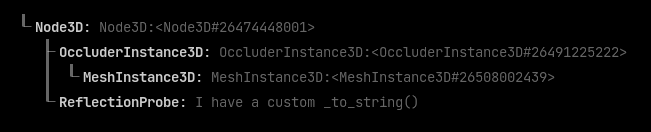
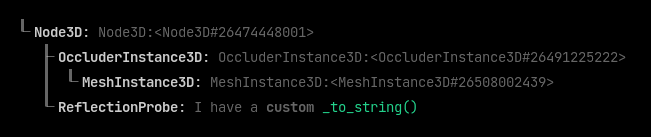
Rebased and tweaked to follow @kleonc's comment. The String() handler is now called to display the node type. By default, it displays the node type and instance ID unless _to_string() is overridden.

print_tree()

image

print_tree_pretty()

image

It's even possible to use BBCode in either of these if you feel like it. It will display correctly in the editor Output panel and console output:

image

@Calinou Calinou force-pushed the node-print-tree-print-class branch from 8af1615 to e6df395 Compare April 16, 2023 16:07
@Calinou Calinou requested a review from a team as a code owner April 16, 2023 16:07
@Calinou Calinou force-pushed the node-print-tree-print-class branch 2 times, most recently from 5777ac2 to abb8780 Compare April 16, 2023 17:58
@YuriSizov YuriSizov modified the milestones: 4.1, 4.2 Jun 14, 2023
@AThousandShips AThousandShips modified the milestones: 4.2, 4.3 Oct 26, 2023
@akien-mga akien-mga modified the milestones: 4.3, 4.x Jun 28, 2024
…etty()`

The class name may not always be obvious, especially when nodes are
renamed from their default names. `_to_string()` is called if overridden
in the node's script. By default, the node type and instance ID are displayed.

This also adds rich formatting, including for `_to_string()` handlers if displayed
within `print_tree()` or `print_tree_pretty()`.
@Calinou Calinou force-pushed the node-print-tree-print-class branch from abb8780 to 6fdd1b3 Compare March 3, 2025 19:29
Sign up for free to join this conversation on GitHub. Already have an account? Sign in to comment

Projects

None yet

Development

Successfully merging this pull request may close these issues.

8 participants