

Simple Scaffold is a file scaffolding tool. You define templates once, then generate files from them whenever you need — whether it's a single component or an entire app boilerplate.
Templates use Handlebars.js syntax, so you can inject data, loop over lists, use conditionals, and write custom helpers. It works as a CLI or as a Node.js library, and it doesn't care what kind of files you're generating.
Full documentation is available at chenasraf.github.io/simple-scaffold — including detailed guides on CLI usage, Node.js API, templates, configuration files, examples, and migration from v1/v2.
- Getting Started
- Configuration Files
- Templates
- Interactive Mode & Inputs
- Remote Templates
- CLI Reference
- Node.js API
- Built-in Helpers
- Contributing
npm install -D simple-scaffold
# or use directly with npx
npx simple-scaffoldRun init to create a config file and an example template:
npx simple-scaffold initThis creates scaffold.config.js and templates/default/{{name}}.md. Now generate files:
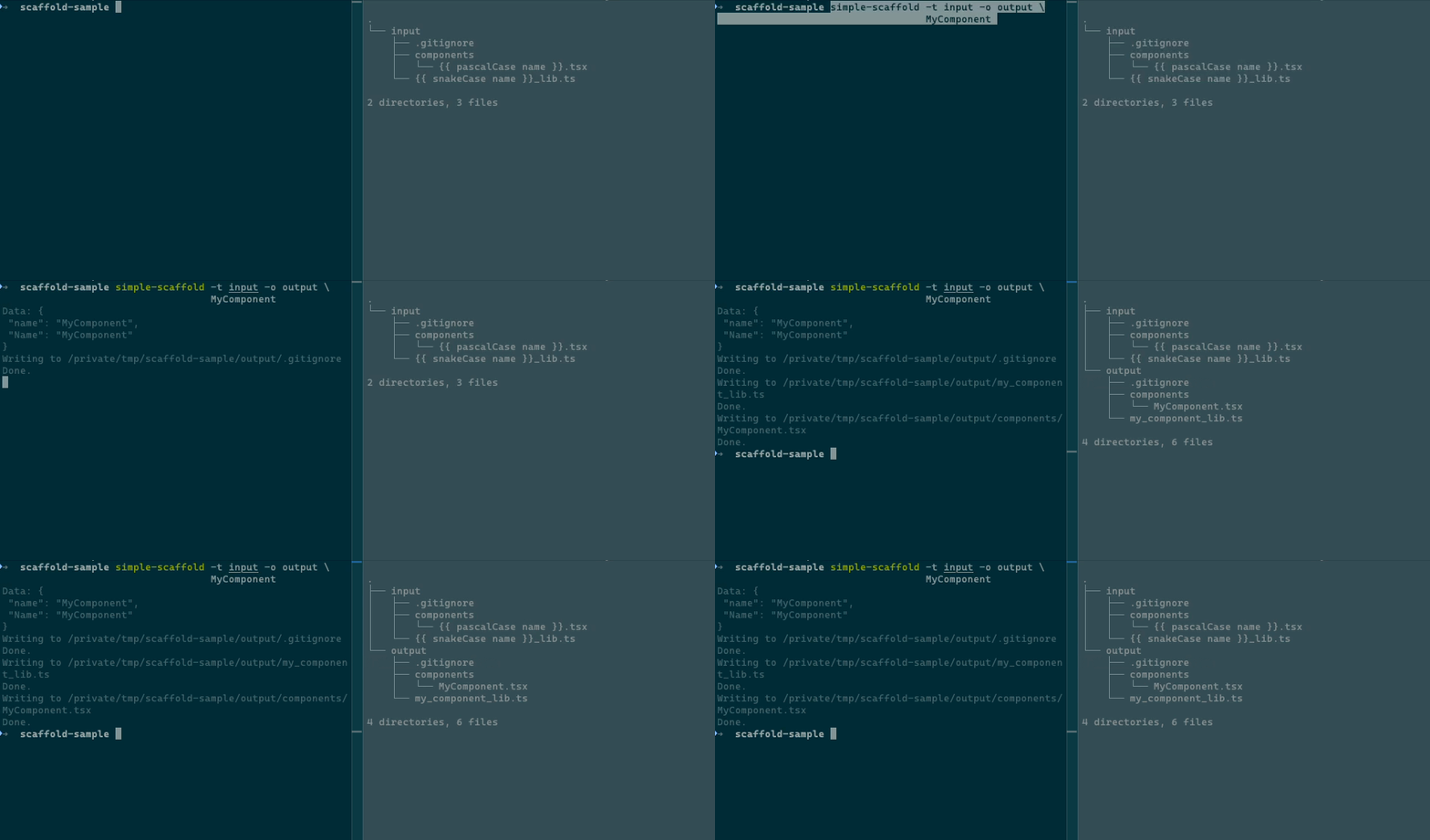
npx simple-scaffold MyProjectGenerate files from a template directory without a config file:
npx simple-scaffold -t templates/component -o src/components MyComponentConfig files let you define reusable scaffold definitions. Simple Scaffold auto-detects config
files in the current directory — no --config flag needed.
It searches for these files in order:
scaffold.config.{mjs,cjs,js,json}, scaffold.{mjs,cjs,js,json}, .scaffold.{mjs,cjs,js,json}
// scaffold.config.js
module.exports = {
  component: {
    templates: ["templates/component"],
    output: "src/components",
  },
  page: {
    templates: ["templates/page"],
    output: "src/pages",
    subdir: true,
  },
}
Then run:
npx simple-scaffold -k component MyComponent
npx simple-scaffold -k page Dashboard
Use the key default to skip the -k flag entirely.
npx simple-scaffold list
npx simple-scaffold list -c path/to/config.js
Templates are regular files in a directory. Both file names and file contents support Handlebars syntax. Simple Scaffold preserves the directory structure of your template folder.
templates/component/{{pascalCase name}}.tsx
// Created: {{ now 'yyyy-MM-dd' }}
import React from "react"

export default {{ pascalCase name }}: React.FC = (props) => {
  return (
    <div className="{{ camelCase name }}">{{ pascalCase name }} Component</div>
  )
}
Running npx simple-scaffold -t templates/component -o src/components PageWrapper produces
src/components/PageWrapper.tsx with all tokens replaced.
Template paths support globs and negation:
{
  templates: ["templates/component/**", "!templates/component/README.md"]
}Place a .scaffoldignore file in your template directory to exclude files. It works like
.gitignore — one pattern per line, # for comments.
When running in a terminal, Simple Scaffold prompts for any missing required values (name, output, template key). Config files can also define inputs — custom fields that are prompted interactively:
module.exports = {
  component: {
    templates: ["templates/component"],
    output: "src/components",
    inputs: {
      author: { type: "text", message: "Author name", required: true },
      license: { type: "select", message: "License", options: ["MIT", "Apache-2.0", "GPL-3.0"] },
      isPublic: { type: "confirm", message: "Public package?" },
      priority: { type: "number", message: "Priority level", default: 1 },
    },
  },
}
Input types: text (default), select, confirm, number
Pre-fill inputs from the command line to skip prompts:
npx simple-scaffold -k component -D author=John -D license=MIT MyComponentUse templates from any Git repository:
# GitHub shorthand
npx simple-scaffold -g username/repo -k component MyComponent

# Full Git URL (GitLab, Bitbucket, etc.)
npx simple-scaffold -g https://gitlab.com/user/repo.git -k component MyComponent
The repository is cloned to a temporary directory, used, and cleaned up automatically.
| Command | Description |
|---|---|
[name] |
Generate files from a template (default) |
init |
Create config file and example template |
list / ls |
List available template keys in a config |
| Flag | Short | Description | Default |
|---|---|---|---|
--config |
-c |
Path to config file or directory | auto-detect |
--git |
-g |
Git URL or GitHub shorthand | |
--key |
-k |
Template key from config | default |
--output |
-o |
Output directory | |
--templates |
-t |
Template file paths or globs | |
--data |
-d |
Custom JSON data | |
--append-data |
-D |
Key-value data (key=string, key:=raw) |
|
--subdir/--no-subdir |
-s/-S |
Create parent directory with input name | false |
--subdir-helper |
-H |
Helper to transform subdir name | |
--overwrite/--no-overwrite |
-w/-W |
Overwrite existing files | false |
--dry-run |
-dr |
Preview output without writing files | false |
--before-write |
-B |
Script to run before each file is written | |
--after-scaffold |
-A |
Shell command to run after scaffolding | |
--quiet |
-q |
Suppress output | |
--log-level |
-l |
Log level (none, debug, info, warn, error) |
info |
--version |
-v |
Show version | |
--help |
-h |
Show help |
import Scaffold from "simple-scaffold"

// Basic usage
const scaffold = new Scaffold({
  name: "MyComponent",
  templates: ["templates/component"],
  output: "src/components",
})
await scaffold.run()

// Load from config file
const scaffold = await Scaffold.fromConfig("scaffold.config.js", {
  key: "component",
  name: "MyComponent",
})
await scaffold.run()| Option | Type | Description |
|---|---|---|
name |
string |
Name for generated files (required) |
templates |
string[] |
Template paths or globs (required) |
output |
string | Function |
Output directory or per-file function |
data |
Record<string, unknown> |
Custom template data |
inputs |
Record<string, Input> |
Interactive input definitions |
helpers |
Record<string, Function> |
Custom Handlebars helpers |
subdir |
boolean |
Create parent directory with name |
subdirHelper |
string |
Helper for subdir name transformation |
overwrite |
boolean | Function |
Overwrite existing files |
dryRun |
boolean |
Preview without writing |
logLevel |
string |
Log verbosity |
beforeWrite |
Function |
Async hook before each file write |
afterScaffold |
Function | string |
Hook after all files are written |
All helpers work in both file names and file contents.
| Helper | Example Input | Output |
|---|---|---|
camelCase |
my name |
myName |
pascalCase |
my name |
MyName |
snakeCase |
my name |
my_name |
kebabCase |
my name |
my-name |
hyphenCase |
my name |
my-name |
startCase |
my name |
My Name |
upperCase |
my name |
MY NAME |
lowerCase |
My Name |
my name |
Add your own via config:
module.exports = {
  component: {
    templates: ["templates/component"],
    output: "src/components",
    helpers: {
      shout: (str) => str.toUpperCase() + "!!!",
    },
  },
}I am developing this package on my free time, so any support, whether code, issues, or just stars is very helpful to sustaining its life. If you are feeling incredibly generous and would like to donate just a small amount to help sustain this project, I would be very very thankful!

I welcome any issues or pull requests on GitHub. If you find a bug, or would like a new feature, don't hesitate to open an appropriate issue and I will do my best to reply promptly.
If you are a developer and want to contribute code, here are some starting tips:
- Fork this repository
- Run
pnpm install - Run
pnpm devto start file watch mode - Make any changes you would like
- Create tests for your changes
- Update the relevant documentation (readme, code comments, type comments)
- Create a PR on upstream
Some tips on getting around the code:
- Use
pnpm cmdto use the CLI feature of Simple Scaffold from within the root directory, enabling you to test different behaviors. Seepnpm cmd -hfor more information. - Use
pnpm testto run tests - Use
pnpm docs:buildto build the documentation once - Use
pnpm docs:watchto start docs in watch mode - Use
pnpm buildto build the output
