Multi-agent dispatch and coordination for agent-shell. Spawn parallel AI agents from Emacs, coordinate their work, and visualize progress with a live SVG task graph rendered in the agent-shell header.
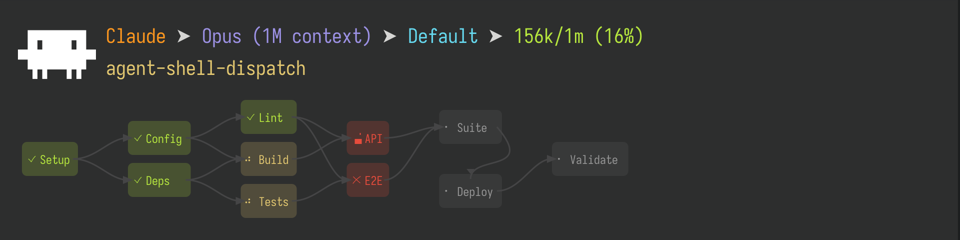
- Live SVG task graph -- dependency-aware DAG rendered in the header line with status colors and state indicators
- Explicit status model -- tasks are
not-started,working,done,error,permission, ordead, driven entirely by explicit reports (no process-state guessing) - Parallel agent spawning -- launch background agent-shell sessions that work independently
- Permission forwarding -- tool permission requests from background agents surface as interactive button dialogs in the dispatcher buffer (with ediff support for file diffs)
- Inter-agent messaging -- typed message protocol for progress reports, error reports, input requests, and completion notifications
- Dispatcher pattern -- the primary agent coordinates without implementing; subagents communicate via messages only, and the dispatcher owns all task graph updates
- Agent activity tracker -- a compact column on the left of the task graph shows each agent's busy/idle state in real-time, auto-wrapping to multiple columns when needed
- Session mode propagation -- when you change the dispatcher's session mode (e.g. plan → acceptEdits), the change is automatically forwarded to all subagent sessions so their permission behavior stays in sync
| State | Icon | Meaning |
|---|---|---|
not-started |
· |
No report yet -- task hasn't been picked up |
working |
spinner | Agent explicitly reported working |
done |
✓ |
Dispatcher marked task complete |
error |
✗ |
Dispatcher marked task as errored |
permission |
lock | Working task blocked on a permission or input request |
dead |
? |
Agent reported working but process died |
(use-package agent-shell-dispatch
  :after agent-shell
  :config
(agent-shell-dispatch-global-mode 1))Clone this repository and add it to your load-path:
(add-to-list 'load-path "/path/to/agent-shell-dispatch")
(require 'agent-shell-dispatch)
(agent-shell-dispatch-global-mode 1)agent-shell-dispatch-global-mode installs advice for header rendering, message queue draining, session mode propagation, and a theme change hook. All are no-ops in buffers without active dispatch state (all state is buffer-local), so it's safe to enable unconditionally. Without it, the task graph won't render and session mode changes won't propagate to subagents.
- Emacs 29+ (for SVG support and
text-property-search-forward) - agent-shell
This package is designed to be driven by an AI agent (e.g. Claude Code) via the included dispatch skill. The typical workflow:
- Symlink the skills into your agent's skills directory
- (Optional) Add a hook to redirect
TodoWriteto the task graph - Invoke
/dispatchwith a plan or description
Symlink the skills into your Claude Code skills directory (or equivalent for your agent):
# Required -- multi-agent dispatch coordinator
ln -s /path/to/agent-shell-dispatch/skills/dispatch ~/.claude/skills/dispatch

# Optional -- replaces TodoWrite with the SVG task graph for single-agent work
ln -s /path/to/agent-shell-dispatch/skills/tasks ~/.claude/skills/tasks
The tasks skill renders the same live SVG task graph used by dispatch, but for single-agent workflows. When installed, the agent uses it in place of TodoWrite to visually track progress through multi-step work.
After symlinking, restart or reload your agent so it picks up the new skills.
If you installed the tasks skill and want to ensure the agent never falls back to TodoWrite, add a PreToolUse hook to ~/.claude/settings.json:
{
  "hooks": {
    "PreToolUse": [
      {
        "matcher": "TodoWrite",
        "hooks": [
          {
            "type": "command",
            "command": "echo '{\"hookSpecificOutput\":{\"hookEventName\":\"PreToolUse\",\"permissionDecision\":\"deny\",\"permissionDecisionReason\":\"BLOCKED: Do not use TodoWrite. Use the tasks skill instead (invoke via Skill tool with skill=tasks). This is a hard override — no exceptions.\"}}'",
            "statusMessage": "Checking TodoWrite override..."
          }
        ]
      }
    ]
  }
}In your agent session, invoke:
/dispatch PLAN-OR-DESCRIPTION
The agent becomes the dispatcher: it spawns implementation agents, assigns tasks, and starts the live task graph in the header. Permission requests from background agents appear as interactive buttons in the dispatcher buffer.
- Dispatcher assigns tasks to subagents and marks them
working - Subagents work and communicate via messages only (they never touch the task graph)
- Subagent finishes and sends a
task-completedmessage with task ID and summary - Dispatcher receives notification, optionally sends a reviewer, then marks the task
done - On error, subagent sends an
errormessage; dispatcher markserror
The dispatcher owns all task graph transitions. Subagents cannot call agent-shell-dispatch-report or agent-shell-dispatch-start.
The package is split into three modules:
| Module | Purpose |
|---|---|
agent-shell-dispatch.el |
Agent lifecycle, status resolution, spawn/send/kill coordination |
agent-shell-dispatch-messages.el |
Typed messaging protocol between sub-agents and dispatcher (permissions, progress, errors, input requests, completions) |
agent-shell-dispatch-render.el |
Pure SVG task-graph renderer -- topology, geometry, theme-aware drawing, viewport panning |
All dispatch and render state is buffer-local, so multiple independent dispatch sessions can run concurrently in separate agent-shell buffers.
| Function | Description |
|---|---|
agent-shell-dispatch-spawn-agent |
Spawn a background agent in a directory with an initial message |
agent-shell-dispatch-send-to-agent |
Send a message to a specific agent buffer (clears input-pending state) |
agent-shell-dispatch-list-agents |
List active dispatch agent buffers with status |
agent-shell-dispatch-view-agent |
View recent output from one agent |
agent-shell-dispatch-view-all-agents |
View recent output from all agents |
agent-shell-dispatch-start |
Register tasks and start the SVG task graph |
agent-shell-dispatch-stop |
Stop rendering (state preserved for toggle) |
agent-shell-dispatch-report |
Report task status -- dispatcher only |
agent-shell-dispatch-agent-buffer |
Look up full buffer name from short agent name |
agent-shell-dispatch-interrupt-agent |
Interrupt a running agent |
agent-shell-dispatch-kill-agents |
Kill all dispatch agents and stop rendering |
agent-shell-dispatch-global-mode |
Global minor mode -- installs all advice (render, queue drain, mode propagation) |
agent-shell-dispatch-render-mode |
Buffer-local minor mode -- manages heartbeat timer |
See agent-shell for license terms.