
Porter is a Craft CMS plugin that is the missing toolbox for all things users.
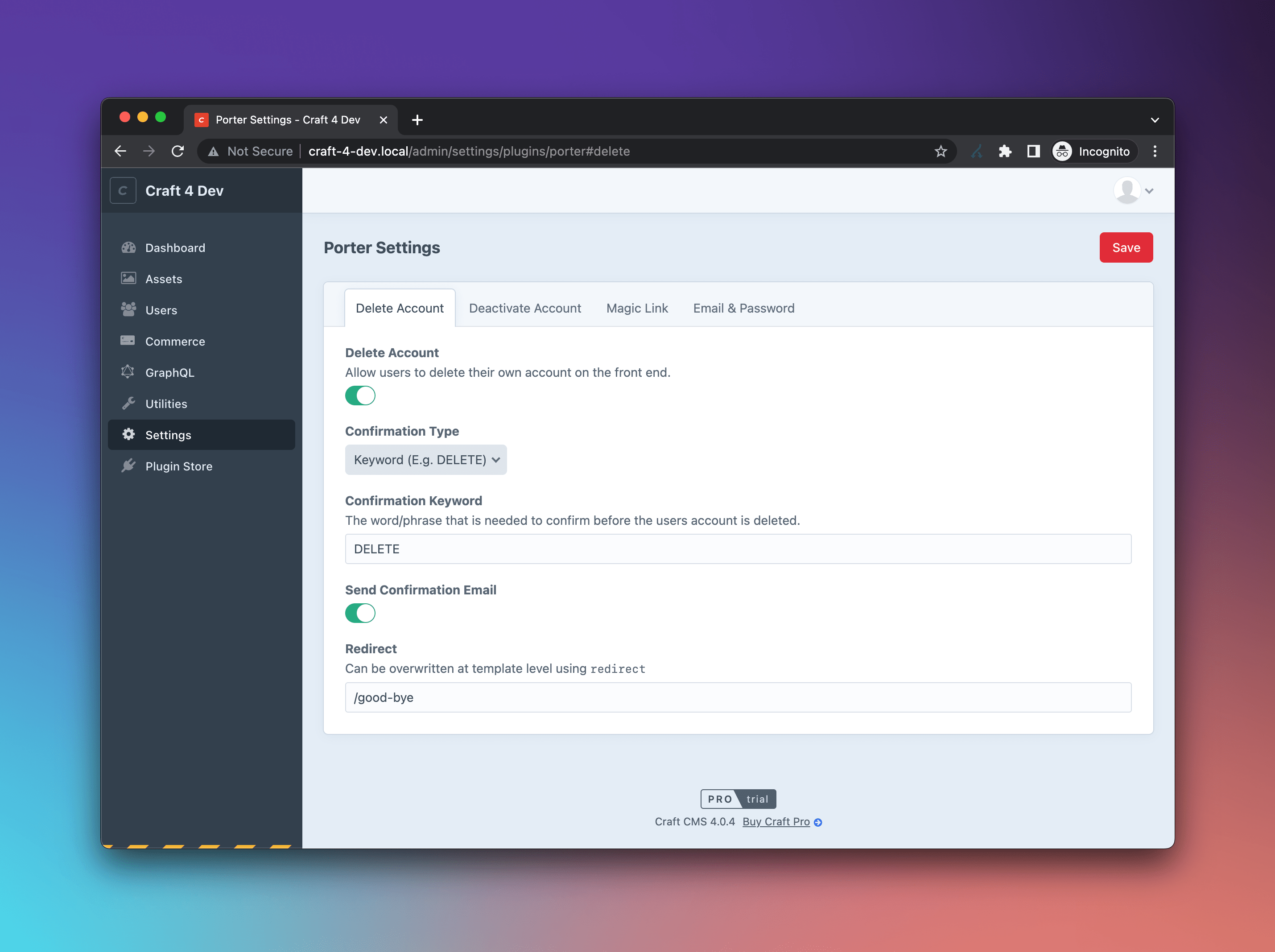
- Delete Account
- Front-end form for users to delete their own account
- Customisable confirmation keyword (e.g.
DELETE) or user field
- Deactivate Account
- Front-end form for users to deactivate their own account
- Inactive Account Cleanup
- Warn users by email after a configurable period of inactivity
- Auto-deactivate accounts that don't return after a longer threshold
- Admins and users with control panel access are always skipped
- Magic Link
- Sign in via a link emailed to the user's inbox
- Front end and/or control panel login, with configurable expiry
- Block Burner / Disposable Emails
- 22,000+ disposable email domains blocked
- Domain validity, syntax and MX record checks
- Password Policy
- Configurable min/max length
- Lower case, upper case, numeric, and symbol requirements
- Email Notifications
- Transactional emails for key account events (sign in, password change, suspension, deletion, etc.)
- Each email can be toggled on/off in the plugin settings
- All email content is editable under
Settings > System Messages
- Install with Composer:
composer require bymayo/porter - Enable the plugin under
Settings > Plugins - Configure under
Settings > Porter
You can also install via the Plugin Store by searching for Porter.
- Craft CMS 5.x
- PHP 8.2
- MySQL (no PostgreSQL support)
The Delete Account, Deactivate Account and Magic Link forms all work the same way: drop the Twig helper into a template, optionally pass a properties hash to override the defaults, or copy the full form template into your project for total control.
Let users delete their own account from the front end. Enable under Settings > Porter > Account and pick a confirmation keyword or user field.
{{ craft.porter.deleteAccountForm() }}Classes are prefixed with porter__ by default. Override any property:
{{ craft.porter.deleteAccountForm({
    buttonClass: 'bg-black text-white hover:bg-white hover:text-black',
    buttonText: 'Delete Account',
}) }}| Property | Default | Description |
|---|---|---|
redirect |
Plugin redirect setting | Where the user goes after deletion |
confirmationClass |
porter__confirmation |
Class for the confirmation field |
alertClass |
porter__alert |
Class for the success/error flash |
fieldClass |
porter__field |
Class for the input |
fieldContainerClass |
porter__field-container |
Class for the field wrapper |
fieldLabelClass |
porter__field-label |
Class for the input label |
buttonClass |
porter__button |
Class for the submit button |
buttonText |
Delete Account |
Submit button text |
For full markup control, copy bymayo/porter/src/templates/components/deleteAccountForm.twig into your project. From Twig you can read the defaults via craft.porter.deleteAccountFormProperties():
{% set formProperties = craft.porter.deleteAccountFormProperties() %}

{{ formProperties.buttonText }}
⚠️ Users need the "Delete Users" permission on themselves or their user group.
⚠️ Admins cannot delete their own account.
Let users deactivate their own account from the front end. Enable under Settings > Porter > Account.
{{ craft.porter.deactivateAccountForm() }}{{ craft.porter.deactivateAccountForm({
buttonClass: 'bg-black text-white hover:bg-white hover:text-black',
buttonText: 'Deactivate Account',
}) }}| Property | Default | Description |
|---|---|---|
redirect |
Plugin redirect setting | Where the user goes after deactivation |
alertClass |
porter__alert |
Class for the success/error flash |
buttonClass |
porter__button |
Class for the submit button |
buttonText |
Deactivate Account |
Submit button text |
For full markup control, copy bymayo/porter/src/templates/components/deactivateAccountForm.twig. Defaults are available via craft.porter.deactivateAccountFormProperties().
⚠️ Admins cannot deactivate their own account.
Sign in via a link emailed to the user's inbox. Enable under Settings > Porter > Login.
{{ craft.porter.magicLinkForm() }}{{ craft.porter.magicLinkForm({
buttonClass: 'bg-black text-white hover:bg-white hover:text-black',
buttonText: 'Send Magic Link',
}) }}| Property | Default | Description |
|---|---|---|
redirect |
Plugin redirect setting | Where the user goes after requesting a link |
alertClass |
porter__alert |
Class for the success/error flash |
fieldClass |
porter__field |
Class for the email input |
fieldContainerClass |
porter__field-container |
Class for the field wrapper |
fieldLabelClass |
porter__field-label |
Class for the input label |
buttonClass |
porter__button |
Class for the submit button |
buttonText |
Send Magic Link |
Submit button text |
For full markup control, copy bymayo/porter/src/templates/components/magicLinkForm.twig. Defaults are available via craft.porter.magicLinkFormProperties().
⚠️ Admins cannot use magic links.
Warn users who haven't signed in for a while, then deactivate them if they don't return. Enable under Settings > Porter > Account and set the reminder and deactivate thresholds.
Cleanup runs via a console command, so schedule it with cron:
0 3 * * * cd /path/to/site && php craft porter/users/cleanup-inactive
Each run sends warning emails to users that have crossed the reminder threshold (once per inactive period — signing back in resets it) and deactivates accounts past the deactivate threshold. Deactivated users get the Account Deactivated notification if it's enabled.
⚠️ Admins and any user with control panel access are always skipped.
⚠️ Users with nolastLoginDatearen't touched. Reactivating a previously deactivated user clears theirlastLoginDateautomatically, so they get a fresh inactivity clock from their next sign in.
Block disposable and invalid emails at sign up. Enable under Settings > Porter > Email & Password and add a free API key from https://verifier.meetchopra.com/.
Send transactional emails on key user events. Toggle each one under Settings > Porter > Notifications. Email content (heading, subject, body) is editable under Settings > System Messages.
| Sent when | |
|---|---|
| Welcome | A user's account is activated. |
| New Device Login Detected | A user signs in from a new IP or device. |
| Password Changed | A user's password is changed. |
| Email Address Changed | A user's email is changed (sent to the previous address). |
| Account Suspended | A user's account is suspended. |
| Account Restored | A suspended account is restored. |
| Account Deactivated | A user's account is deactivated. |
| Account Deleted | A user's account is deleted. |
| Failed Login Attempts | Consecutive failed sign in attempts cross the configured threshold. |
| Inactive Account Reminder | A user hasn't signed in for a while, before their account is deactivated. |
Porter ships with a clean, responsive HTML email layout. Craft expects the template inside your project's templates/ folder, so copy it across once:
-
Copy the file:
mkdir -p templates/_emails
cp vendor/bymayo/porter/src/templates/email/_layout.twig templates/_emails/layout.twig
-
In the control panel, go to
Settings → Emailand set HTML Email Template to_emails/layout. -
Send a test from
Settings → Email → Testto verify it renders.
Tweak the copy (logo, colours, footer) to match your brand — Porter won't overwrite it on plugin updates.
⚠️ New Device Login Detected — behind a proxy?If your site sits behind a reverse proxy, load balancer or CDN, set the following in
config/general.phpso Craft picks up the real client IP:'trustedHosts' => ['any'], // or restrict to your proxy's CIDR ranges 'secureHeaders' => ['X-Forwarded-For', 'X-Forwarded-Host', 'X-Forwarded-Proto'],
If you have any issues (Surely not!) then I'll aim to reply to these as soon as possible. If it's a site-breaking-oh-no-what-has-happened moment, then hit me up on the Craft CMS Discord - @bymayo