architecture
Version 2 of the vPiP architecture uses a message bus allow the various components making up the drawing system to communicate. This will allow remote monitoring of a machine, or having multiple machines draw the same drawing.
The message bus uses the MQTT protocol. A single application can take on multiple roles in the diagram below or the roles can be separated into individual applications, so long as the communication protocol set out below is followed.
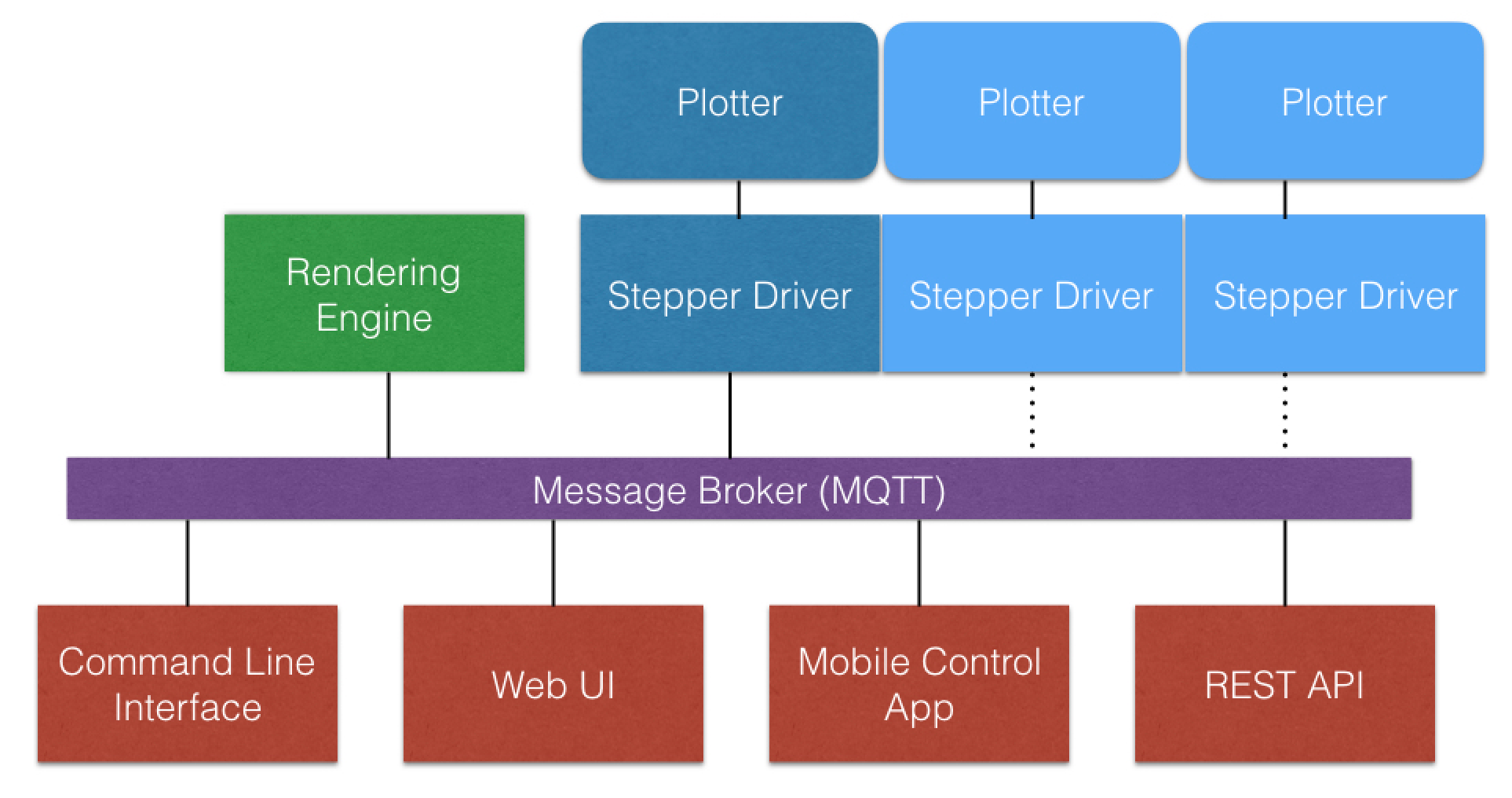
The Stepper Driver takes drawing instructions and creates instructions for the 2 stepper motors and pen servo.
The Render Engine accepts instructions to create drawing instructions for the Board Driver. A Render Engine could handle a particular type of job, such as render an SVG or could contain multiple render options.
The Web UI is the user interface to the system. It may choose to also act as a virtual plotter to be able to create images of what the plotter is drawing.
The Mobile Control App is a mobile app version of the Web UI
The command line interface (CLI) is an application thay can be incorporated into scripts or used on the command line to allow commands to be sent in to the system.
The REST API provides a programatic interface to allow the drawing system to be extended and incorporated into other applications.
The message bus is a pub/sub messaging system based on MQTT.
- Publishers publish messages to well defined topics
- Subscribers subscribe to topics for messages they are interested in
- Publishers do not need to know who has subscribed to a topic, so the publisher and subscribers are decoupled
The vPip system will use the following message categories. The final decision on how these categories map to topics has yet to be made, as some message brokers (iot services) have controlled topic spaces.
Topic: system
System messages are used to control the overall system. Whenever a component starts or stops (in a controlled way) they must send a message to this category. This topic can also be used to query the overall state of the system.
All components of the system must subscribe to this category
Component specific message are sent to a specific component of the system. Each component in the system needs to have a unique <deviceID> and depending on the functionality should use the applicable message types:
Topic: <deviceID>/plotter
Plotter messages are sent to devices that can render a drawing (either a physical drawing machine, or a component that generates an image). The messages sent to this message type are typically move to (x, y), draw to (x, y) or return home. By default a plotter component will listen to it's own plotter category, but can be configured via a plotterContol message to listen to a different plotter category belonging to a different component.
Topic: <deviceID>/plotterControl
Plotter control message allow control and configration of the plotting machine. They allow a machine to be paused during a drawing, allow for the remote control of the machine (stepper moves, steppers off, etc...), help with setup such as setting configuration parameters. A separate control message type allows for control messages not to be queued up behind drawing instructions to allow for responsive stop / pause commands. The plotter will also publish status information to all
Topic: <deviceID>/plotterStatus* Plotter status messages are published by physical drawing machines to allow monitoring components to be able to report on the state and current activity of the drawing machine
Topic: <deviceID>/renderer
Renderer messages are sent to render engines to configure and control the render engine. When a render engine job is started the category to send the drawing instructions can be specified.