Enhancing the North Creek High School Digital Experience
@NCHS is a new mobile application developed for students at North Creek High School. The primary goal of @NCHS is to provide a streamlined platform for students at North Creek High School that encompasses current and future utilization of technology on campus. Consistent with the Future Business Leaders of America (FBLA) Mobile Application Development competetive event guidelines, the app includes the following required features: a schedling feature allowing students to input their schedule, information about extracurricular activities, a lunch menu, the ability to email teachers and staff, a calendar that is updated with school information, integration of social media platforms, and a bug reporting system. In addition, @NCHS is equipped with numerous additional features such as an announcements and updates tab system, a class start alarm, an extracurricular tracker, and SMART goal setter. These along with the under-the-hood security features of @NCHS work to enhance the North Creek High School Digital Experience and give the app a professional feel.
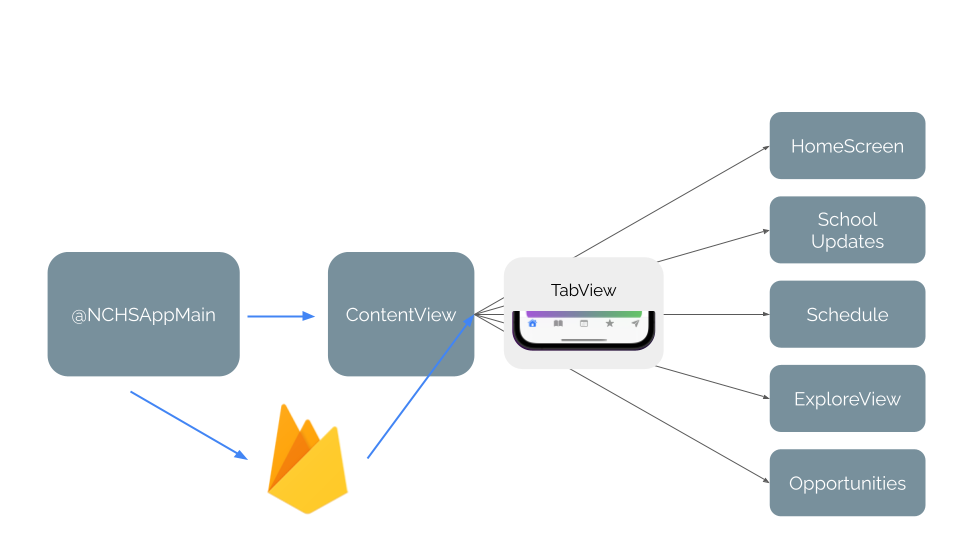
@NCHS was built with Apple's SwiftUI framework and the Firebase backend database structure and is deployable on iOS and iPadOS platforms. Our custom code paired with these frameworks enabled us to build a well-crafted app that is both aesthetically pleasing and functionally robust.
Prerequisite: macOS Monterey version 12.0 or newer
1. Install Xcode Developer Tools version 13.4.1 from the Mac App Store.
   https://apps.apple.com/us/app/xcode/id497799835?mt=12
2. Follow the provided instructions to download this repository as a ZIP file:
   https://sites.northwestern.edu/researchcomputing/resources/downloading-from-github/
3. Locate the @NCHS.xcodeprof file within the newly extracted @NCHS folder and open the file with XCode.
4. After clicking open, click on the uppermost blue @NCHS file and change the provisioning profile to your own developer account.
5. Build the project using the following instructions. Set the build scheme to @NCHS and ensure that the selected iOS simulator meets the prerequisites to view the application on iOS.
   https://developer.apple.com/documentation/xcode/building-and-running-an-app?changes=_8
6. To directly download @NCHS onto your iPhone, plug your own phone into the computer using a USB cable and select your phone as the iOS simulator.
7. You may have to approve the application on your iPhone and ensure that your iPhone meets the prerequisites to view the application on iOS.
Frontend: Swift
- Apple's powerful and intuitive programming language for iOS.
- Used for user interface and implementation.
Backend: Firebase Realtime Database
- Google's backend-as-a-service app development platform that provides hosted backend services such as a realtime database, cloud storage, authentication, crash reporting, machine learning, remote configuration, and hosting for static files.
- Used to enable Google account authentication and store user data.
- Provided utilities for tracking analytics and reporting and fixing application crashes.
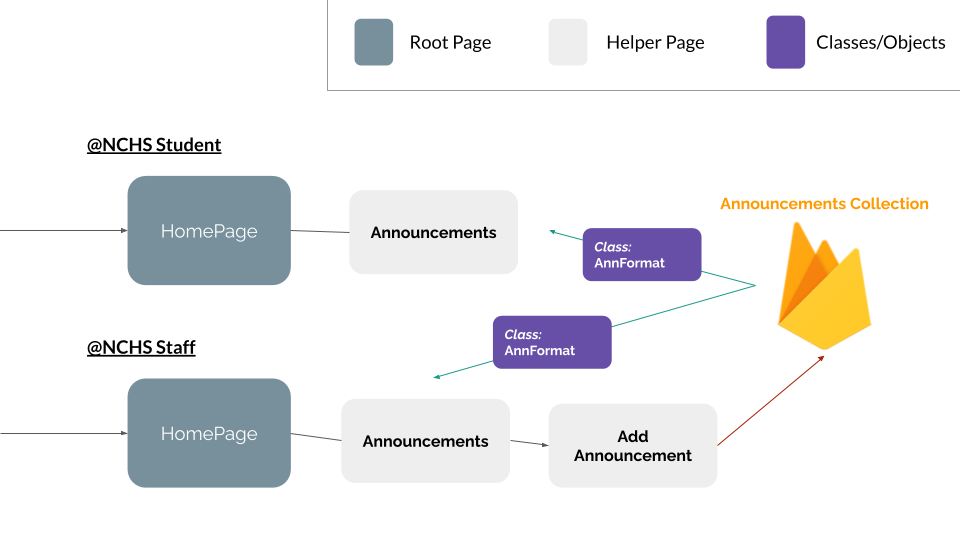
- Powers communication-based features of app including announcements and updates, and staff additional abilities in these areas.
Integrated Development Environment: Xcode; Compatible with AppCode, CodeRunner, Visual Studio Code
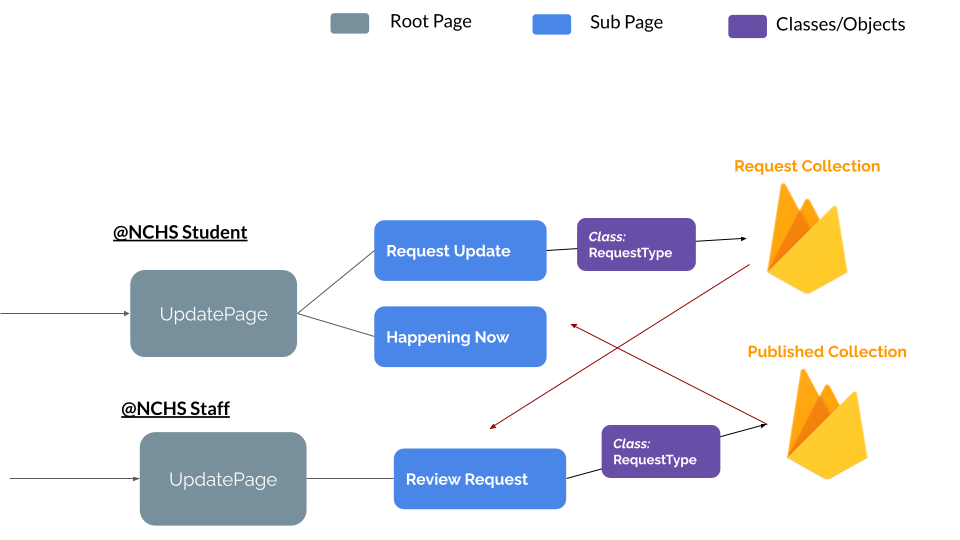
@NCHS supports both a student view and a staff view mode, each with its own separate application. The user interface for each mode differs, in that the staff application's user experience is revolved around the equipped administrative abilities. These administrative abilities can be observed by students in Announcements and Updates. For Announcements, only staff members may add an announcement. For Updates, student users will have the option of submitting an update request. This update request is recieved by the staff user who the student specifies in the Teacher input field. As a precautionary measure against student misuse of the Updates system, this staff user will have the ability to confirm or deny student updates before they are synchronized to the accounts of other student users. This ability is enabled through the backend database structure.
@NCHS strives to ensure the protection of each user through responsible practices of protecting the private nature of student personal information. All personal information collected by @NCHS is done exclusively with your consent, by means of registering an account with @NCHS. The personal information collected is only used by @NCHS developers to plan content more appropriately, based on user interests. @NCHS does not, under any circumstances, share user information with any third parties, including public organizations, corporations or individuals, except when applicable by law. @NCHS does not sell, communicate or divulge your information to any mailing lists. Users are entitled to know when their information is collected and be informed of the purpose of such collection. Users may, at any time, access, modify, or delete the personal information @NCHS has collected about them. This, as well as any pending questions or comments regarding this policy can be done by emailing [email protected] or [email protected].
- Used navigation links in a ScrollView with LinearGradient boxes containing various information.
Objective: To store the user account information and provide relevant links.
- Displays user name, email address, and profile picture.
- Provides links to the terms and conditions, help, and report a bug capability.
Objective: To welcome the user to the application.
- Personalized greeting to user and North Creek image.
- List of schoolwide announcements.
Objective: To efficiently inform the student of upcoming events and information.
- A list of student-submitted updates titled "Happening Now" and input field for student to submit their own updates.
- Buttons redirecting the user to various North Creek calendars including a daily calendar, yearlong calendar, and athletics calendar.
- Links to North Creek's Instagram and Facebook pages, both embedded within the app.
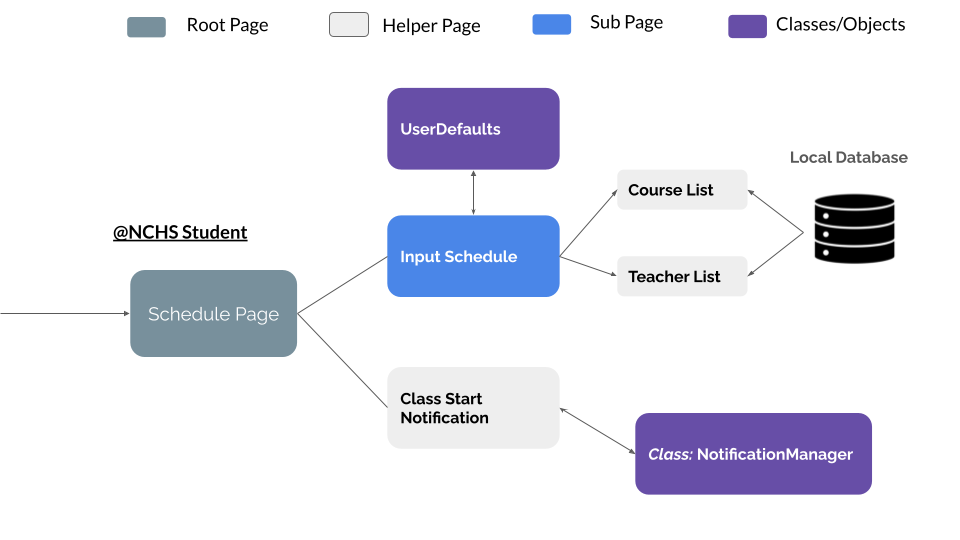
Objective: To allow a student to keep track of their academic schedule for the respective school year.
- Buttons allowing students to edit their schedule for either semester 1 or semester 2.
- Drag-down lists for course name, teacher, and room number for each of periods one through seven.
- Push notifications that, if enabled, remind students daily at 8:15 that class is starting.
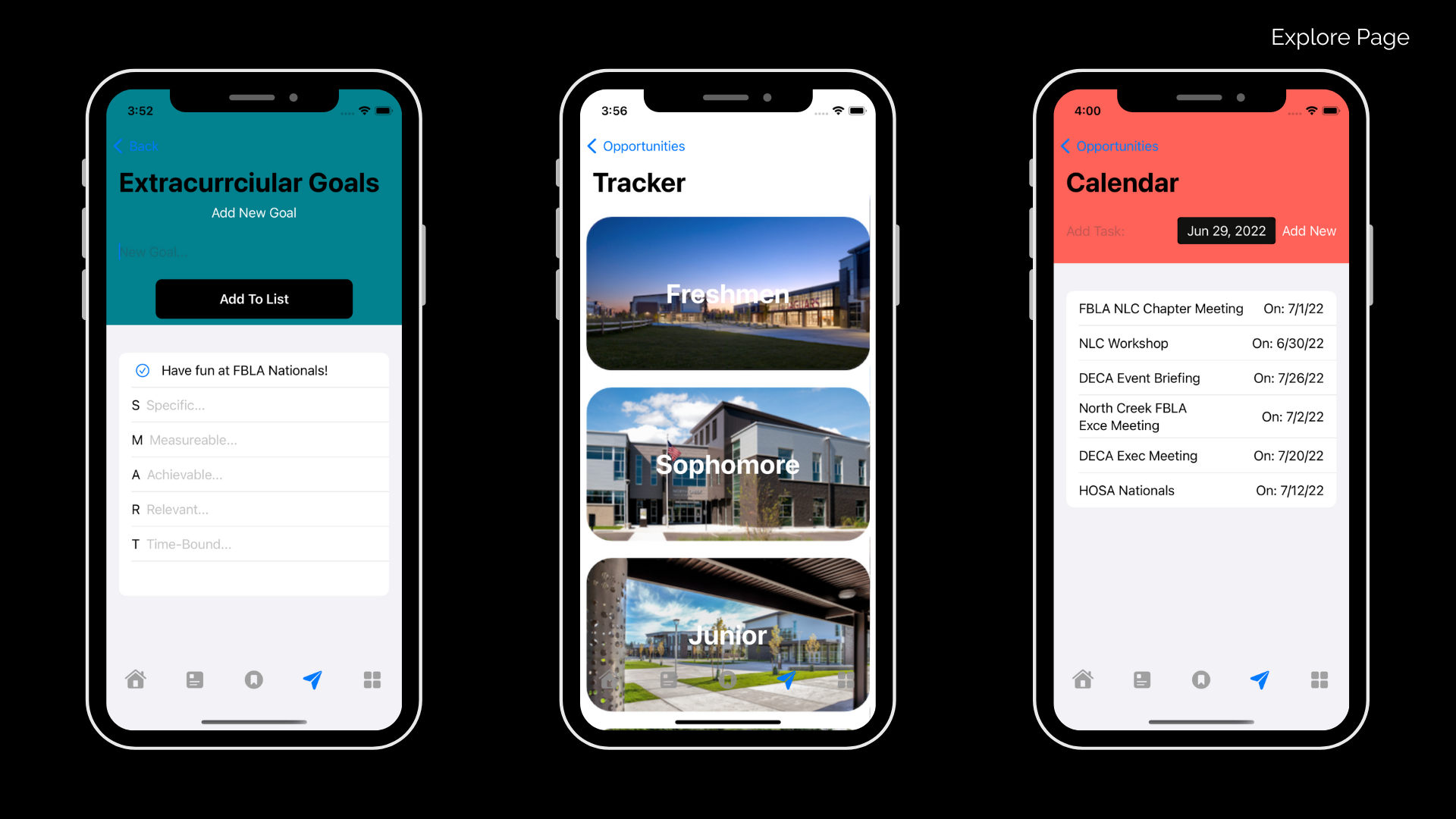
Objective: To inform students of extracurricular opportunities availible to them.
- Buttons page directing to separate subpages titled "Highlights", "Goals", "Calendar", "Tracker", and "Explore".
- Highlights page contains links to various articles discussing the importance of extracurricular activities.
- Goals page contains input fields for student goals, and confirm whether the goal is SMART. (Specific, Measurable, Accurate, Reasonable, Time-Sensitive)
- Calendar page allows students to mark important events in a calendarized view.
- Tracker page allows students to list extracurricular activities they are involved in.
- Explore page produces a list of clubs, competitions, and volunteering opportunities, with North Creek clubs starred.
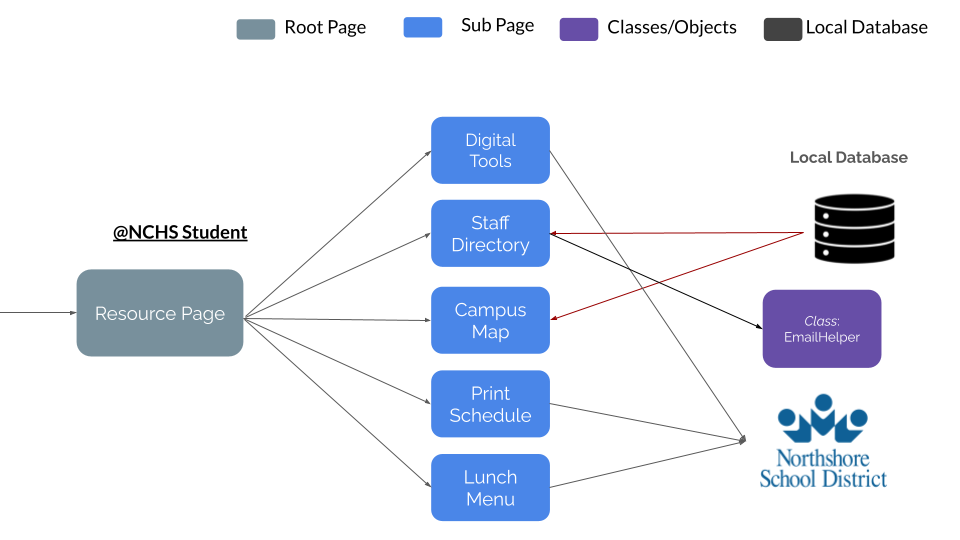
Objective: To equip students with school-provided resources that will aid them through their academic journey.
- Buttons directing to locations containing digital tools, a staff directory, campus map, print schedule, and a lunch menu.
- Digital tools includes links to Clever, Google Drive, Naviance, Remind, Schoology, and StudentVUE.
- Staff directory lists name of all North Creek faculty with the ability to email each individual listed.
Thanks to the 100 Days of SwiftUI - Hacking with Swift course by Paul Hudson for its free collection of videos, tutorials, tests, and more, allowing us to learn SwiftUI effectively!
Thanks to Mr. Ian Barnes, our dedicated and supportive chapter and regional FBLA advisor!
Thanks to Mr. Jeffery Stride, our knowledgable and passionate AP Computer Science A teacher!
Thanks to Ms. Nancy Nygren, our school technology specialist, for assistance in web scraping using the iCalendar Python module!
Thanks to the FBLA-PBL organization for conducting this enterprising and rewarding mobile application development opportunity!
- All unoriginal images used throughout the presentation of @NCHS are protected under Fair Use and Other Educational Uses.
- These images are credited at Sources for @NCHS Images.
- SF Symbols were integrated to generate TabView icons.
- Google logo used for application graphics in accordance with Google's trademark usage guidelines.
- All unacknowledged images contained in the presentation of @NCHS are our original works of authorship.
- Firebase platform is a registered trademark of Google LLC.
- iOS is a registered trademark of Cisco in the U.S. and other countries.
- iPadOS, Swift, SwiftUI, and Xcode are all registered trademarks of Apple Inc.
- Machine Learning applications using user data
- Android platform compatibility
- TestFlight installation