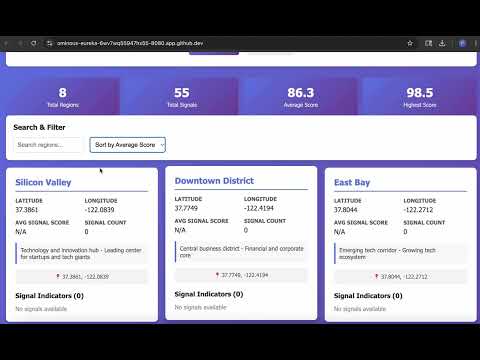
A Spring Boot REST API for geospatial analysis that stores and analyzes geographic regions with growth indicators.
- Region Management: Create, read, update, and delete geographic regions
- Signal Tracking: Store growth indicators (population growth, POI counts, etc.) for regions
- Hotspot Detection: Retrieve regions with the highest combined scores
- H2 In-Memory Database: Fast data storage for development and testing
- Comprehensive Error Handling: Proper HTTP status codes and JSON responses
- Java 17
- Spring Boot 3.2.3
- Spring Web
- Spring Data JPA
- H2 Database
- Lombok
- Maven
src/main/java/com/geospatial/
├── controller/          # REST controllers
│   ├── RegionController.java
│   ├── SignalController.java
│   └── HotspotController.java
├── service/            # Business logic
│   ├── RegionService.java
│   └── SignalService.java
├── repository/         # Data access layer
│   ├── RegionRepository.java
│   └── SignalRepository.java
├── entity/            # JPA entities
│   ├── Region.java
│   └── Signal.java
├── dto/              # Data transfer objects
│   ├── RegionRequest.java
│   ├── RegionResponse.java
│   ├── SignalRequest.java
│   ├── SignalResponse.java
│   ├── HotspotResponse.java
│   └── ApiResponse.java
├── exception/        # Exception handling
│   ├── ResourceNotFoundException.java
│   ├── DuplicateResourceException.java
│   └── GlobalExceptionHandler.java
└── GeospatialAnalysisApplication.java
- Java 17 or higher
- Maven 3.6+
# Navigate to project directory
cd SpringBootRestAPI

# Build the project
./mvnw clean install

# Run the application
./mvnw spring-boot:run
The application will start on http://localhost:8080
POST /api/regions
Content-Type: application/json

{
  "name": "Downtown District",
  "latitude": 37.7749,
  "longitude": -122.4194,
  "description": "Central business district"
}GET /api/regionsGET /api/regions/{id}PUT /api/regions/{id}
Content-Type: application/json
{
"name": "Downtown District",
"latitude": 37.7749,
"longitude": -122.4194,
"description": "Updated description"
}DELETE /api/regions/{id}POST /api/signals
Content-Type: application/json
{
"regionId": 1,
"indicatorType": "POPULATION_GROWTH",
"score": 85.5,
"description": "Annual population growth rate"
}GET /api/signalsGET /api/signals?regionId=1GET /api/signals/{id}PUT /api/signals/{id}
Content-Type: application/json
{
"regionId": 1,
"indicatorType": "POPULATION_GROWTH",
"score": 90.0,
"description": "Updated growth rate"
}DELETE /api/signals/{id}GET /api/hotspots?limit=10Returns regions sorted by total score (sum of all signals) in descending order.
# 1. Create regions
curl -X POST http://localhost:8080/api/regions \
  -H "Content-Type: application/json" \
  -d '{
    "name": "Silicon Valley",
    "latitude": 37.3861,
    "longitude": -122.0839,
    "description": "Tech hub"
  }'

# 2. Add signals to the region
curl -X POST http://localhost:8080/api/signals \
  -H "Content-Type: application/json" \
  -d '{
    "regionId": 1,
    "indicatorType": "TECH_INVESTMENT",
    "score": 95.0,
    "description": "High tech investment activity"
  }'

curl -X POST http://localhost:8080/api/signals \
  -H "Content-Type: application/json" \
  -d '{
    "regionId": 1,
    "indicatorType": "POPULATION_GROWTH",
    "score": 78.5,
    "description": "Strong population growth"
  }'

# 3. Get top hotspots
curl http://localhost:8080/api/hotspots?limit=5All API responses follow this format:
{
  "success": true,
  "message": "Operation successful",
  "data": { ... }
}{
"success": false,
"message": "Region not found with ID: 999",
"data": null
}200 OK- Successful GET, PUT, DELETE201 Created- Successful POST400 Bad Request- Validation errors404 Not Found- Resource not found409 Conflict- Duplicate resource500 Internal Server Error- Server error
Access the H2 database console at: http://localhost:8080/h2-console
- JDBC URL:
jdbc:h2:mem:geospatialdb - Username:
sa - Password: (leave empty)
POPULATION_GROWTH- Population growth ratePOI_COUNT- Points of interest countTECH_INVESTMENT- Technology investment levelBUSINESS_ACTIVITY- Business development activityINFRASTRUCTURE_SCORE- Infrastructure qualityEMPLOYMENT_RATE- Employment growth rate
This project is open source and available under the MIT License.