DNSChain (formerly DNSNMC) makes it possible to be certain that you're communicating with who you want to communicate with, and connecting to the sites that you want to connect to, without anyone secretly listening in on your conversations in between.
- What is it?
- How do I use it?
- How do I run my own DNSChain server?
- Community
- Contributing
- Release History
- License
In spite of their names, SSL/TLS and HTTPS are not secure.
DNSChain fixes this. What is DNSChain?
- It's a DNS server that supports old-school DNS, and blockchain-based DNS (Namecoin currently), giving you access to
*.bitwebsites. - It creates the .dns meta-TLD, giving HTTP clients secure access to blockchain data.
- It's an HTTP server (and in the future, an HTTPS server)
- It lets you communicate directly with information in blockchains (read, and maybe even write!) from JavaScript apps!
- At its core, it lets you connect to websites, chat with your friends, and be safe from eavesdroppers and Big Brother-type entities. It gives you the gift of authentication.
It's also only about 600 lines of easy to understand CoffeeScript! This means that even mere mortals can look at the code, and verify for themselves that it is safe to run on their systems.
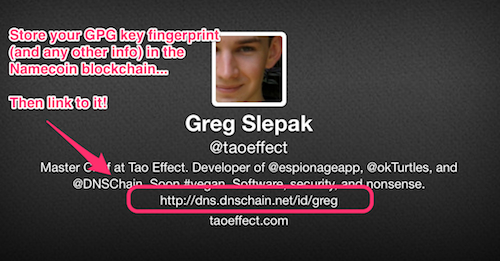
Well, simple to share, a little more difficult to register it (at the moment only, give it time ^_^):
- Use
namecoindto register your identity in theid/namespace. - Use a DNSChain server that exposes its
.dnsmeta-TLD through the traditional DNS, as shown in the screenshot.
It's always best to use your own server, of course. Note: headers containing a crypographic signature will be sent soon!
SSL certificates today do not provide the security that they claim to provide. DNSChain replaces Certificate Authorities by providing a means for distributing public keys in a way that is secure from MITM attacks.
.dns is a meta-TLD because unlike traditional TLDs, it is not meant to globally resolve to a specific IP. Rather, it is meant to resolve to a DNSChain server that you personally own and run.
It bears emphasizing that you cannot register a meta-TLD because you already own them!
When a DNSChain server sees a request to a .dns domain, it handles the request itself, looking it up in a blockchain stored on that same server. At the moment, DNSChain uses the Namecoin blockchain, but it can easily be configured to use any blockchain.
- More info: Introducing the dotDNS metaTLD
No special software is required, just set your computer's DNS settings to use one of the public DNSChain servers (more secure to run your own though).
Then try the following:
- Visit http://okturtles.bit
- "What's the domain info for
okturtles.bit?" http://namecoin.dns/d/okturtles - "Who is Greg and what is his GPG info?" http://namecoin.dns/id/greg
Don't want to change your DNS settings?
As a convenience, the first DNSChain server's .dns meta-TLD can be accessed over the old-DNS by way of dns.dnschain.net, like so:
- "Who is Greg?" http://dns.dnschain.net/id/greg
This means you can immediately begin writing JavaScript apps that query the blockchain. :)
DNSChain is meant to be run by individuals!
Yes, you can use a public DNSChain server, but it's far better to use your own because it gives you more privacy, makes you more resistant to censorship, and provides you with a stronger guarantee that the responses you get haven't been tampered with by a malicious server.
Those who do not own their own server or VPS can use their friend's (as long as they trust that person). DNSChain servers will sign all of their responses, thus protecting your from MITM attacks. (NOTE: signing is not yet implemented, but will be soon)
You can, if you must, use a public DNSChain server. Simply set your computer's DNS settings to one of these. Note that some of the servers must be used with dnscrypt-proxy.
| IP or DNSCrypt provider | DNSCrypt Info | Logs | Location | Owner | Notes |
|---|---|---|---|---|---|
| 192.184.93.146 (aka d/okturtles) | N/A | No | Atlanta, GA | id/greg | |
| 54.85.5.167 (aka name.thwg.org) | N/A | No | USA | id/wozz | |
| 2.dnscrypt-cert.okturtles.com | Required Info | No | Atlanta, GA | id/greg | |
| 2.dnscrypt-cert.soltysiak.com | Required Info | No | Poznan, Poland | @maciejsoltysiak | IPv6 available |
Tell us about yours by opening an issue (or any other means) and we'll list it here!
We'll post the public keys for these servers here as well once signed DNS & HTTP responses are implemented. Note that DNSChain + DNSCrypt servers already guarantee the authenticity of DNS responses.
.bit domains and public identities are currently stored in the Namecoin P2P network. It's very similar to the Bitcoin network.
All of this must currently be done using namecoind, a daemon that DNSChain requires running in the background to access the Namecoin network.
See the Namecoin wiki for more info:
Get yourself a Linux server (they come as cheap as $2/month), and then make sure you have the following software installed:
nodejsandnpm- We recommend using a package manager to install them.- coffee-script (version 1.7.1+) - install via
npm install -g coffee-script grunt-cli- install vianpm install -g grunt-cli, provides thegruntcommand.namecoind- instructions
- Install DNSChain using:
npm install -g dnschain(you may need to putsudoin front of that). - Run
namecoindin the background. You can usesystemdand create anamecoin.servicefile for it based off of dnschain.service. - If an update is released, update your copy using
npm update -g dnschain.
Test DNSChain by simply running dnschain from the command line (developers see here). Have a look at the configuration section below, and when you're ready, run it in the background as a daemon. As a convenience, DNSChain comes with a systemd unit file that you can use to run it.
DNSChain uses the wonderful nconf module for all of its configuration purposes. This means that you can configure it using files, command line arguments, and environment variables.
There are two configurations to be aware of (both loaded using nconf): DNSChain's, and namecoind's:
dnschain.conflocations (in order of preference):$HOME/.dnschain.conf$HOME/.dnschain/dnschain.conf/etc/dnschain/dnschain.conf
namecoin.conflocations (in order of preference):$HOME/.namcoin/namcoin.conf
DNSChain will fetch the RPC username and password out of Namecoin's configuration file if it can find it. If it can't, you'll either need to fix that, or provide rpcuser, rpcpassword, etc. to it via command line arguments or environment variables.
The format of the configuration file is similar to INI, and is parsed by the NodeJS properties module (in tandem with nconf). Here's an example of a possible dnschain.conf:
[log]
level=info

[dns]
port = 5333
oldDNS.address = 8.8.8.8  # no quotes around IP

# disable traditional DNS resolution (default is NATIVE_DNS)
oldDNSMethod = NO_OLD_DNS # no quotes around this either

[http]
port=8088
tlsPort=4443
Have a look at config.coffee to see all the possible configuration options and defaults!
Make sure you did everything in the requirements and then play with these commands from your clone of the DNSChain repository:
sudo grunt example(runs on privileged ports by default)grunt example(runs on non-privileged ports by default)
Grunt will automatically lint your code to the style used in this project, and when files are saved it will automatically re-load and restart the server (as long as you're editing code under src/lib).
To test and develop at the same time, simply run sudo grunt example and set your computer's DNS to use 127.0.0.1. Grunt will automatically lint your code to the style used in this project, and when files are saved it will automatically re-load and restart the server (as long as you're editing code under src/lib).
- Greg Slepak (Original author and current maintainer)
- Matthieu Rakotojaona (DANE/TLSA contributions and misc. fixes)
- TJ Fontaine (For
native-dns,native-dns-packetmodules and related projects) - Simon Grondin (For answering DNS & code-related questions)
- Your name & link of choice here!
See TODOs in source, below is only a partial list:
- sign responses
- Support command line arguments
portmapfor cleaneriptablessupport in the systemd unit files.-v-h
- Corrected StackedSchedule scheduling
- Copied old release notes to HISTORY.md
(NOTE: 0.2.1 is the same as 0.2.0, just forgot to bump NPM version.)
- New Features:
- oldDNSMethod config options should can now be specified as strings (and should be!)
- new oldDNSMethod
NO_OLD_DNS_EVERprevents resolution in oldDNS even if the blockchain specifies it be done. (see comments inglobals.coffeefor more info and options)
- Improvements:
- Improved logging shows file and line number for all warnings and errors (and for some messages of other log levels too)
- All injected globals now start with 'g' (except for module names)
- Faster
.bitresolution - Imporved overall code quality and readability
- Fixes:
- Fixed #8 (exception on NS timeout)
- Fixed #9 (return NXDOMAIN on bad 'ns' in *.bit)
- Improvements:
- Some improved logging
- Fixes:
- Issue resolving some
.bitdomains introduced in previous release ttlfor.bitdomains is now equal to average block creation time- Outdated license string in
package.json
- Issue resolving some
- New Features:
- DANE/TLSA support for BOTH canonical DNS and blockchain DNS!
- Added
NO_OLD_DNSoption foroldDNSMethod(refuses all non-blockchain queries)
- Improvements:
- Redesigned
dns.coffeeand improved its structure - Accurate
ttlvalues now returned for namecoin DNS queries based onexpires_infield - Updated contributors, code and config examples in
README.md - Improved EDNS support
- Improved handling of ANY queries
- Updated dependencies to latest versions
native-dnsis now fetched from thednschainbranch of our fork.- Comments added all over the place (to
native-dns& related projects also!) - Many other code improvements both to DNSChain and the NodeJS
native-dnsmodule - Some performance improvements
- Redesigned
- Fixes:
- Fixed broken
grunt example - Fixed some uncaught exceptions (issues #1 and #2)
- Fixed broken NAPTR support
- Fixed broken
- Changes:
- DNSChain license is now MPL-2.0 (applies to version 0.1.0 onward)
- Default logging level is now
info
(For complete release history see HISTORY.md)
Copyright (c) 2013-2014 Greg Slepak. Licensed under MPL-2.0 license.