Pacenote Pal is an application for Assetto Corsa Rally that replaces the in-game codriver with an external one. This way you can use custom voices, edit the pacenotes per stage, and change the timing.
A demo can be found here:
Seeing it in action:
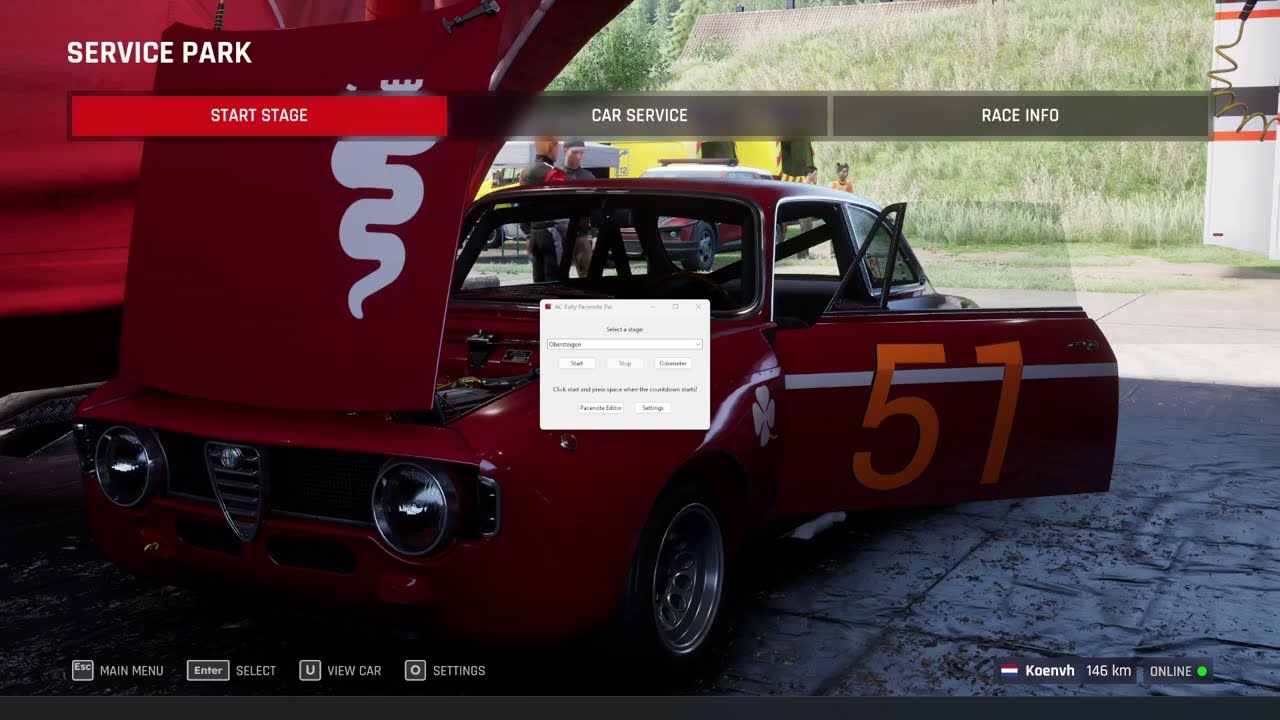


- Set the audio for the in-game spotter to 0%
- Start the program
- Select your stage or select "-- Automatically select stage --" to let Pacenote Pal load the correct pacenotes file
- Press start
Adding a voice can be done by adding a folder in the folder voices. Changing the pacenotes can be done by
editing the YAML files in the pacenotes folder, or adding a new file.
Settings can be changed by clicking the "Settings" button in the UI.
All settings can be found in the config.yml file. You can change them by right-clicking on the file and
selecting "Edit in Notepad". Changes only come into effect after restarting the application.
A pacenote consists of three things:
distance- This is the distance into the stage for this pacenote in metres. Press the "Odometer" button to show the current distance, this window will stay on top of the game if set to windowed or borderless. The codriver will call out this pacenote some time before the pacenote (depending on your settings), so this should be where the corner/obstacle/thing actually is.link_to_next- Whether when the notes from the current pacenote are called out, the next one will be called out immediately after it as well.notes- A list of the audio files to call out at this pacenote. The notes are the audio files from the voices folder, and you can also add your own audio files if you want notes that are not in the game (e.g. sumppu). If the file does not exist it will be skipped. The audio files have to be .wav. Additionally, you can add fixed pauses by addingPauseX.Ys, e.g.Pause1.5sto pause for 1.5 seconds. The file names are case-sensitive.
The easiest way is to use the pacenote editor. You can also do it manually.
Load an existing file from the box on the top left, and select the voice to use. The voice influences the example that plays, and highlights which notes are missing from the audio. You can also type freely into this textbox.
The first column is for removing the note, the second column for the distance in metres (see the odometer for your current distance in the stage), it automatically reorders them based on the distance. The third column is whether this note should be linked to the next. The fourth column are the notes that it should play, and their ordering. The fifth column shows which audio files the pacenote is translated to, and allows you to play a demo of what it will sound like in the stage. Missing files will be highlighted in red.

Everyone likes to make their pacenotes in their own way. Here are some ways that you can use to record your pacenotes:
- Using a program like OBS Studio or the XBOX Game Bar, you can record your run in ACR, calling out which pacenotes you think should happen where. Keep Pacenote Pal's odometer on screen and inside the recording area, so that later you can put the recording side-by-side with the Pacenote Pal editor.
- You can also use the pacenote editor directly while on the stage. Like the odometer it stays on top if the game is in windowed or borderless mode. Using the odometer you can create your pacenotes as you go along.
Create an empty YAML file for your pacenotes in the pacenotes folder, e.g. My Notes.yml.
Add a single empty pacenote to it and save the file, i.e.:
- distance: 0
  link_to_next: false
  notes: []
When you (re)start Pacenote Pal, you should see the file in the list. Select it and press start. Now you can start the stage as normal and start making your pacenotes.
The pacenote editor can help verify that the pacenotes you entered are the ones you intended, and you did not make typos or other errors.
Create a folder in the folder voices. The name of the folder will be the name of your voice. Add all the .wav
files for the notes. The default list the game uses is:
After, AfterCrossroad, AfterEnd, AfterJunction, AfterTheSign, AfterTheSigns, And, AroundBale, AroundBarrel, AroundPole, AroundSign, AroundSigns, AroundTyres, Asphalt, AtJunction, AtTheBale, AtTheBarrel, AtTheCrossroad, AtTheGate, AtTheHouse, AtThePoles, AtTheRail, AtTheRoundabout, AtTheSign, AtTheSigns, AtTheTyres, BadCamber, Bale, Barrel, BigCrest, BigCut, BigDip, Blind, Brake, Bridge, Bump, Bumps, Caution, CautionInside, CautionOutside, Chicane, Cobbles, Concrete, Crest, Crossroad, Cut, CutIn, Dip, Dist100, Dist130, Dist150, Dist170, Dist200, Dist250, Dist300, Dist350, Dist40, Dist400, Dist50, Dist60, Dist70, Dist80, Dist90, Ditch, DitchInside, DitchOutside, Dont, DontCut, Down, Downhill, Early, Finish, FlatCrest, FlatOut, Ford, Gate, GoLeft, GoRight, GoStraight, Gravel, Handbrake, HeavyBrake, Hidden, Hole, Holes, Ice, Immediate, Inside, Into, IntoDip, Jump, JumpBig, JumpMaybe, JumpSmall, Junction, KeepIn, KeepLeft, KeepMiddle, KeepOut, KeepRight, Kinks, KinksStartingLeft, KinksStartingRight, Late, Left1, Left2, Left3, Left4, Left5, Left6, LeftAcuteHP, LeftChicane, LeftChicaneEntry, LeftFlat, LeftHP, LeftKink, LeftOpenHP, LeftRight, LeftSquare, Logs, LogsInside, LogsOutside, Long, LongStraight, Loose, LoseGravel, Minus, Mud, Narrows, NarrowsInside, NarrowsLeft, NarrowsOutside, NarrowsRight, OnAsphalt, OnCobbles, OnConcrete, OnGravel, OnIce, OnLooseGravel, OnPavement, OnSnow, OnSnowAndIce, Opens, OpensLate, Outside, Over, OverBigJump, OverBridge, OverBump, OverBumps, OverCrest, OverJump, OverJumpSmall, Pavement, Plus, Pole, Pothole1, Pothole2, Potholes1, Potholes2, Right1, Right2, Right3, Right4, Right5, Right6, RightAcuteHP, RightChicane, RightChicaneEntry, RightFlat, RightHP, RightKink, RightLeft, RightOpenHP, RightSquare, Rock, Rocks, RocksInside, RocksOutside, Rough, Roundabout, Ruts, Short, Sign, Signs, Slippery, SlowDown, SmallCrest, SmallCut, Snow, SnowAndIce, StopAtMarshals, Sudden, SuddenLeft, SuddenRight, Threes, ThreesInside, ThreesOutside, ThroughGate, ThroughTunnel, ThroughWater, Tighten1, Tighten2, Tighten3, Tighten4, Tighten5, Tightens, TightensLate, Tree, TreeInside, TreeOutside, Tunnel, Tyres, UnderBridge, Up, UpHill, VeryLong, VeryLongStraight, Water, WaterSplash, Wet, Widens, WidensInside, WidensLeft, WidensOutside, WidensRight, Yes
I'm aware there are typos in that list (e.g. ThreesOutside), but that matches what ACR uses internally as well.
If a file is missing, it will be skipped. It is also possible to add multiple variants of a note by doing
e.g. After.wav, After_1.wav, After_2.wav. It will randomly pick one of the options.
It is also possible to add files that are not in this list (e.g. Sumppu.wav). They will not appear in the
default pacenotes, but can be used in custom pacenotes.
ACR uses 6 for the widest turn and 1 for the tightest turn. Depending on the voice you could make the audio for Left6 sound like "1 Left", "Fast Left", or something else instead to make it work with the default pacenotes.
It is possible to create a combination of notes by chaining them using a dash (-). This way it is possible
to create e.g. Into-Left6.wav which will play for the pacenote [Into, Left6] rather than Into.wav and
Left6.wav. There is no limit to this, so Into-Left6-And-Right5-VeryLong.wav will also work. It is also
possible to create multiple options for this by adding a _1, _2, etc., like Into-Left6_2.wav.
It will pick one at random. When one is used it will also show in the Pacenote Editor. They will not be shown
as one note in the Pacenote Editor.
Custom notes should ideally consist of letters and numbers. Please use the UpperCamelCase convention, and avoid names with only numbers and special characters. The wave files should be PCM signed 16-bit little-endian, with one channel and a sampling rate of 44100 Hz.
You can add translations to the notes for the notes in the Pacenote Editor by creating a dictionary.yml file
and adding a list of Translation: FileName pairs, e.g. Links 6: Left6. Translations must be unique, and every
file can have only one translation.
These are custom voices others made that work with Pacenote Pal. If you made one as well, and you want it added to the list, send me a message :-)
| Name | URL |
|---|---|
| Maciek Handwerker (Polish) | https://www.patreon.com/posts/assetto-corsa-144820495 |
| Polish | https://www.youtube.com/watch?v=87DIPBfmpts |
| Polish Stilo | https://www.overtake.gg/downloads/polish-stilo-intercom-co-driver-voice-pack.85489/ |
| Russian | https://kupvadim.github.io/game-notes/Games/Assetto%20Corsa%20Rally/PacenotePal_VadimInGame_RU/ |
| Paul Coleman (English) | https://www.patreon.com/posts/144292538?collection=1852289 |
| Lucato (Italian) | https://www.youtube.com/watch?v=4i1QHbwA8FI |
| Czech Bbuchy | https://www.overtake.gg/downloads/czech-co-driver.82985/ |
| Czech czbf | https://www.overtake.gg/downloads/czech-voice-nav-by-czbf.85375/ |
| Korean | https://www.patreon.com/posts/aseto-koreusa-ac-144278418 |
- @aaattihun for the Hungarian voice
- pyaccsharedmemory.py is based on https://github.com/rrennoir/PyAccSharedMemory