


A tiny pixel office where your coding agents come to life.
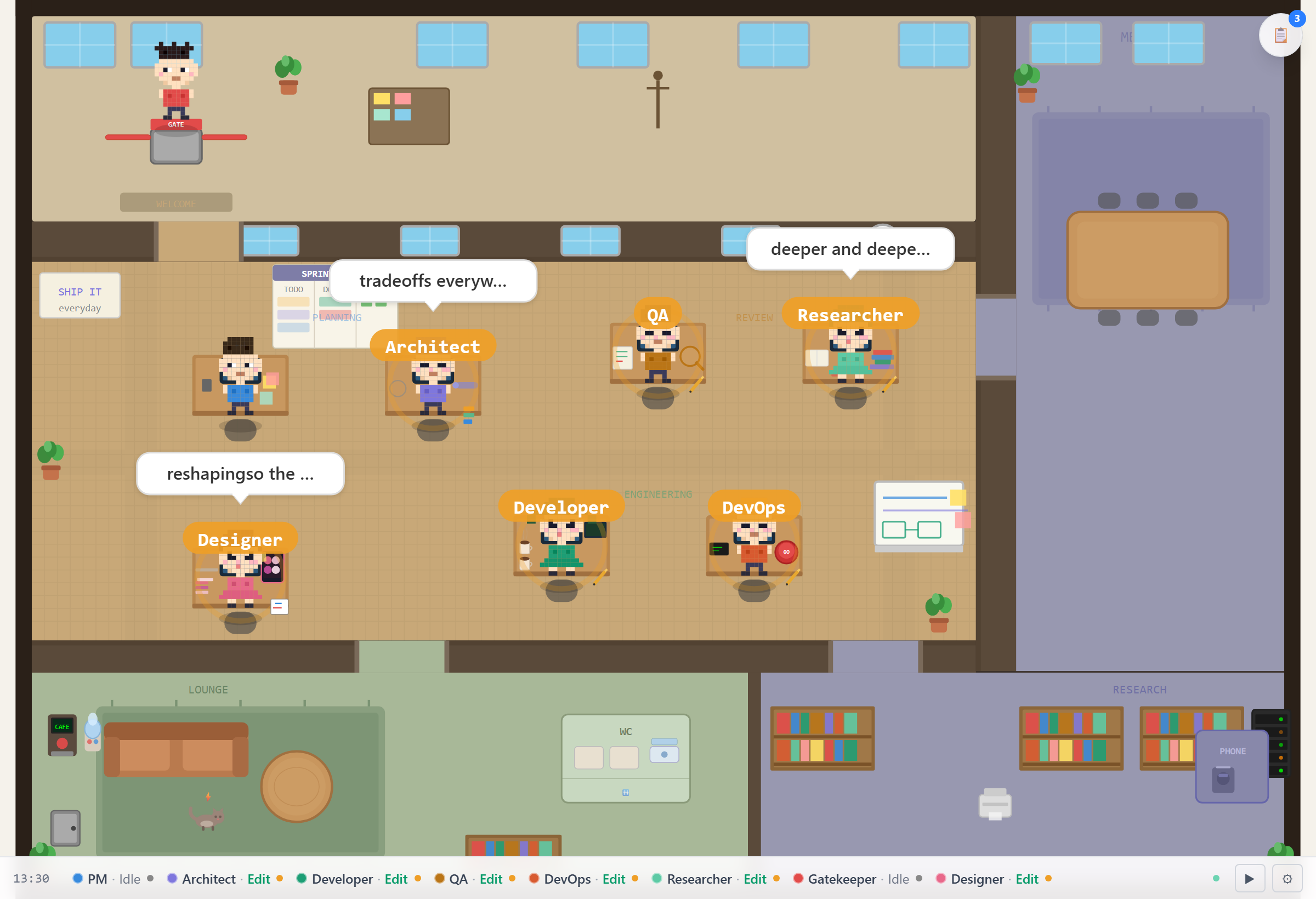
The office mid-session: someone heads-down, someone blocked, someone just shipped — all from a live session.
While Claude Code grinds through your codebase, a pixel version sits at a desk doing the same — typing,
getting blocked, stomping off to argue with QA about whether that's really a bug. Point it at your
Claude Code / Codex / CI session and your agents clock in for real — working, blocked, shipping,
bickering, live. It does approximately nothing useful, and you'll leave it open all day anyway.
Quick Start · Meet the Team · FAQ · 中文版
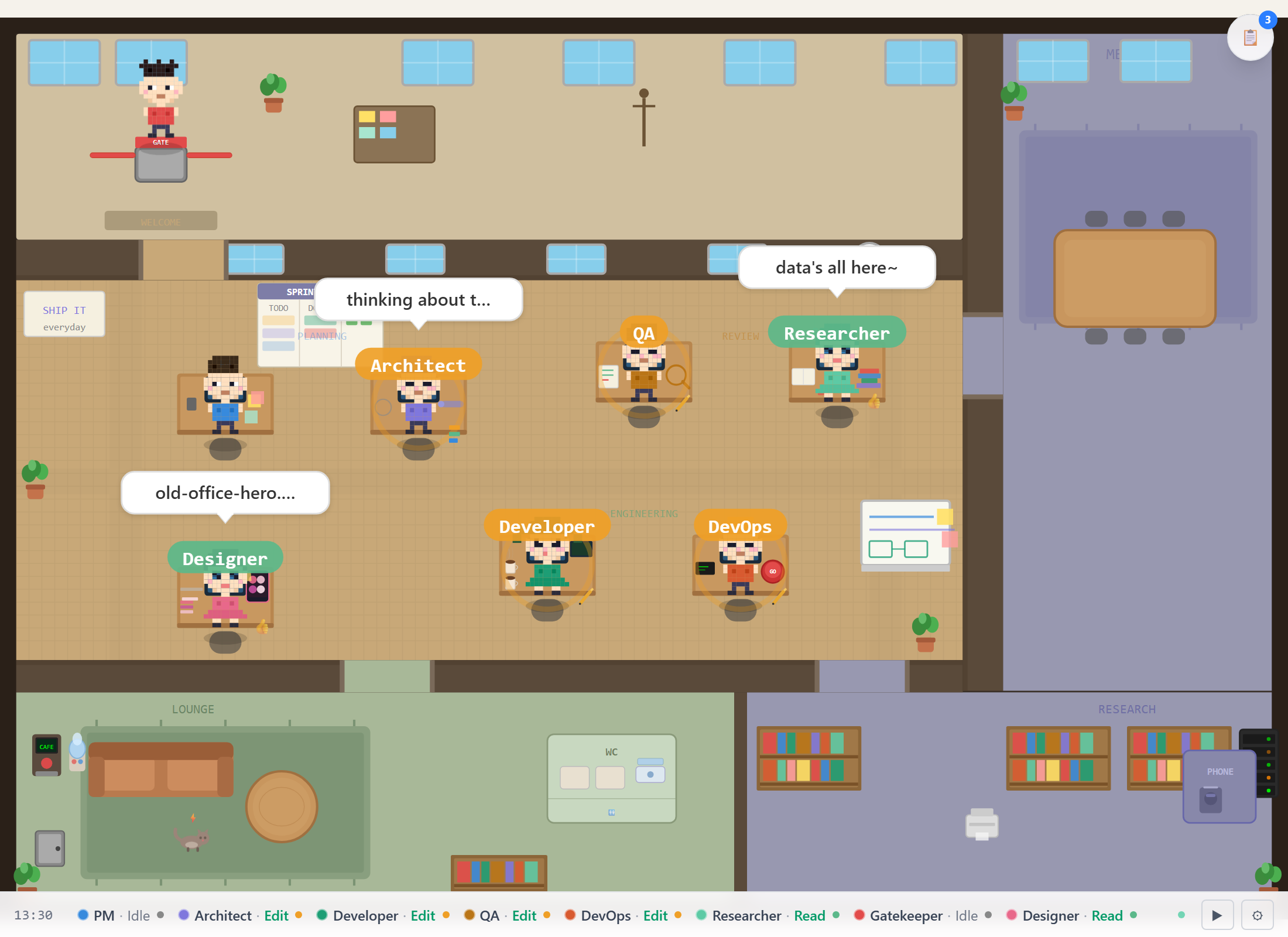 The office, live. Each character is a real agent in your session. |
 Poke a character and it bobs and pops a bubble with its current status. It never moves or changes state. |
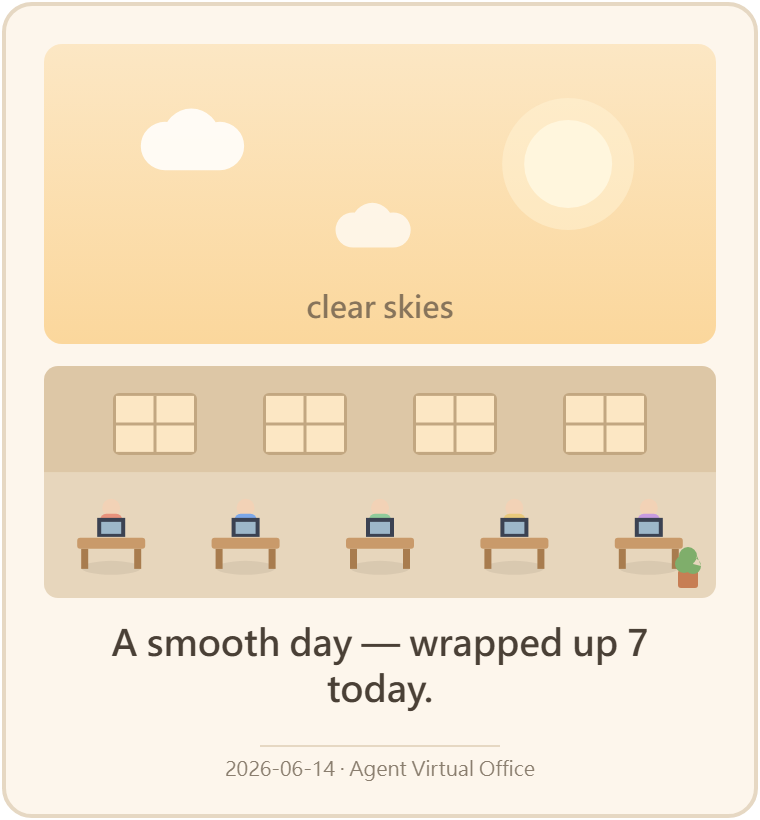 End-of-day card. One click exports the day as a PNG. A quiet day says so. |
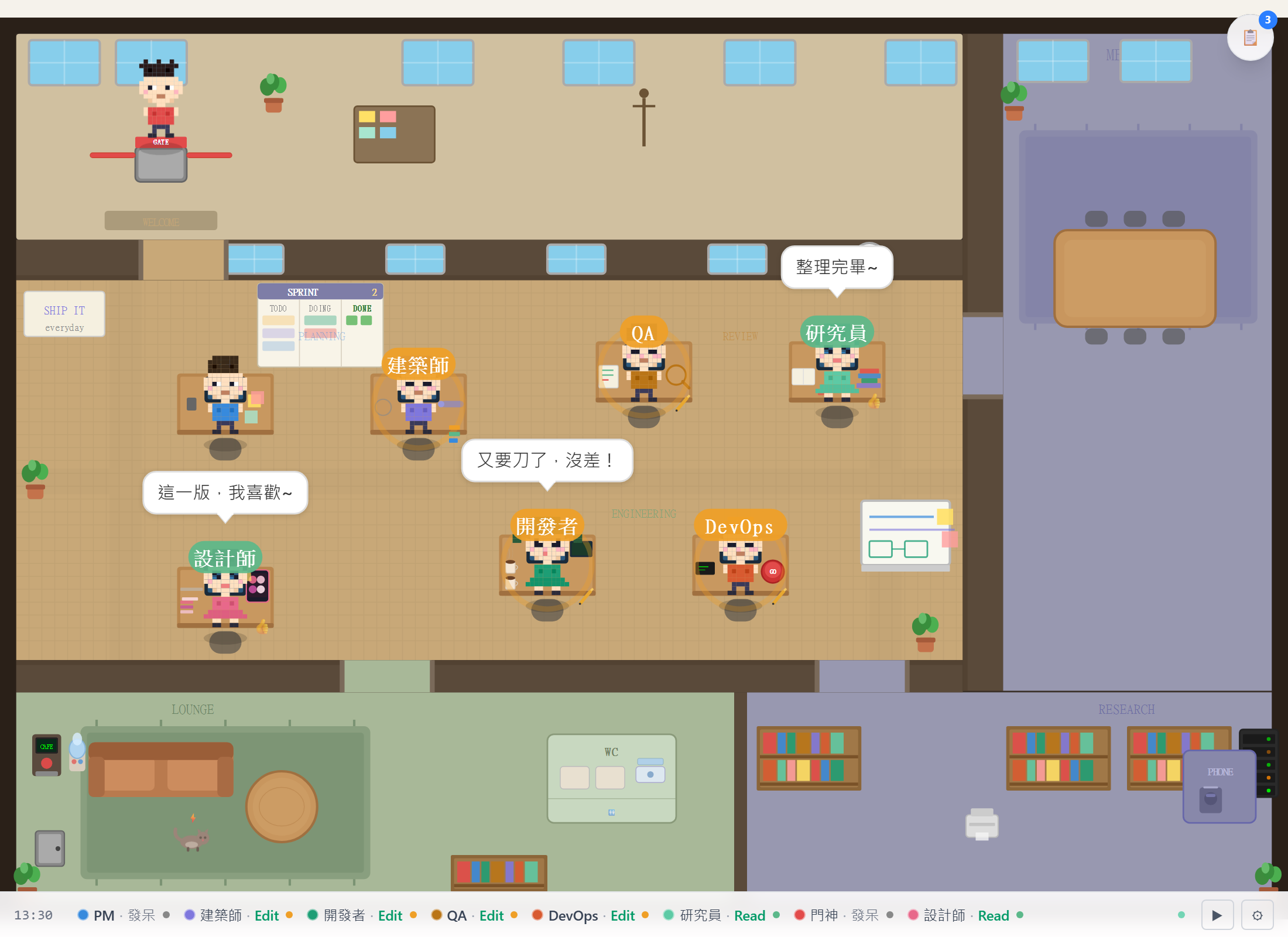 繁體中文 built in. Labels, bubbles, and names all localized. |
| Character | Personality | Usually spotted... |
|---|---|---|
| PM | Meetings are a love language | Realigning a Gantt chart that needed no realigning |
| Architect | Beret. Opinions. | Bolting to the whiteboard mid-thought yelling "Eureka!" |
| Developer | Twin-tails, running on caffeine | Five empty cups deep, brewing number six |
| QA | Trusts nothing, magnifying glass ready | Telling Dev the bug is real. It's real. |
| DevOps | Hard hat, no fear | One deep breath, then hitting the big red button |
| Researcher | Lives behind a book fort | Adding to the pile until something clicks |
| Gatekeeper | The bouncer of your pipeline | Shield up: "Prerequisites not met." Try again. |
| Designer | Pink hair, strong opinions on padding | Nudging a swatch 2px left, for the third time |
Leave it running and stuff just… happens. Some events fire on real signals from your session — a real deploy sets off the celebration, a blocked streak kicks off the argument — while the social stuff drifts in on a timer and quietly backs off when a live session is busy, so the office never talks over real work:
- Tea Break — a few sneak off to the coffee machine to talk about the others
- Stand-up — PM herds everyone to the whiteboard. Nobody escapes.
- Food's Here — someone walks in with a bag. Productivity ends.
- Review Beef — Dev: "no bug." QA: "look here." Dev: "…fine."
- It Deployed — Ops slaps the button, the whole room loses it
- Eureka — Architect freezes, then sprints to the whiteboard
…and the rare stuff: someone brings a dog, the AC dies and everyone fans themselves, the boss does a walkthrough and the whole office suddenly looks very busy.
The office fills the width of whatever you dock it in — IDE sidebar, half-screen, full window — with no dead gutters. Hit ☰ for a vertical roster: who's working, who's blocked, and a live feed of what just happened.
It's pure SVG — 8 hand-drawn characters, no canvas, no GPU, tiny bundle.
The same tool animates differently per role. qa + Bash pulls out a magnifier; ops + Bash hits the deploy button; designer + Edit walks to the whiteboard.
Everything you see is real. Events fire from your actual session, and an agent's status is never made up. When one gets stuck you see why — 🧪 test run, 🔨 build, 📦 install, or just ❔ unknown — with a ↻ when the same thing keeps failing. It only names a cause when the hook actually reports one; otherwise it stays vague on purpose.
Each role murmurs in its own voice — the skeptic QA, the brisk PM, the heads-down Researcher — but the speech bubble is only for that voice; status always rides the colored ring and a work symbol. Personality without faking it: no invented conversations, no made-up rapport the agents couldn't actually have.
Click a character and it bobs and tells you what it's doing right now. It won't move or change state. Space pokes again; right-click pokes without opening the inspector.
One click saves the day as a little pixel-art postcard you can share. Slow day with nothing finished? The card says so.
The quieter stuff: weather follows the room's mood, 45 seconds of silence reads as thinking instead of stuck, reduced-motion and a11y are respected, and a watchdog keeps anyone from freezing mid-walk.
→ The classifier, movement, and behavior engine are written up in docs/ARCHITECTURE.md.
# Straight from the public GitHub repo — no clone, no install:
npx github:KbWen/agent-virtual-office

# Using Claude Code? Wire up automatic status in one command:
npx github:KbWen/agent-virtual-office setup
Open the browser tab it pops, and your agents are already at their desks. That's it — no backend, no database, no WebSocket.
Prefer to clone, or want options?
git clone https://github.com/KbWen/agent-virtual-office.git
cd agent-virtual-office
npm install
npm run dev
CLI flags: --port=PORT · --lang=en|zh-TW · --no-open · --no-host (localhost only; the dev
server otherwise binds all interfaces).
The dev server has no authentication and exposes to your LAN by default. Use
--no-hostfor localhost-only, or the productionservemode with anOFFICE_API_TOKENfor a secured deploy.
Hosting it for a team (production build, Docker, Nginx, PM2, TLS) → docs/deployment/DEPLOYMENT.md.
The office reacts to any tool that can send an HTTP request:
# Tell the office an agent is working:
curl -X POST http://localhost:5174/api/status \
  -H "Content-Type: application/json" \
  -d '{"dev":"working","workflow":"Sprint 42"}'

# Or fire a one-shot CI moment:
curl -X POST http://localhost:5174/api/event -d '{"event":"deploy-success"}'- Claude Code →
npx agent-virtual-office setup, and every tool call routes itself. Done. - Codex CLI / Codex App / Gemini CLI / GitHub Actions / any CI → see the Integration guide.
| Event | Capability needed | What it shows |
|---|---|---|
PreToolUse / PostToolUse |
Core hooks | Per-tool working/done/blocked status |
SubagentStart / SubagentStop |
Core hooks | Subagent workflow banners |
UserPromptSubmit |
Core hooks | PM enters planning mode |
Stop |
Core hooks | Turn-end idle state |
PermissionDenied (AVO-148) |
Hooks v1.x+ | Stamps the responsible agent blocked with reason permission-denied when the permission system denies a tool call. Harmless if your Claude Code version does not emit this event — the handler simply never runs. |
StopFailure (AVO-148) |
Hooks v1.x+ | Stamps all currently-working session agents blocked with api-rate-limit or api-auth-failed when the turn ends on a Claude-API error (keyed on the matcher enum field — zero text parsing). Harmless if absent. |
The hook supports capturing raw hook events for fixture generation and schema validation:
- Enable:
touch ~/.claude/office-hook-capture(Linux/macOS) orNew-Item ~/.claude/office-hook-capture(PowerShell) - Use Claude Code normally — every tool call appends a JSON line to
~/.claude/office-hook-capture.jsonl - Sanitize:
node scripts/sanitize-hook-capture.mjs→ createstests/fixtures/hook-events/*.json - Review: check fixtures for residual sensitive strings before committing
- Disable: remove the marker file; raw capture stays in
~/.claude(never committed)
The capture path is fully try/catch'd — enabling or disabling it has zero effect on normal hook behavior.
http://localhost:5174?mode=panel     # compact panel for IDE sidebars
http://localhost:5174?lang=zh-TW     # force Traditional Chinese
English is the default; Traditional Chinese is available via ?lang=zh-TW, the in-app EN/中 toggle,
the --lang flag, or browser auto-detect (zh-TW / zh-Hant).
Make the roster yours — rename the characters (and optionally recolor them) to match your real team
or your own naming. Two ways, both override the existing roles (pm, arch, dev, qa, ops,
res, gate, designer):
# URL param — rename by role (name:role, comma-separated):
http://localhost:5174?agents=Alice:dev,Bob:qa,Chen:pm
// Before the app loads (e.g. an inline <script> in a custom host page) — rename AND recolor:
window.__office_config__ = {
  agents: {
    dev: { name: 'Alice', color: '#E8927C' },
    qa:  { name: 'Bob',   color: '#7CA7E8' },
  },
}
The ?agents= URL param sets names only; window.__office_config__ sets names + colors. This
changes who the existing characters are, not their pixel-art looks — custom sprite art (hats,
outfits, per-agent accessories) is a separate, not-yet-built track (see docs/SPRITE_REQUIREMENTS.md).
Visual/emergent bugs (stacked characters, teleports, frozen walkers) live in minutes of runtime, not in any single function — so the repo ships its own observation tools:
| command | what it does |
|---|---|
npm run soak |
The soak gate. Runs the office headless for 5 min (--minutes N to change) and fails on world-invariant violations: teleports, sustained standing stacks, frozen walkers, characters standing inside furniture. Also runs nightly in CI (sim-soak workflow). |
node scripts/overlap-recorder.mjs 12 |
Stack forensics: when two characters sit fully overlapped ≥2s, dumps both agents' last ~12s state chains (positions, targets, behaviors) so the mechanism is visible. |
node scripts/zone-audit.mjs |
Movement-rhythm audit: 3-min zone occupancy, room visits, and how often 0/1/2+ characters are walking at once. |
All three reuse a running npm run dev server on :5173, or start their own. If you see a
visual glitch, run the matching recorder before theorizing — every overlap/rhythm fix in
v1.4.0 started from one of these captures.
Common issues
Office is blank — no agents appear
- No hooks installed? Run
npx agent-virtual-office setup. - Wrong directory? The office filters by
process.cwd()— run it in the same directory as your session. - Stale status? Status expires after 5 minutes of inactivity — start a new session.
- Not using Claude Code? Push status with
curl(see Connect Your Agent).
Port 5174 in use → npx agent-virtual-office --port=5175
Browser doesn't open (headless Linux / WSL / remote) → open http://localhost:5174 manually.
Colleagues can't see it (LAN) → set OFFICE_API_ALLOWED_ORIGINS=http://192.168.1.100:5174, or use --no-host for localhost only.
Windows Firewall prompt → the dev server binds all interfaces; use --no-host to avoid it.
Node version error → requires Node ≥ 22 (node --version).
Strict CSP — animations missing → allow style-src 'self' 'unsafe-inline' (the exception applies to
style= attributes only). The office still works without it — only the weather/movement decoration drops.
Full notes in docs/ARCHITECTURE.md.
Agent Virtual Office is an open-source, pixel-art visualization of AI coding agents. It turns a live Claude Code, Codex, or Gemini CLI session into a tiny office where each agent is a character that visibly works, gets blocked, and ships — in real time, driven only by real signals from your session. Built with React and pure SVG, it runs entirely on your machine with no backend.
Run npx github:KbWen/agent-virtual-office setup once. It registers Claude Code hooks so every tool
call, subagent, and turn updates the office automatically — no manual wiring, no API keys.
Yes. Anything that can send an HTTP POST can drive the office — Codex CLI / Codex App, Gemini CLI, GitHub Actions, or your own scripts. See the Integration guide.
No. It doesn't chart tokens, spend, or productivity. It's an honest visualization: an agent's status only updates when a real signal comes in, and activity is never faked. It's a desk toy, not a metrics tool.
No. There is no backend, no database, no telemetry, and no external service. Status updates travel
over HTTP on your own machine — localhost by default, with optional LAN exposure you can turn off
via --no-host.
No. npx github:KbWen/agent-virtual-office runs it straight from the public GitHub repo. The only
requirement is Node.js ≥ 22.
React 19 + Vite 8 · SVG · Zustand · Tailwind CSS v4 · requestAnimationFrame. Runs in the browser, no backend.
2000+ tests cover the classifier, inference, store, movement, event honesty, blocked-reason detection, poke, and the share card. Deep dive → docs/ARCHITECTURE.md.
PRs welcome — the office can always use more life. Skim the docs for the technical lay of the land before diving in.
MIT