In-game configurable buff automation for Baldur's Gate: Enhanced Edition.
Cast all your pre-battle buffs with one click. BuffBot scans each character's spellbook, lets you configure which buffs to cast, in what order, on which targets — then executes the entire sequence automatically across all party members in parallel.
Alpha Release — fully functional but rough around the edges. Bug reports and feedback welcome.
BuffBot requires EEex v0.11.0-alpha or later. EEex v1 is recommended.
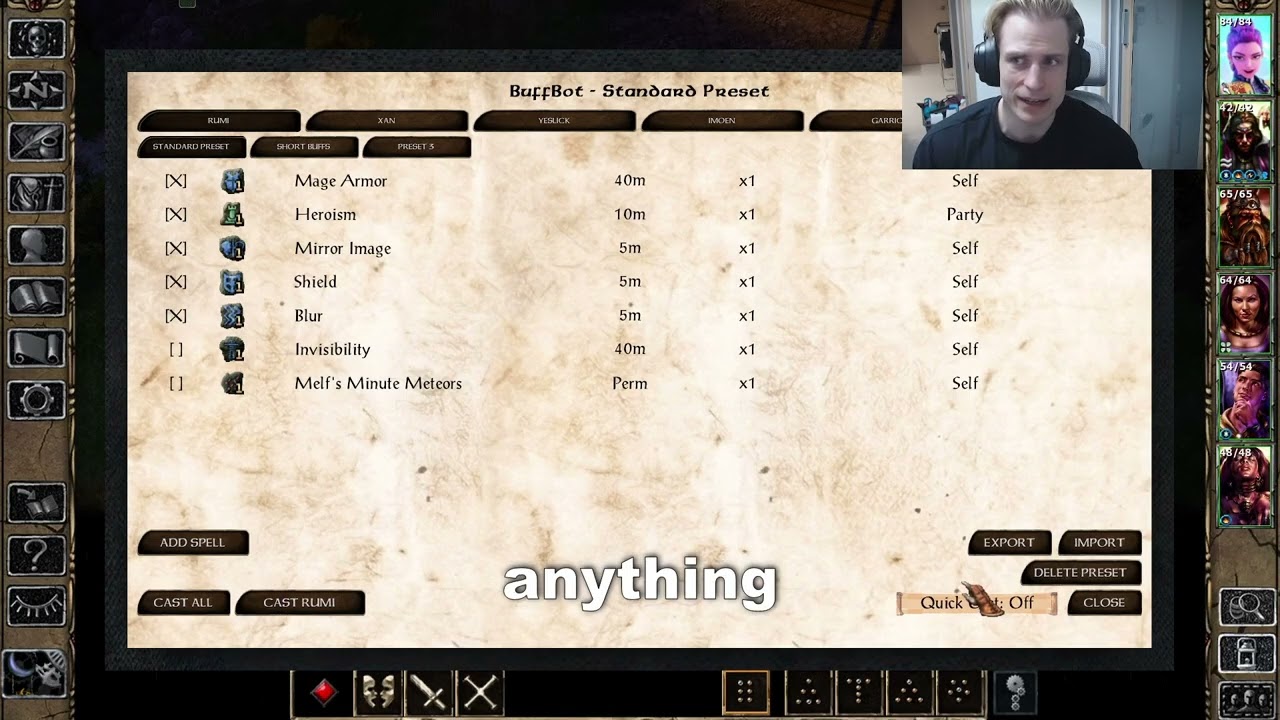
- Dynamic spellbook scanning — discovers buff spells from all sources (memorized, innate, HLAs, kit abilities) in real time. No hardcoded spell lists — works with modded spells automatically
- In-game config panel — per-character tabs, scrollable spell list with enable/disable, duration display, target assignment, priority ordering, sort-by-duration, and per-spell row lock (locked spells stay put when sorting)
- Up to 8 presets — independent buff configurations per character (Long Buffs, Short Buffs, Boss Fight, Undead Prebuff, etc.) with create/rename/delete
- Summons and clones as casters — configure Project Images, Simulacra, and other allied spellcasting summons in a dedicated Summons view; cast one summon alone or let configured summons join Cast All
- Quick Cast mode — per-preset 3-state toggle (Off / Long only / All) for instant casting via Improved Alacrity. Long mode fast-casts only long-duration buffs, then casts short buffs normally
- F12 innate abilities — each party character gets one innate per preset in their special abilities, triggering party-character buffing directly from gameplay without opening the panel
- Skip active buffs — detects already-active buffs via spell state + effect list checks and skips them. No wasted spell slots
- Manual spell override — "Add Spell" picker to include spells the classifier missed, "Remove" to exclude false positives
- Config export/import — export a character's full setup to a file, import onto any character across saves or between players
- Save game persistence — configuration saved per-character in EEex save games. Survives save/load automatically
- Subwindow selection spells — spells like Protection from Elemental Energy that normally open a selection popup are handled seamlessly. Pre-configure which variant to cast, and BuffBot bypasses the popup entirely
- Mod-friendly — tested with SCS, Spell Revisions, and kit mods. Reads spell data dynamically, so mod-added spells show up automatically
- BG:EE, BG2:EE, or EET
- EEex v0.11.0-alpha or later (v1 recommended)
EEex v0.11 and v1 have full BuffBot feature parity. BuffBot's LuaJIT installer recognizes both the older 5.1 layout and the newer 5.1-LuaJIT layout, and activates the matching runtime when needed. On EEex v1, any install tier works — Minimal, Full, or Experimental.
EEex v0.11 keeps its internal Lua files in override/. When using v0.11, install EEex and BuffBot late in the mod order — after generalized biffing and any later file-replacement step — so those files cannot be consumed or replaced.
Do not assume an arbitrary save can be downgraded to v0.11 after EEex v1 and other EEex mods have written it; that downgrade is not guaranteed safe.
For the curious: how EEex tiers and LuaJIT layouts interact
EEex v1's Minimal and Full tiers leave LuaJIT off by default; Experimental enables it. BuffBot checks the loader state and required DLLs instead of relying on EEex component numbers, then enables or repairs LuaJIT as needed. It uses LuaVersionExternal=5.1 for v0.11's older layout and LuaVersionExternal=5.1-LuaJIT for v1's newer layout. The "EEex LuaJIT Support" component is auto-skipped when the matching runtime is already active.
- Download the latest release and extract it into your game directory
- Run
setup-buffbot.exe(or use your preferred WeiDU launcher) - Select "BuffBot: In-Game Buff Automation" when prompted
- Accept the "EEex LuaJIT Support" component if prompted (auto-skipped if EEex already has LuaJIT active)
Uninstall: re-run the setup and choose uninstall. WeiDU removes all mod files and restores the TLK automatically.
Copy all files from buffbot/ to your game's override/ directory. Note: innate ability tooltip names require TLK patching — see Developer Setup below.
- Actionbar button — appears to the right of the action bar
- F11 — keyboard shortcut
- F12 innates — per-preset abilities in each character's special abilities
- Open the panel (F11 or actionbar button)
- Select a character tab at the top
- Select a preset tab (default: "Long Buffs" / "Short Buffs")
- Enable/disable spells with the checkbox column
- Set targets for each spell (Self, Party, or a specific character)
- Reorder spells with the Up/Down buttons
- Click Cast to start buffing — or use the F12 innate for that preset
- Quick Cast button cycles Off → Long → All for fast casting
- Default presets auto-populate from scanned spells: long/permanent buffs enabled in preset 1, short buffs in preset 2
- Create new presets for specific situations (up to 8 per character)
- Each preset is fully independent — own spell list, targets, priorities, quick cast setting
- Create the allied summon or clone, then open BuffBot and switch from Party to Summons.
- Select the live summon tab and enable the spells it should cast. Those enabled rows are its cast selection; there is no separate pre-cast queue checkbox.
- Use Cast (this summon) to run only that summon, or Cast All to run the party preset and every configured live summon together. A configured summon created during the run joins automatically.
Clone presets are stored by owner identity and are reused when that owner's clone is created again. On first open they seed from the owner's matching preset, limited to spells the clone can cast. To disable automatic participation globally, set SummonsJoinCast = 0 under [BuffBot] in baldur.ini.
Project Image locks its owner while active. BuffBot skips locked owners and drops owner entries placed after Project Image so they cannot fire later as delayed casts. Put anything the owner must cast before Project Image earlier in the priority order. Copied BuffBot F12 innates on clones are not supported in v1.6.1-alpha; use the Summons panel actions instead.
- Click Export to save a character's entire config (all presets + overrides) to a file
- Click Import to load a config from any exported file onto the current character
- Spells the target character doesn't have are silently skipped
- Files are saved in
override/bfbot_presets/— share them with other players or use across playthroughs
This is an alpha release. Everything works, but some things are unfinished:
- Placeholder innate icons — F12 abilities use the Stoneskin icon. Custom icons are planned
- Panel visuals — functional but unpolished. The layout works, the aesthetics don't win awards
- Spell Revisions sub-spells — some SR spells (Barkskin, Dispelling Screen) deliver effects via sub-spells, so the classifier may show them as ambiguous. Use "Add Spell" to manually include them
- Windows only for export/import listing — the file picker uses Windows
dir /bfor directory listing. The core export/import file I/O works on any platform, but the picker won't list files on macOS/Linux - Clone F12 innates — clones copy their owner's BuffBot innate icons, but activating those copies does not reliably route the preset to the clone. Use the Summons view or Cast All
BuffBot includes a built-in test suite. In the in-game console (the BG:EE / BG2:EE console — toggle with Ctrl-Space when CLUAConsole=1 is set in baldur.ini):
BfBot.Test.RunAll()         -- full test suite (600+ assertions)
BfBot.Test.ExportImport()   -- export/import tests
BfBot.UI.Toggle()           -- open/close config panel
Log files are written to the game directory: buffbot_test.log, buffbot_exec.log.
Reporting bugs: please open an issue at GitHub Issues with:
- Game version (BG:EE / BG2:EE / EET) and EEex version
- Steps to reproduce
- Mod list (especially SCS, Spell Revisions, kit mods)
- Output from
BfBot.Test.RunAll()if relevant
BuffBot was built with significant assistance from Claude Code (Anthropic's AI coding tool). The architecture, code, tests, and documentation were developed collaboratively between a human developer and AI.
The code is fully open source — judge it on its merits. If you have concerns about AI-assisted mods, that's understandable; the source is there for review.
Found a bug? Have a feature idea? Open an issue on GitHub.
For iterative development without running WeiDU each time:
# Set your game path (one-time setup)
echo 'BGEE_DIR="/path/to/your/game"' > tools/deploy.conf

# Deploy to game override
bash tools/deploy.sh
Requires Python 3 for TLK patching (innate ability tooltip names).
bg-eeex-buffbot/
├── buffbot/              # Mod source files (copied to override/)
│   ├── setup-buffbot.tp2 # WeiDU installer
│   ├── M_BfBot.lua       # Bootstrap (auto-loaded by EEex)
│   ├── BfBotCor.lua      # Core namespace, logging, field resolution, caches
│   ├── BfBotCls.lua      # Buff classifier (opcode scoring)
│   ├── BfBotScn.lua      # Spellbook scanner (known spells iterators)
│   ├── BfBotExe.lua      # Execution engine (parallel per-caster)
│   ├── BfBotPer.lua      # Persistence (marshal handlers, presets, export/import)
│   ├── BfBotInn.lua      # F12 innate abilities (runtime SPL generation)
│   ├── BfBotUI.lua       # Config panel logic
│   ├── BfBotTst.lua      # Test suite (600+ assertions)
│   └── BuffBot.menu      # UI definitions (.menu DSL)
├── tools/                # Dev utilities
│   ├── deploy.sh         # Copy files to game override
│   └── patch_tlk.py      # TLK patcher for innate tooltips
├── docs/                 # Design docs and analysis
└── README.md
- EEex by Bubb — makes this entire mod possible
- Bubble Buffs by factubsio — original inspiration (Pathfinder: WotR)
- Claude Code by Anthropic — AI development assistant