


A parsing, archiving and rendering service.
- Twitter profiles
- Twitter posts
- YouTube profiles (users and channels)
- YouTube videos
- Facebook profiles (users and pages)
- Facebook posts (from pages and users)
- Instagram posts
- Instagram profiles
- Any link with an oEmbed endpoint
- Any other link with metatags
- Screenshot
- Archive.is
- Archive.org
- Video Vault
find -name '*.example' | while read f; do cp "$f" "${f%%.example}"; done
docker-compose build
docker-compose up --abort-on-container-exit
To make requests to the API, you must set a request header with the value of the configuration option authorization_header - by default, this is X-Pender-Token. The value of that header should be the API key that you have generated using bundle exec rake lapis:api_keys:create, or any API key that was given to you.
Use this method in order to get the archivers enabled on this application
Parameters
Response
200: Information about the application
{
  "type": "about",
  "data": {
    "name": "Keep",
    "version": "v0.68.0",
    "archivers": [
      {
        "key": "archive_org",
        "label": "Archive.org"
      }
    ]
  }
}
401: Access denied
{
  "type": "error",
  "data": {
    "message": "Unauthorized",
    "code": 1
  }
}Get parseable data for a given URL, that can be a post or a profile, from different providers. format can be one of the following, see responses below:
htmljsoembedjson
Parameters
url: URL to be parsed/rendered (required)refresh: boolean to indicate that Pender should re-fetch and re-parse the URL if it already exists in its cache (optional)archivers: list of archivers to target. Possible values:- empty: the URL will be archived in all available archivers
none: the URL will not be archived- string with a list of archives separated by commas: the URL will be archived only on specified archivers
Response
HTML
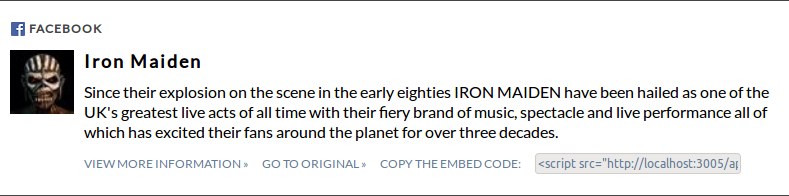
A card-representation of the URL, like the ones below:


JavaScript
An embed code for the item, which should be called this way:
<script src="http://pender.host/api/medias.js?url=https%3A%2F%2Fwww.youtube.com%2Fchannel%2FUCEWHPFNilsT0IfQfutVzsag"></script>oEmbed
An oEmbed representation of the item, e.g.:
{
  "type": "rich",
  "version": "1.0",
  "title": "Porta dos Fundos",
  "author_name": "PortadosFundos",
  "author_url": "https://www.youtube.com/channel/UCEWHPFNilsT0IfQfutVzsag",
  "provider_name": "youtube",
  "provider_url": "http://www.youtube.com",
  "thumbnail_url": "https://yt3.ggpht.com/-xle954Zxs4E/AAAAAAAAAAI/AAAAAAAAAAA/geYaRfTQ0FY/s88-c-k-no-rj-c0xffffff/photo.jpg",
  "html": "\u003ciframe src=\"http://localhost:3005/api/medias.html?url=https%3A%2F%2Fwww.youtube.com%2Fchannel%2FUCEWHPFNilsT0IfQfutVzsag\" width=\"600\" height=\"300\" scrolling=\"no\" seamless\u003eNot supported\u003c/iframe\u003e",
  "width": 600,
  "height": 300
}
JSON
200: Parsed data
{
  "type": "media",
  "data": {
    "url": "https://www.youtube.com/user/MeedanTube",
    "provider": "youtube",
    "type": "profile",
    "title": "MeedanTube",
    "description": "",
    "published_at": "2009-03-06T00:44:31.000Z",
    "picture": "https://yt3.ggpht.com/-MPd3Hrn0msk/AAAAAAAAAAI/AAAAAAAAAAA/I1ftnn68v8U/s88-c-k-no/photo.jpg",
    "username": "MeedanTube",
    "author_url": "https://www.youtube.com/user/MeedanTube",
    "author_name": "MeedanTube",
    "raw": {
      "metatags": [],
      "oembed": {},
      "api": {}
    },
    "schema": {},
    "html": "",
    "embed_tag": "<embed_tag>"
  }
}
400: URL not provided
{
  "type": "error",
  "data": {
    "message": "Parameters missing",
    "code": 2
  }
}
401: Access denied
{
  "type": "error",
  "data": {
    "message": "Unauthorized",
    "code": 1
  }
}
408: Timeout
{
  "type": "error",
  "data": {
    "message": "Timeout",
    "code": 10
  }
}
429: API limit reached
{
  "type": "error",
  "data": {
    "message": 354, // Waiting time in seconds
    "code": 11
  }
}
409: Conflict
{
  "type": "error",
  "data": {
    "message": "This URL is already being processed. Please try again in a few seconds.",
    "code": 9
  }
}Create background jobs to parse each URL and notify the caller with the result
Parameters
url: URL(s) to be parsed. Can be an array of URLs, a single URL or a list of URLs separated by a commas (required)refresh: Force a refresh from the URL instead of the cache. Will be applied to all URLsarchivers: List of archivers to target. Can be empty,noneor a list of archives separated by commas. Will be applied to all URLs
Response
200: Enqueued URLs
{
  "type": "success",
  "data": {
    "enqueued": [
      "https://www.youtube.com/user/MeedanTube",
      "https://twitter.com/meedan"
    ],
    "failed": [

    ]
  }
}
401: Access denied
{
  "type": "error",
  "data": {
    "message": "Unauthorized",
    "code": 1
  }
}Clears the cache for the URL(s) passed as parameter.
Parameters
url: URL(s) to be deleted, either as an array or a string with one URL or multiple URLs separated by a space (required)
Response
200: Success
{
  "type": "success",
}
401: Access denied
{
  "type": "error",
  "data": {
    "message": "Unauthorized",
    "code": 1
  }
}There are rake tasks for a few tasks (besides Rails' default ones). Run them this way: bundle exec rake <task name>
test:coverage: Run all tests and calculate test coverageapplication=<application name> lapis:api_keys:create: Create a new API key for an applicationlapis:api_keys:delete_expired: Delete all expired keyslapis:error_codes: List all error codes that this application can returnlapis:licenses: List the licenses of all libraries used by this projectlapis:client:ruby: Generate a client Ruby gem, that allows other applications to communicate and test this servicelapis:client:php: Generate a client PHP library, that allows other applications to communicate and test this servicelapis:docs: Generate the documentation for this API, including models and controllers diagrams, Swagger, API endpoints, licenses, etc.lapis:docker:run: Run the application in Dockerlapis:docker:shell: Enter the Docker containerswagger:docs:markdown: Generate the documentation in markdown format
- Add a new file at
app/models/concerns/media_<provider>_<type>(example...providercould befacebookand type could bepostorprofile) - Include the class in
app/models/media.rb - It should return at least
published_at,username,title,descriptionandpicture - If
typeisitem, it should also return theauthor_urlandauthor_picture - The skeleton should look like this:
module Media<Provider><Type>
  extend ActiveSupport::Concern

  included do
    Media.declare('<provider>_<type>', [<list of URL patterns>])
  end

  def data_from_<provider>_<type>
    # Populate `self.data` with information
    # `self.data` is a hash whose key is the attribute and the value is... the value
  end

  def <provider>_as_oembed(original_url, maxwidth, maxheight)
    # Optional method
    # Define a custom oEmbed structure for this provider
  end
end- Add a new file at
app/models/concerns/media_<name>_archiver.rb - Include the class in
app/models/media.rb - It should have a method
archive_to_<name> - It should call method
Media.declare_archiver, saying the URL patterns it supports (using theonlymodifier) or the URL patterns it doesn't support (using theexceptmodifier) - The skeleton should look like this:
module Media<Name>Archiver
  extend ActiveSupport::Concern

  included do
    Media.declare_archiver('<name>', [<list of URL patterns as regular expressions>], :only) # Or :except instead of :only
  end

  def archive_to_<name>
    # Archive and then update cache (if needed) and call webhook (if needed)
    Media.notify_webhook_and_update_cache(<name>, url, data, key_id)
  end
endIt's possible to profile Pender in order to look for bottlenecks, slownesses, performance issues, etc. To profile a Rails application it is vital to run it using production like settings (cache classes, cache view lookups, etc.). Otherwise, Rail's dependency loading code will overwhelm any time spent in the application itself. The best way to do this is create a new Rails environment. So, follow the steps below:
- Copy
config/environments/profile.rb.exampletoconfig/environments/profile.rb - Make sure you have a
profileenvironment setup onconfig/config.ymlandconfig/database.yml - Run
bundle exec rake db:migrate RAILS_ENV=profile(only needed at the first time) - Create an API key for the profile environment:
bundle exec rake lapis:api_keys:create RAILS_ENV=profile - Start the server in profile mode:
bundle exec rails s -e profile -p 3005 - Make a request you want to profile using the key you created before:
curl -XGET -H 'X-Pender-Token: <API key>' 'http://localhost:3005/api/medias.json?url=https://twitter.com/meedan/status/773947372527288320' - Check the results at
tmp/profile
Everytime you make a new request, the results on tmp/profile are overwritten
We can also run performance tests. It calculates the amount of time taken to validate, instantiate and parse a link for each of the supported types/providers. In order to do that, run: bundle exec rake test:performance. It will generate a CSV at tmp/performance.csv, so that you can compare the time take for each provider.
Meedan ([email protected])