
Replies: 6 comments 10 replies

|
|

|
Instead of hardly trying to use Or are these |

|
Of course, we used |
|
please forgive my poor English, I'm using Google Translate |
|
I think, as you already discovered, define just replace strings and replace it at build time with the variable But for such issues, it's easier to just use Vite natively instead of finding a workaround |
|
I agree with you,I think I should work hard at |

|
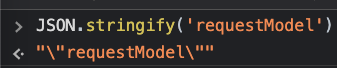
Vite replaces the text as is, that could cause syntax error, so you have to add quotes on both sides if what you intend is to pass a string. I do it as this: {
define: {
"process.env.DIRECTUS_URL": `"${env.DIRECTUS_URL}"`,
"process.env.DIRECTUS_ACCESS_TOKEN": `"${env.DIRECTUS_ACCESS_TOKEN}"`,
}
} |

|
After many, many tries, finally this configuration seems to work for me when I want to specify the application version via environment variables: export default defineConfig(({mode}) => {
process.env = {...process.env, ...loadEnv(mode, process.cwd())};
return {
plugins: [vue()],
resolve: {
alias: {
'@': fileURLToPath(new URL('./src', import.meta.url)),
},
},
define: {
"__APP_VERSION__": process.env.NODE_ENV === 'production' ? process.env.VITE_APP_VERSION : JSON.stringify(process.env.VITE_APP_VERSION),
}
};
});<script setup>
import {computed, onMounted} from "vue";
onMounted(() => console.log(import.meta.env.VITE_APP_VERSION));
const ver = computed(() => import.meta.env.VITE_APP_VERSION);
onMounted(() => console.log({ver: ver.value}));
</script>
<template>
<div>
<div>{{ ver }}</div>
<div>__APP_VERSION__</div>
</div>
</template>VITE_APP_VERSION=v5.5.5 vite
VITE_APP_VERSION=v5.5.5 vite build
|

|
What helped me to use Cloudflare Pages variables in Vue project: // vite.config.ts
export default defineConfig({
define: {
__CF_PAGES_BRANCH__: process.env.CF_PAGES_BRANCH,
},
});Then in Vue SFC component: <script setup lang="ts">
const version = "__CF_PAGES_BRANCH__";
</script>
<template>
<div class="flex flex-col flex-grow">
<p>Use as is: __CF_PAGES_BRANCH__</p>
<p>Use from script: {{ version }}</p>
</div>
</template> |
|
And here is another approach that worked well for me: // vite.config.ts
export default defineConfig({
define: {
__CF_PAGES_BRANCH__: JSON.stringify(process.env.CF_PAGES_BRANCH),
},
});// env.d.ts
declare const __CF_PAGES_BRANCH__: string;<script setup lang="ts">
const branch = __CF_PAGES_BRANCH__ ?? "n/a";
</script>
<template>
<div class="flex flex-col flex-grow">
<p>{{ branch }}</p>
</div>
</template> |

|
thaanks, works just well! |

|
I'll just post that my problem was my file was not being processed by vite because it was in "static" and not in the "module graph". It would be kind of nice to just have a sort of "preprocessor macro" (that's what I thought this was) for this build system and be able to statically replace things project-wide at build time, or if that's not feasible, manually set files I want to transform in the config file. Now that my JS file is under "src/lib", everything's working as expected. EDIT: Nevermind, loadEnv is returning a completely empty object. I've confirmed it's correctly assigning, but the loadEnv function completely doesn't work at all. : So, to clarify everything that needs to be done, if you're loading variables from your .env file, in order for vite.config.js to see the variables in But they will NOT assign if you do: And the ENV var is NOT prefixed with the prefix. So basically just apply the wildcard |


Uh oh!
There was an error while loading. Please reload this page.
This is my
vite.config.jsI use it in my project
output:
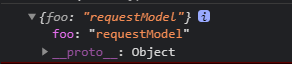
But I use it in a third party library
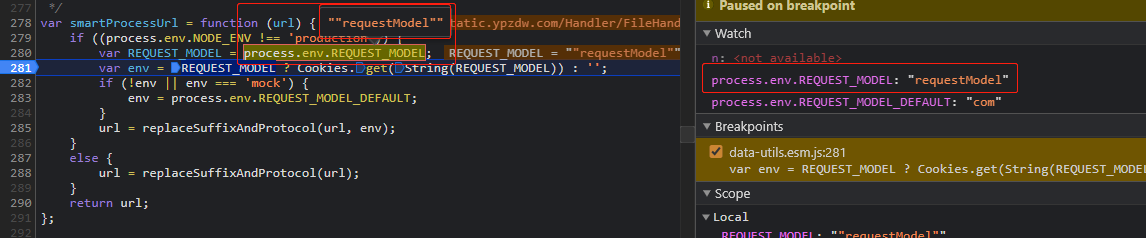
Why does this happen ?
All reactions