Create-next-app doesn't allow a '.' as a project name #62630

Replies: 4 comments

-
|
create-next-app uses next.js/packages/create-next-app/index.ts Line 77 in ef69aca |
Beta Was this translation helpful? Give feedback.

-
|
This still seems untoward and limiting. It's not a huge deal but it's a QoL feature that'd be really nice to have if I could opt to initialize a project in the current directory. Even a question defaulting to "No" would be better IMO |
Beta Was this translation helpful? Give feedback.

-
|
Moving this to discussions since this is technically a feature request! |
Beta Was this translation helpful? Give feedback.

-
|
Are there any updates? I'm trying to learn about a certain topic, and usually, I would first create a folder and then initialize the project. For example, recently, I wanted to look at something related to RAG, but I got a warning when I created the project... By the way, the vite cli next door is really very useful. |

Beta Was this translation helpful? Give feedback.


Uh oh!
There was an error while loading. Please reload this page.
-
Verify canary release
Provide environment information
not relevant, issue is with create-next-app
What browser are you using? (if relevant)
No response
How are you deploying your application? (if relevant)
No response
Describe the Bug
When I run
yarn create next-app --typescriptin the JetBrains terminal window, and try to enter.as a project name, I get an error,Invalid project name: name can no longer contain capital letters.Here's a screenshot: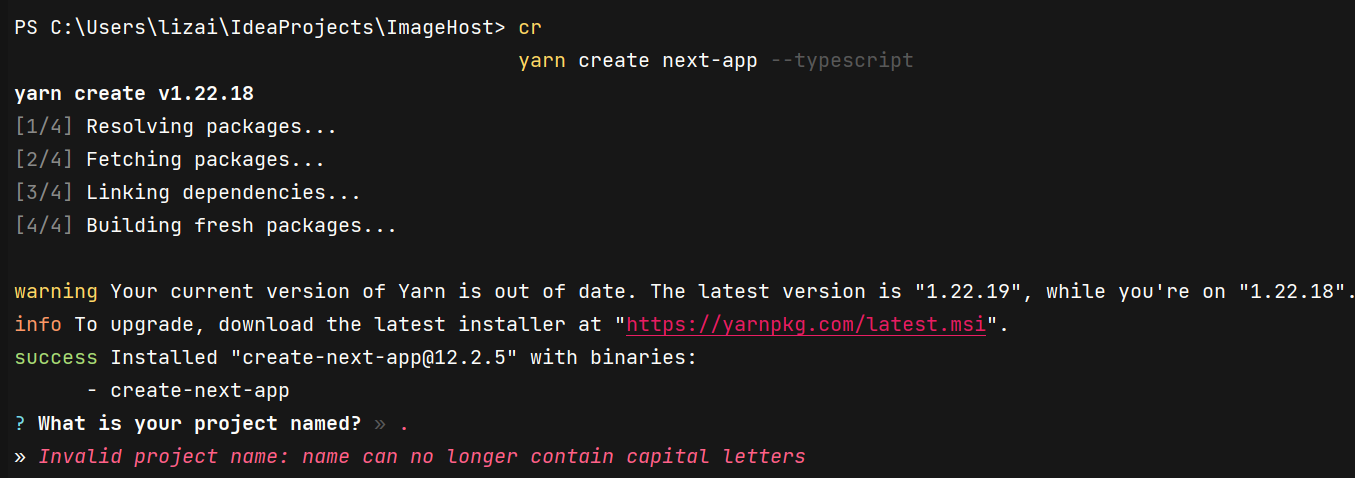
If the
.is not allowed, I think it makes sense to replace the error, but I think there ought to be a way to put a project in my current directory so I don't have to go manually move everything later.Expected Behavior
I expect to be able to create a project in the current directory using
yarn create next-appLink to reproduction
how do I reproduce something in create-next-app?
To Reproduce
Beta Was this translation helpful? Give feedback.
All reactions