This project done under PyImageSearch implements an Optical Mark Recognition (OMR) system designed to detect marked cells in a given image of an OMR sheet. It processes the image, detects the contours of the marked cells, and identifies which answers are selected in each question.
- Preprocessing of OMR Sheet: The system processes the input image of the OMR sheet using techniques like thresholding and contour detection to isolate the marked areas.
- Contour Detection: Identifies individual cells in the OMR sheet.
- Answer Recognition: Detects which options (e.g., A, B, C, D) are selected for each question based on the markings.
- Comparison with Correct Answers: The system allows comparison between detected answers and correct answers, making it useful for grading purposes.
- Image Preprocessing: The input image is converted to grayscale and processed to highlight the contours using edge detection techniques.
- Contour Extraction: The contours of each marked region are extracted to identify the individual cells in the OMR sheet.
- Answer Detection: For each question, the marked option is identified by evaluating which cell has the maximum non-zero pixel count.
- Result Comparison: The detected answers are compared with the correct answers for evaluation.
To run this project, install the necessary Python libraries using the following command:
pip install numpy opencv-python matplotlib imutils- Upload an image of the OMR sheet.
- Run the code to detect the marked cells.
- Compare the detected answers with the correct answers.
- OMR Image Preprocessing: Prepares the image by resizing, converting to grayscale, and applying thresholding.
- Grid Detection: Detects contours corresponding to each OMR cell.
- Answer Detection: Uses the non-zero pixel count to determine which option is selected.
- Comparison: Compares detected answers with a predefined answer key.
An OMR sheet is processed as follows:
| Original OMR Image | Detected Answers |
|---|---|
| (Image Input) | (Processed Output) |
Original Image v/s Output Image
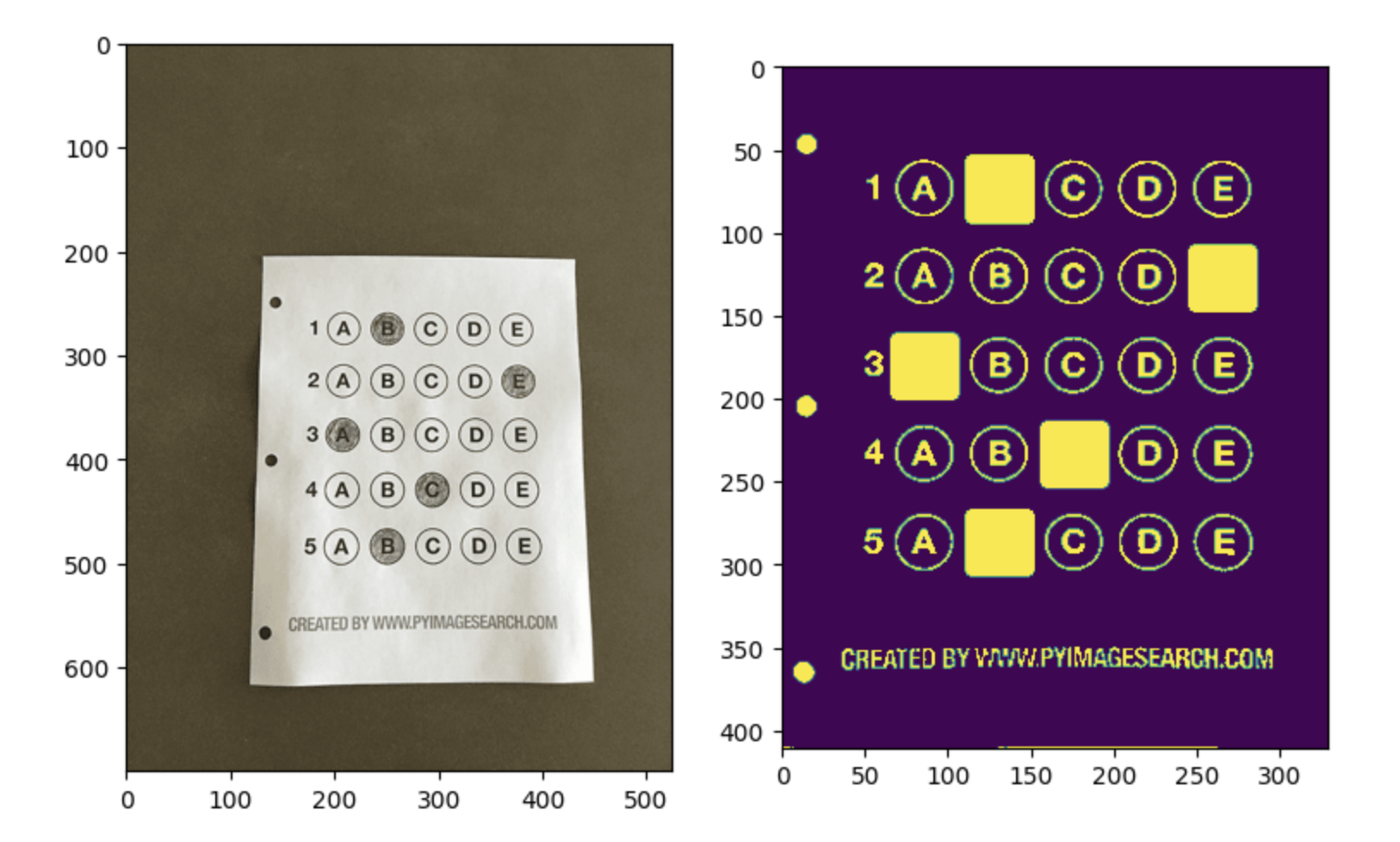
Actual Selection: [B,E,A,C,B]
Output Selection: [B,E,A,C,B]
Contributions are welcome! Fork this repository and submit a pull request with any improvements or bug fixes.