



Wenbo Hu1* †,
Xiangjun Gao2*,
Xiaoyu Li1* †,
Sijie Zhao1,
Xiaodong Cun1,
Yong Zhang1,
Long Quan2,
Ying Shan3, 1
1Tencent AI Labv
2The Hong Kong University of Science and Technology
3ARC Lab, Tencent PCG
CVPR 2025, Highlight
-
[25-09-28]- Secondary output with selectable depth range.
-
[25-09-12]
Added Features:
- GUI Status Bar: Added dynamic text updates below progress bar.
- Current Processing Info Frame: Display for filename, resolution, frames of current job.
- "Local Models Only" Menu Option: Checkbox to force local model loading only.
- "Restore Finished/Failed Input Files" Menu: Restores original source videos.
- Independent Height/Width GUI Inputs: Replaced
max_rescontrol. - Robust FPS/Frame Count: Integrated
ffprobefor accurate frame rate read from source. - Tooltip Help System: Replaced "❓" icons with mouse-over tooltips.
Removed Features:
- Custom
message_catalog.py: Entirely deleted. - GUI Log Window (
tk.Textwidget): Removed internal log display. - GUI Log Verbosity Control: Removed combobox for setting log verbosity.
- "❓" Help Icons: Replaced by new tooltip system.
Also moved helper files into depthcrafter sub-folder
-
[25-06-01]- Image sequence loading.
- Single image loading to generate 5 frame depth video or image.
- Single video loading and process (not batch).
- Save 10bit x265 MP4
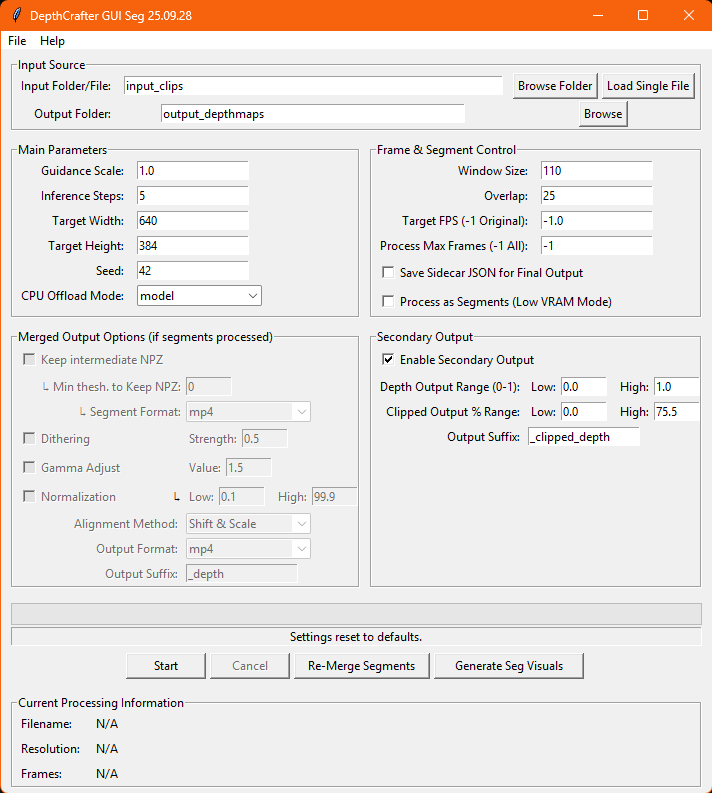
A graphical user interface (GUI) has been added to DepthCrafter to simplify batch processing, manage videos requiring segmentation (e.g., for low VRAM environments or very long videos), and streamline the output process.
Key Features Added:
- Intuitive Graphical Interface:
- Easily select input video folders and output directories.
- Adjust core DepthCrafter parameters (guidance scale, inference steps, resolution, seed, etc.) through a user-friendly panel.
- Video Segmentation for Long/Large Videos:
- Automatic Segmentation: Process videos in manageable segments with configurable window sizes and overlap, ideal for systems with limited VRAM or for extremely long input videos.
- Segment Management: Handles the creation and processing of individual video segments.
- Resume Capability: If processing is interrupted, the GUI can identify and re-process only missing or failed segments, saving significant time.
- Segment Merging & Post-Processing:
- Automated Merging: After segments are processed, the GUI can automatically merge them back into a full-length depth map video.
- Alignment Options: Choose between "Compute Shift & Scale" or "Linear Blend" methods for aligning segment values during the merge.
- Post-Processing for MP4: Apply optional gamma adjustment and dithering to merged MP4 outputs to enhance visual quality.
- Flexible Output Formats for Merged Video: Save the final merged depth video as MP4, or as a sequence of PNG or EXR frames. Single frame EXR output is also supported for the first frame of a merged sequence.
- Re-merging: Re-merge final video without re processing. (If NPZ files are saved)
- Job Management & Configuration:
- Batch Processing: Process all videos within a selected input folder.
- Settings Persistence: Save and load GUI settings (including all processing parameters) to/from JSON configuration files for repeatable workflows.
- Intermediate Output Control:
- Optionally keep intermediate NPZ segment files.
- Generate visual representations (MP4, PNG/EXR sequence) of individual depth segments for review after initial NPZ processing.
- Sidecar Metadata:
- Generates detailed JSON metadata files for both individual segments and final processed/merged videos, capturing all settings and processing information(required for resuming).
This GUI aims to make DepthCrafter more accessible and efficient for users dealing with multiple videos or those needing to break down large processing tasks.
GUI based on enoky/DepthCrafter Main code contributer Gemini 2.5
⚠️ Do not run the installer from inside the cloned repository.
The installer itself is responsible for cloning the repository correctly. more
🤗 If you find DepthCrafter useful, please help ⭐ this repo, which is important to Open-Source projects. Thanks!
🔥 DepthCrafter can generate temporally consistent long-depth sequences with fine-grained details for open-world videos, without requiring additional information such as camera poses or optical flow.
[25-04-05]🔥🔥🔥 Its upgraded work, GeometryCrafter, is released now, for video to point cloud![25-04-05]🎉🎉🎉 DepthCrafter is selected as Highlight in CVPR‘25.[24-12-10]🌟🌟🌟 EXR output format is supported now, with --save_exr option.[24-11-26]🚀🚀🚀 DepthCrafter v1.0.1 is released now, with improved quality and speed[24-10-19]🤗🤗🤗 DepthCrafter now has been integrated into ComfyUI![24-10-08]🤗🤗🤗 DepthCrafter now has been integrated into Nuke, have a try![24-09-28]Add full dataset inference and evaluation scripts for better comparison use. :-)[24-09-25]🤗🤗🤗 Add huggingface online demo DepthCrafter.[24-09-19]Add scripts for preparing benchmark datasets.[24-09-18]Add point cloud sequence visualization.[24-09-14]🔥🔥🔥 DepthCrafter is released now, have fun!
- DepthCrafter v1.0.1:
- Quality and speed improvement
Method ms/frame↓ @1024×576 Sintel (~50 frames) Scannet (90 frames) KITTI (110 frames) Bonn (110 frames) AbsRel↓ δ₁ ↑ AbsRel↓ δ₁ ↑ AbsRel↓ δ₁ ↑ AbsRel↓ δ₁ ↑ Marigold 1070.29 0.532 0.515 0.166 0.769 0.149 0.796 0.091 0.931 Depth-Anything-V2 180.46 0.367 0.554 0.135 0.822 0.140 0.804 0.106 0.921 DepthCrafter previous 1913.92 0.292 0.697 0.125 0.848 0.110 0.881 0.075 0.971 DepthCrafter v1.0.1 465.84 0.270 0.697 0.123 0.856 0.104 0.896 0.071 0.972
- Quality and speed improvement
We provide demos of unprojected point cloud sequences, with reference RGB and estimated depth videos. For more details, please refer to our project page.
365030500-ff625ffe-93ab-4b58-a62a-50bf75c89a92.mov
- Online demo: DepthCrafter
- Local demo:
gradio app.py
- NukeDepthCrafter: a plugin allows you to generate temporally consistent Depth sequences inside Nuke, which is widely used in the VFX industry.
- ComfyUI-Nodes: creating consistent depth maps for your videos using DepthCrafter in ComfyUI.
- Clone this repo:
git clone https://github.com/Tencent/DepthCrafter.git- Install dependencies (please refer to requirements.txt):
pip install -r requirements.txtDepthCrafter is available in the Hugging Face Model Hub.
-
~2.1 fps on A100, recommended for high-quality results:
python run.py --video-path examples/example_01.mp4
-
~8.6 fps on A100:
python run.py --video-path examples/example_01.mp4 --max-res 512
Please check the benchmark folder.
- To create the dataset we use in the paper, you need to run
dataset_extract/dataset_extract_${dataset_name}.py. - Then you will get the
csvfiles that save the relative root of extracted RGB video and depth npz files. We also provide these csv files. - Inference for all datasets scripts:
(Remember to replace the
bash benchmark/infer/infer.sh
input_rgb_rootandsaved_rootwith your path.) - Evaluation for all datasets scripts:
(Remember to replace the
bash benchmark/eval/eval.sh
pred_disp_rootandgt_disp_rootwith your wpath.)
-
Welcome to open issues and pull requests.
-
Welcome to optimize the inference speed and memory usage, e.g., through model quantization, distillation, or other acceleration techniques.
If you find this work helpful, please consider citing:
@inproceedings{hu2025-DepthCrafter,
            author      = {Hu, Wenbo and Gao, Xiangjun and Li, Xiaoyu and Zhao, Sijie and Cun, Xiaodong and Zhang, Yong and Quan, Long and Shan, Ying},
            title       = {DepthCrafter: Generating Consistent Long Depth Sequences for Open-world Videos},
            booktitle   = {CVPR},
            year        = {2025}
    }